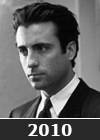
How's this done ?

Soldato
Joined
17 Oct 2006
Posts
2,544
Location
Aviemore, Cairngorms, Scottish Highlands
Can anyone tell em how this effect is done. I use aperture more than PS to process my photo's.

 
Just to let people know I want to know how to get the Sharpe B&W effect I've messed about with a B&W picture but cant get it to look like this. ?
 
Stick up the image you're talking about so we can have a go. That image is pin sharp and if you're processing an image that isn't, then you're never going to achieve the same effect, obviously.
 
Ok here is one its not the best taken picture (my GF hates it of her) as all my photo's are on my iMac at home and i'm on my Macbook pro at the Mrs house.

 
Well the thing that stands out about the image in the OP is the detail, contrast and sharpening. The technique looks great on guys - chiseled and rough - but I'm not sure it's really going to suit the gf there.

The image you're using there is pretty washed out in the first place and lacks the detail to do something comparable anyway. What it could do with is some levels and shadow work to give it a bit more punch and run through a USM filter. After that, if you want to go for B&W, then go for it.

 
I had a quick pop at this - not the same as the image in question but it shows what five minutes in PS can do:
act0984dc8_copy.jpg

I know the cutting is a little dodgy but I just wanted to show what could be done with the image supplied.
I desaturated it, then upped the contrast considerably to get it as contrasty as possible without looking too odd. Then I cut the lady out to another layer, mega-blurred the original layer and then saved it as a flat jpeg :)

You're not going to get much more detail/contrast with the image supplied.
 
Back
Top Bottom