


*** Microsoft Windows 11 Thoughts & Discussion Thread ***

How likely is it going to be changing from a Z790 install of Windows to use the same installation on a Z890 board.............?

Whilst ideally it is a format job, kinda hoping to not need to do so, with drivers prepped ready..?

wishful thinking maybe
 
You should not need to reinstall anything, just uninstall Z790 specific drivers and that's it, Windows 11 handles everything else basically perfectly.
 
You should not need to reinstall anything, just uninstall Z790 specific drivers and that's it, Windows 11 handles everything else basically perfectly.


Excellent, made backups of what I could need as well as prep a USB with 11 on it, just in case. If the Z890 kit turns up today as it should, and I get to swap things over, I'll give it a go.


Thanks
 
Last edited:
You should not need to reinstall anything, just uninstall Z790 specific drivers and that's it, Windows 11 handles everything else basically perfectly.


Sorry forgot this bit....

So would you suggest, prior to switching the PC off, with the z790 build of Windows, to remove anything specific to the Asus Z790 install, like drivers etc first..?
 
Last edited:
Any Asus software, and Z790 specific driver like chipset, Windows 11 will default to its internal MS driver which is fine and usually a previously WHQL driver from Intel anyway just an old version. Windows 11 will then recognise a new mobo with new components and assign the latest driver in the WU database assuming you have check for drivers using WU turned on and that will be all ready to go really. You can then install the latest versions from the new board's website, like the latest chipset driver, and storage controller driver etc.

Windows will likely say it needs to reactivate as a bunch of core stuff has changed, it does that online but iif you are on an OEM license then may moan in different ways about the license being tied to its original hardware and that you need to phone MS to activate, just say hardware fault, new replacement hardware and off it goes :p
 
All went well going from a Z790 board to a Z890, Windows was fine, once all the Gigabyte drivers were installed.

Only got to figure how to sort out the RGB, perhaps I'll get used to flashing and pulsing rainbows.
 
Last edited:
  • Like
Reactions: mrk
Gigabyte seriously needs to redevelop their control centre and remove all the telemetry and AI **** - the software is a disgusting mess which can degrade performance in several games. Fortunately there is no actual need to run it - if you need the RGB control there are better applications.
 
Last edited:
Gigabyte seriously needs to redevelop their control centre and remove all the telemetry and AI **** - the software is a disgusting mess which can degrade performance in several games. Fortunately there is no actual need to run it - if you need the RGB control there are better applications.
I had to disable mine from the bios to stop prompting me to install it every time I turn the PC on. I do not want it and I have no use for it at all.
 
The awful GB software, turn it off, uninstall software :p

Gigabyte seriously needs to redevelop their control centre and remove all the telemetry and AI **** - the software is a disgusting mess which can degrade performance in several games. Fortunately there is no actual need to run it - if you need the RGB control there are better applications.

I had to disable mine from the bios to stop prompting me to install it every time I turn the PC on. I do not want it and I have no use for it at all.


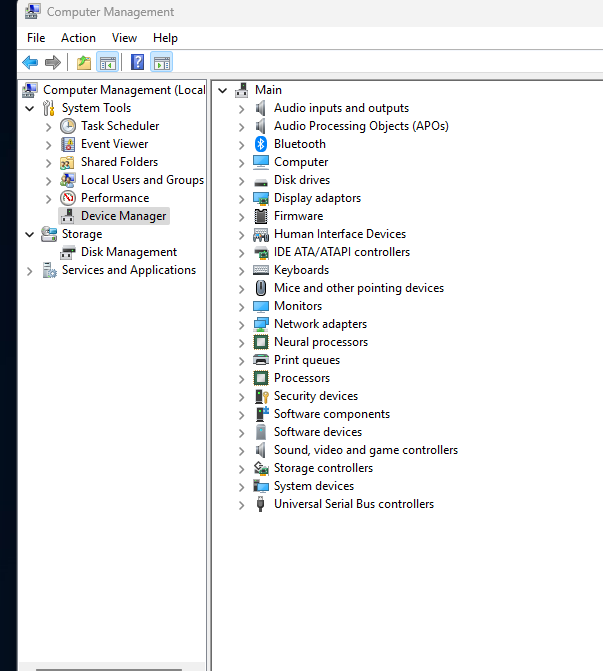
Thanks. The Gigabyte drivers got me to this in windows......

Screenshot-2025-06-17-073302.png


That is what I needed. Some obscure unknown devices, somewhat figured out by their hardware ID, belonging to the BT part of the board, got me up and going.

The RGB side of things.....

Nvidia 4080 FE (minimal RGB)
Corsair Nautilus 360 AIO
Geil Neo Memory
Various aRGB type fans and strips plugged into the Gigabyte board.


meh, varying brands doesn't always help.

I did try Gigabytes Control Centre, it did not last long at all....! Then again it seemed to be causing more issues that it was worth continuing with.

I'll look in the BIOS to stop the reminder to install it at each boot into Windows, the GCC.

I'll get used to rainbows at this rate :D


BTW this is the board I bought, just noting this unboxing video so you can now see how they no longer include a manual with the board, just a flimsy pamphlet in various languages, showing very little indeed....


same with the AIO, no manual at all. If you were not familiar at daisy chaining and fitting the fans to the radiator you would have issues, online guide it seems.
 
Last edited:
My Gigabyte X870 Eagle board came with the manual, you can also download them from the Gigabyte site.

I have done this a few times when I cba to get up to find the manual

 
My Gigabyte X870 Eagle board came with the manual, you can also download them from the Gigabyte site.

I have done this a few times when I cba to get up to find the manual

My older Z690 Gigabyte Aorus Elite board also came with a manual and quick start guid.

Same board again, just a Z890 variant...................no manual.
 
Back
Top Bottom


