


I need to report a crime, someone seems to have stolen 8GB of memory from some of those cards!

Please remember that any mention of competitors, hinting at competitors or offering to provide details of competitors will result in an account suspension. The full rules can be found under the 'Terms and Rules' link in the bottom right corner of your screen. Just don't mention competitors in any way, shape or form and you'll be OK.
I need to report a crime, someone seems to have stolen 8GB of memory from some of those cards!
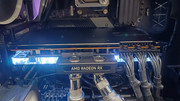
Got an Asus RX 9070 XT prime OC, but the card doesn't fit my computer as my water reservoir is on the wayI was hopping to get an Alphacool waterblock for it but no one has it in stock, so I've ordered a Bykski one, let's see how it goes at least it was £50 cheaper.
I've put it on my second system while I wait for the waterblock
The card seems to be good, looks like it is boosting to around 3230mhz on air with around 52C on the core, 82 on the hot spot and 82 on the memory with default settings, drawing about 320W, didn't do many tests but so far looks good.
I bet your memory will clock higher now it's so much cooler too. Got any pic?


I was running both Nvidia and AMD drivers at the same time last year while using both Ryzen 7800X3D iGPU and a 3060Ti, when I got the 9070 I just uninstalled the Nvidia drivers, deleted the Nvidia folders and reinstalled the latest AMD drivers over the top of what I had installed for the 7800X3D iGPU.I thought id introduce myself given i just defected to AMD (card history gtx970,rtx3080). Ive purchased the 9070xt swift. Hopefully it all goes well. I might just reinstall windows instead of the driver removal approach but havent decided yet

For the sake of 200 quid I’d have tried it myself and made my own mind up. I’ve never had any problems myself with the drivers software.Ive cancelled my order unfortunately after seeing some benchmarks. I use triples for sim racing and it seemes amd software and performance is still behind. Which is annoying because single screen titles the 9070xt and 5070ti is a no brainer amd picj , its another £ £150-£200
Running 4x 144Hz displays from my 9070 without issues, runs better than my old 3060Ti regarding temps etc with no perf loss when gaming, not sure why you didnt at least test it out within your 14 day return period first.Ive cancelled my order unfortunately after seeing some benchmarks. I use triples for sim racing and it seemes amd software and performance is still behind. Which is annoying because single screen titles the 9070xt and 5070ti is a no brainer amd picj , its another £ £150-£200

Because of the Nvidia grip.Running 4x 144Hz displays from my 9070 without issues, runs better than my old 3060Ti regarding temps etc with no perf loss when gaming, not sure why you didnt at least test it out within your 14 day return period first.
Can you have 3 screens for the game and the 4th screen for something else?Running 4x 144Hz displays from my 9070 without issues, runs better than my old 3060Ti regarding temps etc with no perf loss when gaming, not sure why you didnt at least test it out within your 14 day return period first.
Never tried using an extra screen separate from the others, I usually use them all as extended displays. I have tested triple landscape (5760x1080) for DayZ and it worked fine, as long as you have your displays physically in line, there isnt much more for you to do to align them so no, I dont use any other software, I adjust them in Windows 11.Can you have 3 screens for the game and the 4th screen for something else?
I mainly sim race
What software do you use to align the screens?

5800x3dNever tried using an extra screen separate from the others, I usually use them all as extended displays. I have tested triple landscape (5760x1080) for DayZ and it worked fine, as long as you have your displays physically in line, there isnt much more for you to do to align them so no, I dont use any other software, I adjust them in Windows 11.
My displays are all same make and model so I guess that makes it easy
Maybe using a display hooked up to the motherboard, if you have an iGPU on your CPU, would create a separate display for other tasks but I never tested that part out.
You can do quite a lot with AMD these days, I ran 3 of my 1080p displays at 1440p144Hz using VSR a couple of weeks ago, VSR even let me run 8K on my primary display and I got around 45fps in DayZ
Like I said you had 14 days to test it out and then can return it.
What is your full system spec?

If it's a fresh install just grab the latest and goWell I'm late to the party but I've just purchased from ocuk some new components for a pc build. Been out the game for a couple years after selling up and now pairing up with a Gigabyte 9070 XT OC
Anything I need to know in terms of drivers or anything else?

