

Upgrade or Buy New?

Ok, so let's go with an adapter then. This looks to be the guy...
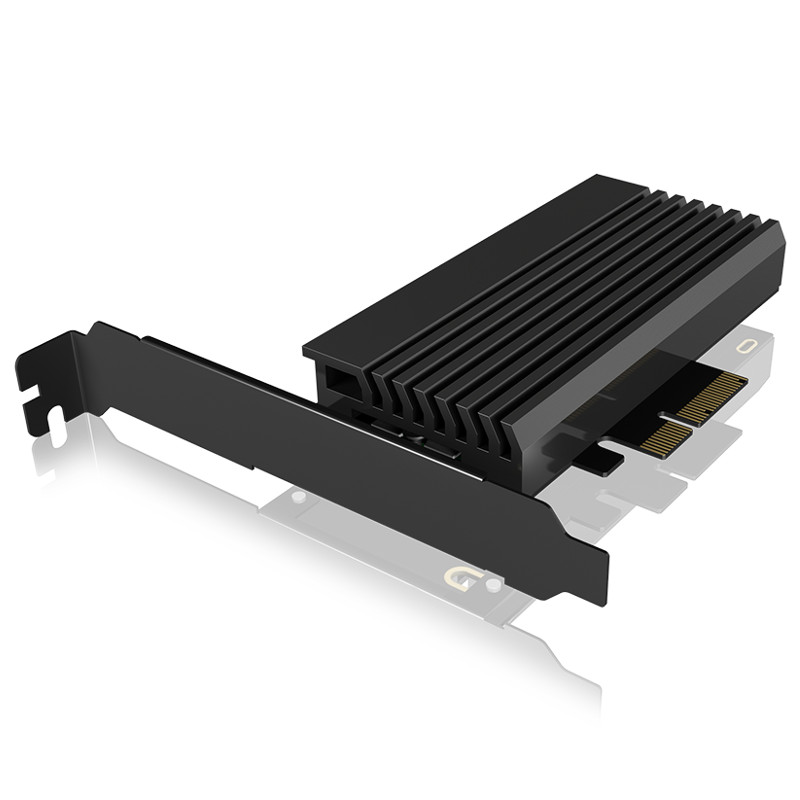

In terms of installing this, does this just go onto the motherboard into the slot above where it says "AMD Crossfire" ?


I guess this will need a PCIe power connection too... now that could be an issue as I don't think I have one available

The slot should deliver more than enough power, NvME's aren't power hungry.

I have something similar by Sabrent that set me back a tenner or so.
 
Last edited:

The slot should deliver more than enough power, NvME's aren't power hungry.

Ah ok, didn't even realise that was a 'thing'. Every day is a learning day for me (well perhaps every 5 minutes is more accurate!)

I have something similar by Sabrent that set me back a tenner or so.

Yep, think I know where you're going with this... and next day delivery would be very handy! ;):)
 
In terms of installing this, does this just go onto the motherboard into the slot above where it says "AMD Crossfire" ?
If there's enough physical space I'd use the one under (full length, black). The silver one might knock your graphics down by 8 lanes. The manual (page 19) is a bit vague on how exactly these slots are configured, but I'm hoping that the bottom slot is chipset connected and can be used independently of the primary PCI-E where your graphics card sits.
 
If there's enough physical space I'd use the one under (full length, black). The silver one might knock your graphics down by 8 lanes. The manual (page 19) is a bit vague on how exactly these slots are configured, but I'm hoping that the bottom slot is chipset connected and can be used independently of the primary PCI-E where your graphics card sits.
thanks @Tetras ill give that a whirl.

I think those schematics/manuals were drawn/written by masochists tbh!
 
My first thoughts are that the SSD you bought is dead on arrival. I would RMA that drive for a new one before spending any more money in the first instance.
Whilst not on the QVL, SSDs rarely have incompatibility issues.
Yes gen 4 drives will work with gen 3 lanes.
 
My first thoughts are that the SSD you bought is dead on arrival. I would RMA that drive for a new one before spending any more money in the first instance.
Whilst not on the QVL, SSDs rarely have incompatibility issues.
Yes gen 4 drives will work with gen 3 lanes.

If that's the case with the Sabrent adapter the return process is extremely easy and costs nothing with the site in question, I'd not be too concerned.
 
Just a thought... I intend on cloning my current SSD onto the new M.2 SSD (once the RMA process is sorted). I understand the point about a fresh install but I'm more concerned about what I might lose rather than clearing out the rubbish (there's probably not that much rubbish in all honesty). Whilst I wait on the RMA process, is it worth upgrading from W10 to W11 on my current SSD? Or should I clone whilst on W10 and then upgrade to W11 on the new M.2 SSD
 
Last edited:
Just a thought... I intend on cloning my current SSD onto the new M.2 SSD (once the RMA process is sorted). I understand the point about a fresh install but I'm more concerned about what I might lose rather than clearing out the rubbish (there's probably not that much rubbish in all honesty). Whilst I wait on the RMA process, is it worth upgrading from W10 to W11 on my current SSD? Or should I clone whilst on W10 and then upgrade to W11 on the new M.2 SSD
back up your files now, then do an upgrade on your current ssd to win 11
then clone that over to the new drive
 
Ok, so interesting times... my system now appears unhappy. I can get into BIOS but if I try and let the system boot normally I get to a screen with ASRock in the middle and at the bottom it says "preparing automatic repair" and the circle of 'buffering' dots spinning above it. I'll leave it going, but it's been like that for quite some time now

btw this is still on the old SSD running W10.

Any ideas or do I just need to wait it out?
 
Ok, so interesting times... my system now appears unhappy. I can get into BIOS but if I try and let the system boot normally I get to a screen with ASRock in the middle and at the bottom it says "preparing automatic repair" and the circle of 'buffering' dots spinning above it. I'll leave it going, but it's been like that for quite some time now

btw this is still on the old SSD running W10.

Any ideas or do I just need to wait it out?
Enable csm in bios.
 
Last edited:
thanks. CSM was already enabled. I've disabled it and now it boots fine.

goggling about the GPU suggests it won't work properly unless in UEFI so is likely to have been the cause? (just curious)
 
thanks. CSM was already enabled. I've disabled it and now it boots fine.
when the ssd has an issue it's usually due to csm, and usually one or the other. if it's off, turn it on. if it's on turn it off :cry:
csm should be disabled for win 11.

goggling about the GPU suggests it won't work properly unless in UEFI so is likely to have been the cause? (just curious)
i'm not sure what you mean?
 
i'm not sure what you mean?
nor am I :cry: I passed my level of competence about 3 pages back haha


Anyway... CSM is currently disabled and it seems ok now in W10
 
A quick update... all good on W11 now (thanks for all your help)

Still waiting on the SSD RMA and will then clone across to that. If that goes smoothly then that'll be job done :D
 
@Geordie1881 excellent news, that RMA seems to be taking a while?
yeah I made the mistake of raising a ticket online. after 5 days I called them and they sorted it over the phone. issue then was that the RMA ran into bank holiday weekend.

anyway... replacement SSD received and I can't see it in BIOS even with all other drives disconnected. I've tried connecting to M.2_1, M.2_2 and via PCIe caddy.

im now working on the basis that 2x DOA is unlikely so it's either me, or the drive isn't compatible. Open to ideas....
 
Back
Top Bottom

