Password managers too hard for old person

I use a password notebook but use passwords akin to PGc$9648sdez#. This may take somebody some time to break and unless it is used often I sure wont remember it however in my opinion it is better than having a manufactured password that I will never know.

My password notebook is kept in the ...........

Edit it must work as I have had no breaches of security in many years of computer use.
 
Last edited:

I use similar passwords so my OCUK password is !@m@studOcuk

That means my Reddit is !@m@studReddit and so on.

I did recognise you on an electric bike forum but only because of similarity of username.
:)

Now I know how to work out your password......
 
Last edited:
I use a password notebook but use passwords akin to PGc$9648sdez#. This may take somebody some time to break and unless it is used often I sure wont remember it however in my opinion it is better than having a manufactured password that I will never know.

My password notebook is kept in the ...........

Edit it must work as I have had no breaches of security in many years of computer use.

 
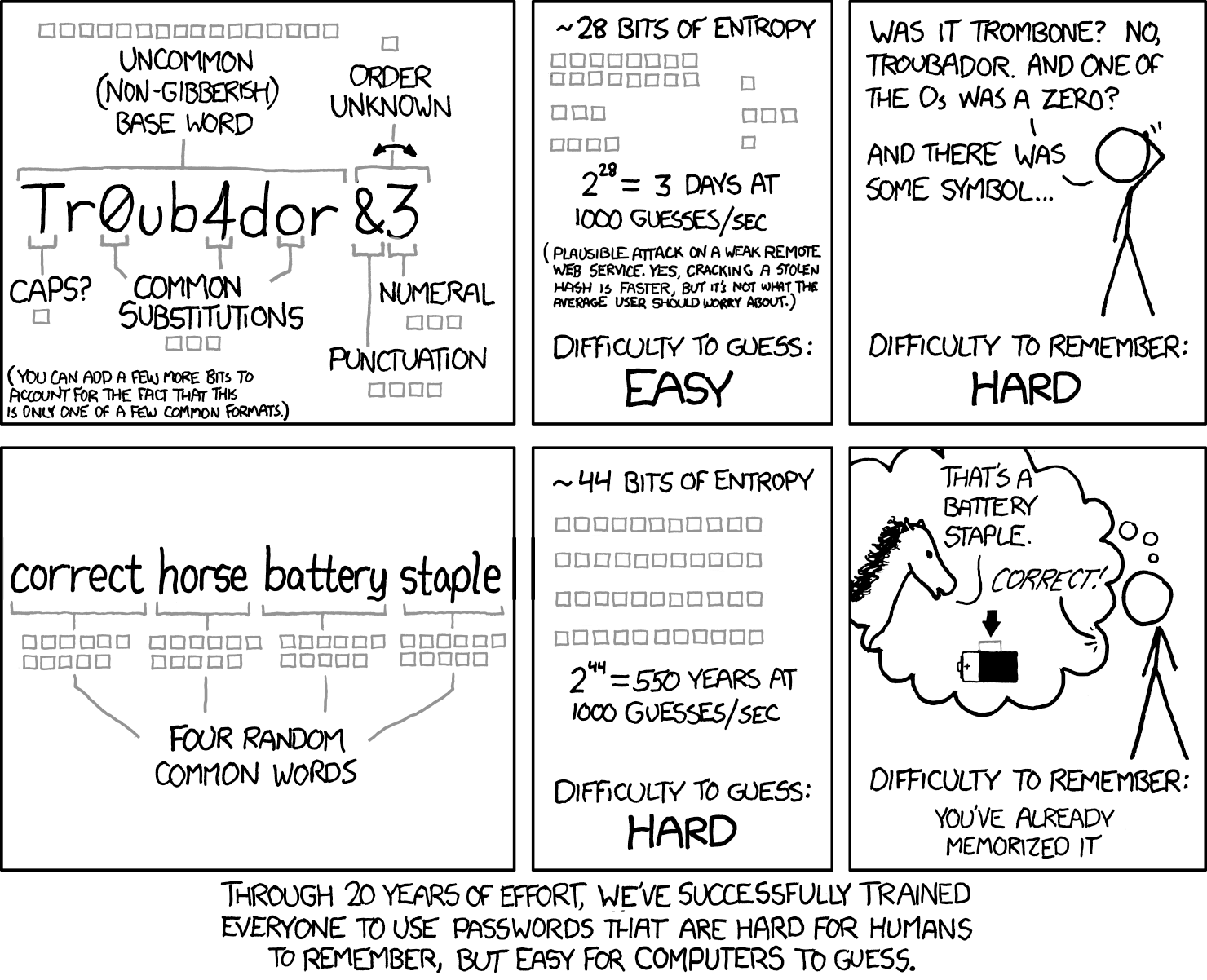
550 years if the computer guesses it on the last throw. But I see what you are saying. I would still need a notebook and the gaps need filling with underscores or another symbol.
Due to an excess of criminality of the human species we all still need to carry on this peculiar ritual.
 
My mum has a book along with coffee rings all over it and coffee chews and this weeks shopping. I constantly get emails saying she's changing her password from Gmail as I'm her back up. She wont change.
 
Last edited:
Do they use apple products? I set my mum up with that using apples password manager/passkeys which is more than enough.....as it's mostly biometrics now it's just Face ID or fingerprint, she rarely has to put in any actual passwords which she finds easier.
 
I have a protected spreadsheet with 96 passwords on it for different things.

I (aged 64) have similar. Since it it's stored on my Google Drive, and I assume that everythinng on the internet will get stole at some point, it's essentially a list of hints. All rely on one of two "roots" which are not anywhere on the doc. Even if you could figure out the code I use to make each one unique to a site then without the root you are stuffed. But at some point I'm going to get too ga-ga to use it. It it's way to complicated for the OP. I agrre with others that in the OP's case, the written passwors are fine, they just eed to be better passwords.
 
Was just doing the DVLA login, I've already got a gov account for council tax, but the DVLA thing required more processes. taking photo of license, facial recognition

Getting a bit much now

Then it does confirmation code to your phone so you need to be able to use two devices or apps - easier with PC, then it asks to scan a QR code. Like really?

I thought with government sites it was all falling under a Gov One account, but it’s still a confusing mess, I have about 3 accounts for various government sites.
It’s so stupid and confusing.
 
Last edited:
I use Firefox password manager but the wife won't touch it as it scares her and afraid she will mess it up. This is a woman with 8 O levels and 3 A levels.
This last week I locked myself out of NS&I -I have never come across a web site like it. Thought EE -BT -7 Trent water were bad but NS&I has them all hands down.
I am now waiting for a letter From NS&I with a password in it.
Now at my age (81) I have to admit sometimes it does get a big PITA. NS&I asked me for the passwords of two questions I have never seen.
Yes it is getting ridiculous now.
 
.....

Anyone been in a similar situation and how did you resolve it?

Managed it for them. Because it's not a problem you can fix. It only gets worse. Started forward planning for the decline.

It's getting unmanageable for most people. Never mind older people or people who aren't techies. Most people have a list somewhere. I'm the only techie in my house. If the rest of the family need access to my encrypted data, passwords etc. They aren't technical enough to recover them. You have to plan for that.
 
If you have 2fa (phone call) on the important ones, PayPal, godaddy etc., there us nothing wrong with a pen and paper list. Just be a bit random with your words.
As an older person I don't do internet banking so that i know that any and all calls from my bank are bound to be scammers. No doubt and just hang up.
 
I write all mine down on a bit of paper as well, can't be hacked.

I always thought these password managers are fine until they get hacked and then you are screwed.
 
I actually do not see this as a problem.
I also hate a password manager. Not sure why.(I think it's because if that got broken, leaked etc the exposure would be horrendous).
I use a system. So every password is different. But the system is the same.

Its only thrown out when a random website doesn't allow my standard symbols.
Or demands a very long password. Then I usually have to reset that every time.

A password book? Unless you are robbed, it's fine


Mines more unsecure. If someone found 4 passwords. They may be able to figure out that I have a system and what it is
 
Last edited:
Keepass is a relatively straight forward password manager if you know a little IT, how to install app, supports encryption,

May not be best for an elderly relative though
 
Last edited:
Back
Top Bottom