


perfect time to be getting rid of the 6800 cards dunno if you seen recently whats been going on with recent drivers and games pink lines and such. looks like they gimping the cards.Just ordered a Gigabyte Aorus 9070XT for £610 after the £60 rebate, delivery scheduled for Saturday. Any Aorus owners have card specific hints or tips?
I've seen a YouTube teardown video where the guy repasted the GPU and replaced some of the pads on the front of the card but after saying he hoped the backplate was being actively used for cooling via thermal pads I don't believe her ever checked this, does anyone know what the position is with this as it would seem like a quick win to reduce temps if they're not making use of the backplate.
It's replacing a 6800XT so I'm familiar with undervolting but the settings in Adrenaline seem different for the newer cards from what I've seen on YouTube !?!
-
Competitor rules
Please remember that any mention of competitors, hinting at competitors or offering to provide details of competitors will result in an account suspension. The full rules can be found under the 'Terms and Rules' link in the bottom right corner of your screen. Just don't mention competitors in any way, shape or form and you'll be OK.
You are using an out of date browser. It may not display this or other websites correctly.
You should upgrade or use an alternative browser.
You should upgrade or use an alternative browser.
The Radeon RX9070XT / RX9070 Owners Thread
- Thread starter CAT-THE-FIFTH
- Start date
More options
Thread starter's postsI have found that it’s game dependent. On mine. I cannot go under -50mv or modern games crash.Shout out to whoever mentioned about setting a negative clock offset to help stability - I was getting slightly jealous of all the people commenting their undervolt settings beating my Red Devil which should be a binned chip vs other peoples cards which was more a midrange model - I’ve found a good fan speed that is still minimal noise, 300w max per draw negative 100 clock offset and -100mv and I’ve played RE3 (always crashes my unstable clocks) and I’m halfway through steel nomad clocks sitting around 2.8-2.9ghz - could happily use this setting moving forward

Associate
- Joined
- 30 Dec 2013
- Posts
- 2,362
- Location
- Liverpool
Yep it’s just crashed so I’m trying to-80mv so far it seems stable (y)I have found that it’s game dependent. On mine. I cannot go under -50mv or modern games crash.

Consolodate the load and share the pain, it seems....

 wccftech.com
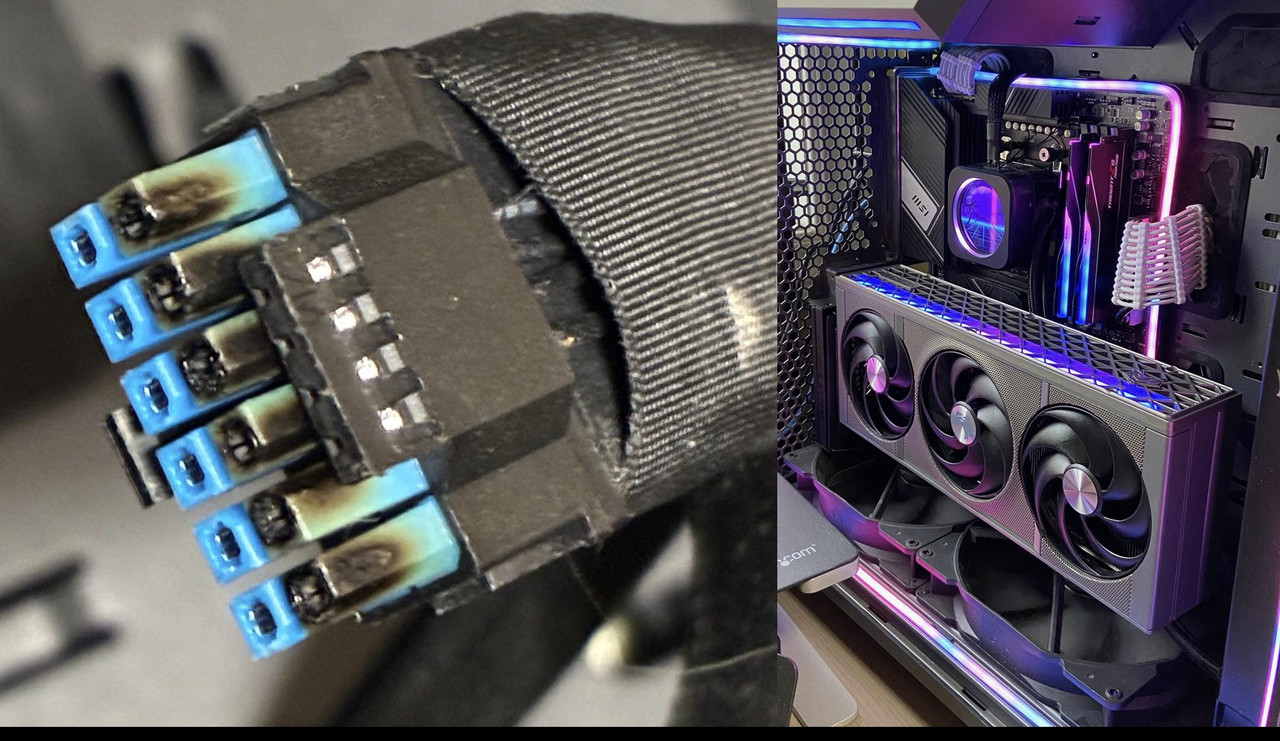
Third Sapphire RX 9070 XT Nitro+ Suffers From Burnt 16-pin Connector
Another incident surfaced which shows how a user met with a burnt 16-pin power connector on the Sapphire RX 9070 XT Nitro+.
wccftech.com

Soldato
- Joined
- 29 Aug 2010
- Posts
- 8,781
- Location
- Cornwall
Luckily 9070XT cards and anything below a 5090 or 4090 don't draw enough power to cause the melting connectors issue, or so I've heard it said...


Associate
- Joined
- 17 Mar 2025
- Posts
- 592
- Location
- solent sound
another reason im glad my sapphire pure uses the 8 pin setup i wouldnt be able to use anything with the 12vhpwr connector now id be too paranoid even if
it was a 50watt maximum pixel pushing card i still wouldnt feel remotely comfortable using one at this point too much risk and literally from my pov absolutely no upside
it was a 50watt maximum pixel pushing card i still wouldnt feel remotely comfortable using one at this point too much risk and literally from my pov absolutely no upside
I was glad to avoid them TBH. Too many stories of problems, no need to add a known potential problem - no matter how small the probability.another reason im glad my sapphire pure uses the 8 pin setup i wouldnt be able to use anything with the 12vhpwr connector now id be too paranoid even if
it was a 50watt maximum pixel pushing card i still wouldnt feel remotely comfortable using one at this point too much risk and literally from my pov absolutely no upside
Associate
- Joined
- 17 Mar 2025
- Posts
- 592
- Location
- solent sound
exactly and it being a <350watt at worst [for my variant at least] just isn't power thirsty enough to really require the 12vhpwr even if that was reliable/safe just seems a wholeI was glad to avoid them TBH. Too many stories of problems, no need to add a known potential problem - no matter how small the probability.
bunch of hassle and risk and anxiety for pretty much at best no upside and at worst well fire basically im fine with my 2x8 pin thank you only complaint on that end is i wish id got white cables on my rig but i can sort that a lot easier than i can sort out the house being burnt down lol

Connector isn't a great design and some people don't seem to know how to properly plug a cable in either, combination of the two means you've got a bit of a recipe for disaster.Is it more the case the the connector is a poor design other than the cards themselves?
Incidents seem to be few and far between, but there is a lot of noise about it
Would be a nightmare if it happened to yourself of course tbf
For every person that reports a problem, you'll have thousands that are cracking on without any issue.
Still, no need to add a potential issue if you have the choice not to.Connector isn't a great design and some people don't seem to know how to properly plug a cable in either, combination of the two means you've got a bit of a recipe for disaster.
For every person that reports a problem, you'll have thousands that are cracking on without any issue.
Yeah, not sure why Sapphire felt the need to go for it over a 2x or 3x 8 pin using the same nice design of hiding the cables with the back plate but I'm sure they had their reasons.Still, no need to add a potential issue if you have the choice not to.
Consolodate the load and share the pain, it seems....
Third Sapphire RX 9070 XT Nitro+ Suffers From Burnt 16-pin Connector
Another incident surfaced which shows how a user met with a burnt 16-pin power connector on the Sapphire RX 9070 XT Nitro+.

Still not installed mine yet as im considering getting a new case as well...
Last edited:
Soldato
- Joined
- 29 Aug 2010
- Posts
- 8,781
- Location
- Cornwall
I think you'd have trouble nicely hiding 3 x 8-pin connectors using the system they did, unless they provided some sort of custom right-angle adaptor.Yeah, not sure why Sapphire felt the need to go for it over a 2x or 3x 8 pin using the same nice design of hiding the cables with the back plate but I'm sure they had their reasons.
Still not installed mine yet as im considering getting a new case as well...
For some manufacturers, more prevelant with Nvidia, it does seem to be the connector of choice, regardless of the odd meltdown that garners the headlines.
I don't keep up much with the details, but I was not aware that there can be the beef for such a single high powered connector on the card noted, over that of 2 x 8 pin type, that are more traditional for AMD cards.
Last edited:

Mine can still hold -90mV to -100mV on all games with +10%PL (350W) but i need to slightly change the negative offset per games between -125Mhz to -200Mhz depending of the game.Yep it’s just crashed so I’m trying to-80mv so far it seems stable (y)
Generaly my card only crashes when it reach near 3300Mhz GPU frequency and that depend on how heavy the game is so basicaly i have to change the negative offset to something that would prevent my card to go near 3300Mhz for each game.
I have done a lot of testing and can confirm that to have the best performances possible you NEED to use the negative offset at at least -100mV by default the 9070 XT will either not reach his top frequency anyway (anything above -60mV isn't enough you'll reach the power limit first even at +10% PL) or crash trying to.
As i already stated earlier, if i leave the frequency offset to even 0 my card is only stable at -40 to -50mV depending on the game because it will reach near 3300Mhz and crash.
Right now i'm trying to figure out how to set the best memory frequency setting and apparently even 2686Mhz is too much and lead to crashes in some games (Samsung memory), 2650 seems fine but i'm not sure.
Moreover heavier games are more stable, generaly the higher fps you can reach in a game the more unstable undervolt is so i need to set the negative offset frequency near -200MHz if i play a game that go above 300fps while most UE5 games are stable at -125Mhz and -100mV.
Last edited:
Mine can still hold -90mV to -100mV on all games with +10%PL (350W) but i need to slightly change the negative offset per games between -125Mhz to -200Mhz depending of the game.
Generaly my card only crashes when it reach near 3300Mhz GPU frequency and that depend on how heavy the game is so basicaly i have to change the negative offset to something that would prevent my card to go near 3300Mhz for each game.
I have done a lot of testing and can confirm that to have the best performances possible you NEED to use the negative offset at at least -100mV by default the 9070 XT will either not reach his top frequency anyway (anything above -60mV isn't enough you'll reach the power limit first even at +10% PL) or crash trying to.
As i already stated earlier, if i leave the frequency offset to even 0 my card is only stable at -40 to -50mV depending on the game because it will reach near 3300Mhz and crash.
Right now i'm trying to figure out how to set the best memory frequency setting and apparently even 2686Mhz is too much and lead to crashes in some games (Samsung memory), 2650 seems fine but i'm not sure.
Moreover heavier games are more stable, generaly the higher fps you can reach in a game the more unstable undervolt is so i need to set the negative offset frequency near -200MHz if i play a game that go above 300fps while most UE5 games are stable at -125Mhz and -100mV.
How many cards have you tested? My card would **** the bed at those settings. I'm only stable at -40mv with -300 core offset.
Silicon lottery. Mine is the same on modern games I cannot go under -50mv. Core offset is interesting as the only time I ever touched it was when I first got mine about a month after launch and from my fiddling it did naff all then. That was quite some time ago.How many cards have you tested? My card would **** the bed at those settings. I'm only stable at -40mv with -300 core offset.

Associate
- Joined
- 15 Aug 2012
- Posts
- 352
I got an ASRock 9070 XT Taichi today. The thing doesn’t really seem to want to go south of 300W power consumption with just a voltage offset. Should I be looking to cap with power limit? Bit worried bout losing perf that way.
I’ve tested it extensively and can confirm that the frequency offset slider work. But this is not the first time i read someone or heard someone saying it didn't work at launch. But how it works exactly seems complicated. But it definitively lower the frequency when i use it and prevent crashes.Silicon lottery. Mine is the same on modern games I cannot go under -50mv. Core offset is interesting as the only time I ever touched it was when I first got mine about a month after launch and from my fiddling it did naff all then. That was quite some time ago.
But maybe i have won the silicon lotery as most games are stable at -125Mhz -100mV and average 3200+Mhz in games. For comparison for some reason even if i set no frequency offset and -130mV (unstable obviously but just for science) i can't get past 3150Mhz in Speedway and Nomad benchmark, my card is like locked at an average of 3100Mhz and i get the same score at -100 or -130mV which is surprising because it should allow my card to go higher but don't even if i set a positive frequency offset.
Also i "only" have a Ryzen 7 7700 and play at 4K with FSR quality so it could be that my card is less stressed than playing at 1440p or 1080p with a X3D CPU because from my testing higher framerate are less stable than heavy game with lower framerates. In all games i don't aim for higher than 120 fps as i have a 120Hz TV.
Last edited: