


• Competitor rules

    Please remember that any mention of competitors, hinting at competitors or offering to provide details of competitors will result in an account suspension. The full rules can be found under the 'Terms and Rules' link in the bottom right corner of your screen. Just don't mention competitors in any way, shape or form and you'll be OK.

ATI Radeon HD 4870 Sudden Framerate Drops

Associate
Joined
22 Jul 2004
Posts
1,349
I'm trying to get to the bottom of a problem I've been having with my new ATI HD 4870. This problem is very noticeable in S.T.A.L.K.E.R. - Shadow of Chernobyl, and, in fact, I thought it was the only game it was happening in for a while until I started playing FlatOut - Ultimate Carnage.

I originally posted this on the Guru3D forums, so it looks like a copy and paste jobby.

Undesirable @ Guru3D Forums. said:
Hi there. I was just wondering if anyone else had a problem with sudden framerate drops while looking at certain areas of the landscape in S.T.A.L.K.E.R. - Shadow of Chernobyl?

I'm not just talking about normal loading stuttering, which accesses the hard drive, I'm talking about a major inexplicable drop in framerate that carries on for a much longer time than a normal loading stutter, which was never present with my previous GeForce 8800 GT card.

I'll be wandering around as normal, popping bandits in the head with a single round of my silenced FN F2000 or VSS Vintorez comfortably at an average of 40 -50 FPS, then I'll look at a certain area of the zone and the framerate will suddenly drop to 5-10 FPS. When I look away again, it'll return back to the normal framerate. It doesn't seem to matter which zone, they're all affected. At least with my GeForce 8800, although obviously inferior, it would keep a consistent framerate without the sudden drop (apart from the normal loading stutter).

It doesn't seem to matter about the complexity of the scene, either. The framerate seems to be perfectly normal when I'm looking at certain complex scenes such as the Duty base, but then the framerate will jump right down when looking at, for instance, the buildings next to the railway bridge in the first zone (although it doesn't consistently happen on the same portion of the landscape every time, it seems to happen in random locations after a certain time period).

Here's two videos of the problem. They're in MKV format - H.264 video, Vorbis Audio, so you may wish to use FFDShow, Media Player Classic and Haali's Media Splitter to view the files:

Video 1:

http://rapidshare.com/files/132767208/S.T.A.L.K.E.R._Framerate_Drop_Problem.mkv


Video 2:

http://rapidshare.com/files/133959206/S.T.A.L.K.E.R._-_Framerate_Drop_Problem_Army_Warehouses.mkv


Note the erratic framerate that keeps dramatically falling and rising when looking at various sections of the landscape.
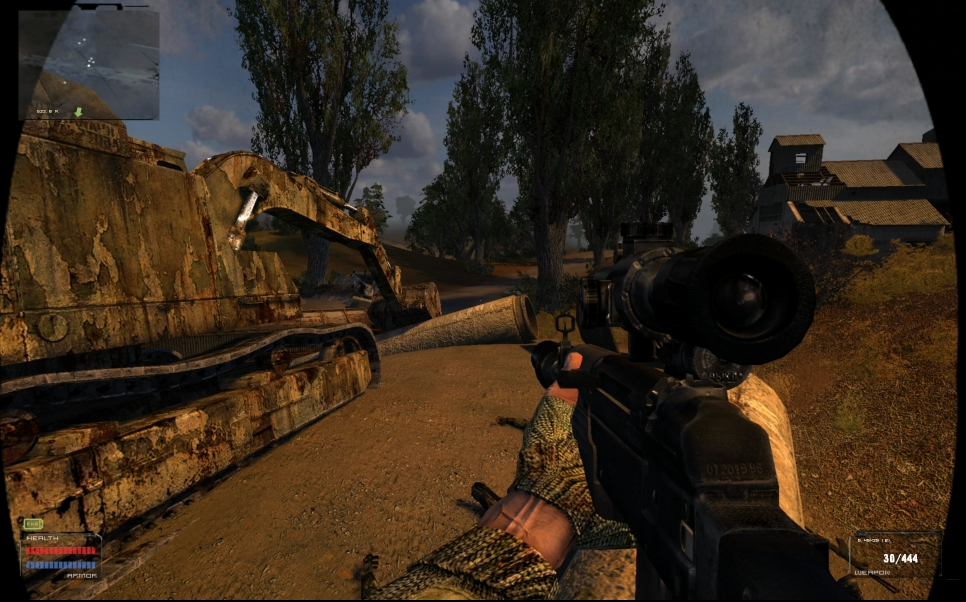
Needless to say, I'm rather worried in case it's another part of my setup that's causing the problem. What would really put my mind at rest is if other people could say here if they've been experiencing the same problem with a sudden framerate drop after they've been wandering around in a game for several minutes and they turn around and look at various locations on the landscape.

Now, I can also post videos of the same problem happening in FlatOut - Ultimate Carnage if anyone wants to see it (I have a feeling that not many people can be bothered to download these videos anyhow). But yeah, it's happening in other games, to a certain extent, and it's starting to make me wish I hadn't upgraded from an nVidia GeForce 8800.

 
In Flatout UC are you running 8xAA? At some points are you getting like 60fps and then dropping down to like 25? If so I dont think you are alone, seen other people reporting it, its either a driver bug or the game needs patching, I rekon its the same with S.T.A.L.K.E.R. too.

What other games have you tried?

Dont worry, the card is much better than your 8800GTX, hopefully these problems will be sorted out.

PS. S.T.A.L.K.E.R. looks amazing now better than it looked before, have they improved it via patches? I stopped playing it due to the fact I kept getting killed at the first bridge :(
 
PS. S.T.A.L.K.E.R. looks amazing now better than it looked before, have they improved it via patches? I stopped playing it due to the fact I kept getting killed at the first bridge :(

how u managed to do that :)
 
how u managed to do that :)

There is like some guys and they kept killing me in the end I think I just got confused, like doing quests but no arrow to tell you which way you are going for some reason, twas very confusing.
 
There is like some guys and they kept killing me in the end I think I just got confused, like doing quests but no arrow to tell you which way you are going for some reason, twas very confusing.

go over the brige :D or give them bottle of vodka and they let u trough

 
I've heavily modded the game and edited the config file for extra quality.

The proper way to go about it is through a tunnel (avoiding the anomolies) further along the bridge to the left of the marines. I usually kill the marines for their guns, but that would be quite hard unmodded, since they absorb an unrealistic amount of shots.

Anyway, I think I've tested S.T.A.L.K.E.R. without any AF, and the problem still persisted, but I'll try again.
 
I've heavily modded the game and edited the config file for extra quality.

The proper way to go about it is through a tunnel (avoiding the anomolies) further along the bridge to the left of the marines. I usually kill the marines for their guns, but that would be quite hard unmodded, since they absorb an unrealistic amount of shots.

Anyway, I think I've tested S.T.A.L.K.E.R. without any AF, and the problem still persisted, but I'll try again.

What mods have you used?

Come to think of it I remember this framerate drop in S.T.A.L.K.E.R with my 8800GTS 640, one way its like 80fps, the other 25, very odd :confused:

I'd have hoped it would have been solved by now.
 
Cool S.T.A.L.K.E.R. Mods:

Oblivion Lost
Weather Overhauled
Panoramic Mod
Float32
Sky4CE SkyGRAPHICS MOD
S.H.A.R.P.E.R. Textures

It can be tricky to get them all working together, so you might just want to use Oblivion Lost, Sky4CE and S.H.A.R.P.E.R. Textures, where there should be no conflicts. You may also need to start a new game.


Cool S.T.A.L.K.E.R. Mod Links:

http://stalker.filefront.com/files/Stalker/Mods;3785
http://www.gsc-game.com/index.php?t=community&s=forums&s_game_type=xr&sec_id=16


Make sure you also edit fsgame.ltx and overwrite the first line with:

Code:
$game_data$   		= true|	true|	$fs_root$|		gamedata\

Otherwise the mods may not work.


As for the quality config file:

Edit "user.ltx" in "C:\Users\Public\Documents\STALKER-SHOC" if you're using Vista, or "C:\Documents and Settings\All Users\Documents\STALKER-SHOC" if you're using XP.
overwrite the relevant lines with this (make a backup first, in case something goes wrong or you don't like the changes).

Code:
r2_aa on
r2_aa_break 0.000000,0.000000,0.000000
r2_aa_kernel 0.5
r2_aa_weight 0.500000,0.300000,0.100000
r2_allow_r1_lights off
r2_gi off
r2_gi_clip 0.01
r2_gi_depth 5
r2_gi_photons 100
r2_gi_refl 0.9
r2_gloss_factor 4.5
r2_ls_bloom_fast on
r2_ls_bloom_kernel_b 0.4
r2_ls_bloom_kernel_g 5.
r2_ls_bloom_kernel_scale 1.25
r2_ls_bloom_speed 40.
r2_ls_bloom_threshold 0.285
r2_ls_depth_bias -0.00002
r2_ls_depth_scale 0.99998
r2_ls_dsm_kernel 1.55
r2_ls_psm_kernel 1.55
r2_ls_squality 1.
r2_ls_ssm_kernel 1.65
r2_mblur 0.16
r2_parallax_h 0.032
r2_slight_fade 2.
r2_ssa_lod_a 96.
r2_ssa_lod_b 64.
r2_sun on
r2_sun_depth_far_bias 0.
r2_sun_depth_far_scale 1.
r2_sun_depth_near_bias -0.00008
r2_sun_depth_near_scale 1.
r2_sun_details on
r2_sun_focus on
r2_sun_lumscale 1.22
r2_sun_lumscale_amb 0.25
r2_sun_lumscale_hemi 0.865
r2_sun_near 30.
r2_sun_near_border 0.97
r2_sun_tsm on
r2_sun_tsm_bias 0.
r2_sun_tsm_proj 0.55
r2_tf_mipbias -0.12
r2_tonemap on
r2_tonemap_adaptation 2.5
r2_tonemap_amount 0.68
r2_tonemap_lowlum 0.28
r2_tonemap_middlegray 0.5
r2_wait_sleep 1
r2_zfill off
r2_zfill_depth 0.5
r2em 4.
r__detail_density 0.2
r__geometry_lod 1.2
r__supersample 4
r__tf_aniso 16
 
Last edited:
Looks like it could be a powerplay issue, I would have suggested using rivatuner to see if the clocks are dropping to 2d speed but 4*** series aren't supported as yet.
 
Not sure if this helps but I was having the same problems you described. Was happening in Crysis, GRID and CoD4. It was exactly like you say, all of sudden the FPS just plummets. I was having stutters and everything and like you I am gaming at 1920x1200.

My problem seems to have been 95% solved when I upgraded from 2Gb-4Gb. However I noticed you are already running 4Gb of RAM.

What OS are you running? Are you running the 8.7 drivers? Is your DirectX up-to-date? Are you forcing AA in Stalker through the ATi Control Panel, as that gave issues for me. I now have mine set to "application controlled" with the drop-down box set to Edge-Detect. Are you running supersampling or multisampling also?

Cheers.
 
I hope so, the card has awsome performance. One min I was running fine with 4xAA in crysis with a cfg next its down to 18fps, putting shadows to medium and PP and turning 4xAA gave a 2fps boost when it should be tons more.

I cant see the 30koreans on screen would be the problem as my CPU was only at 77% so thats not the limitation.
 
I hope so, the card has awsome performance. One min I was running fine with 4xAA in crysis with a cfg next its down to 18fps, putting shadows to medium and PP and turning 4xAA gave a 2fps boost when it should be tons more.

I cant see the 30koreans on screen would be the problem as my CPU was only at 77% so thats not the limitation.

I don't run any AA in Crysis, I find that as soon as I enable even just x2AA I get the problem. Running at 1920x1200 helps though and it looks fine. I definately think it must be drivers or b0rked cards as I've seen more and more of these threads popping up. :eek:
 
What OS are you running? Are you running the 8.7 drivers? Is your DirectX up-to-date? Are you forcing AA in Stalker through the ATi Control Panel, as that gave issues for me. I now have mine set to "application controlled" with the drop-down box set to Edge-Detect. Are you running supersampling or multisampling also?
I'm running Vista x64. 8.7 WHQL drivers, and DirectX is up to date. I have tried many combinations of in-game and Catalyst settings, including disabling AA (which doesn't seem to work with S.T.A.L.K.E.R. and the 4800 series anyway), AF, VSYNC, Catalyst AI. I don't think adaptive AA works without normal AA being enabled anyway. The problem remains.

I don't think there's any point in trying the game without any mods, as I never had the same sudden framerate drop with my GeForce 8800 GT, and I am having the same problem in FlatOut - Ultimate Carnage anyway, as I said earlier.
 
Back
Top Bottom



