i7 930 : Having a lot of trouble from 3.8 -> 4.0 Ghz - what am I missing

After reading through, you only state what speed and timings the memory are, u don't state if its 6 or 12 gb, this can make a huge difference.

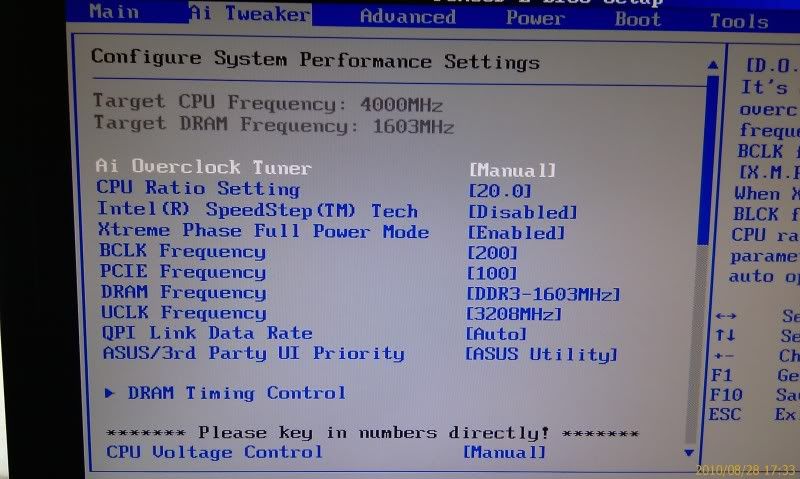
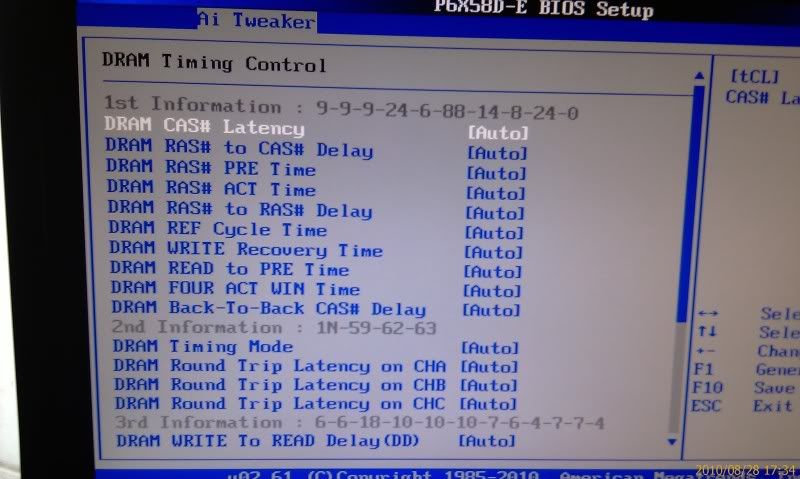
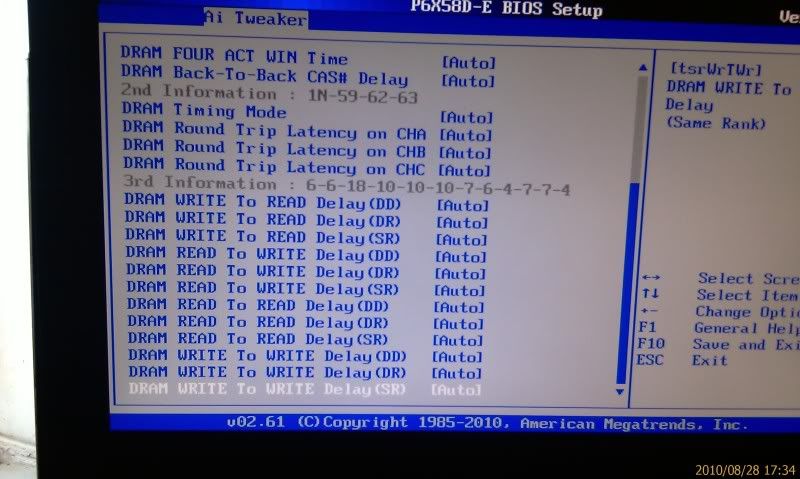
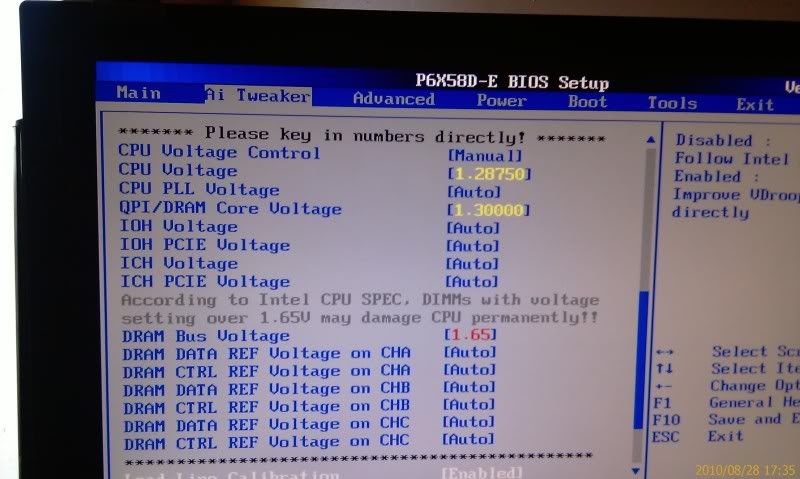
Anyways, below is what my rig is clocked at, with everything on auto apart from the key volts (vcore, qpi/dram, memory), LLC on.

I left the cpu skew and amp stuff on auto, u may wanna try that, i can't see why your cpu would need so much qpi unless you are using 12gb to behonest.

Try and make sure you choose either the closet memory speed from the drop down menu, that is close to your memory's spec, or for now, choose the lowest one.

Even if it is a poor clocker, that qpi you are using is very high for not high clocks on cpu/memory, guess we are gonna have to all have a proper think over this one.

mloyh.jpg
 
It is 6gb of RAM (3 x 2GB)

I'll try again but i'm pretty sure mine wouldnt even boot into windows with a vcore of 1.2875 in bios :-/
 
Well thats my cpu, like you said and we all say aswell each cpu is totally different. But if only using 6gb, you really should'nt be needing uber high qpi.

If you would like i can go into my bios and write down all the settings, so u can set those to either auto/on or whatever, as a lot of the stuff is fine to turn off, or leave on auto. Just so we know everything else is sorted and what not. I'll wait for you to reply before i do that though lol.
 
That would be appreciated, thanks :)

Im happy to reset to default and start again - ive got my rock solid settings for 3.8ghz written down as a fall back!

Full spec should now be in my sig
 
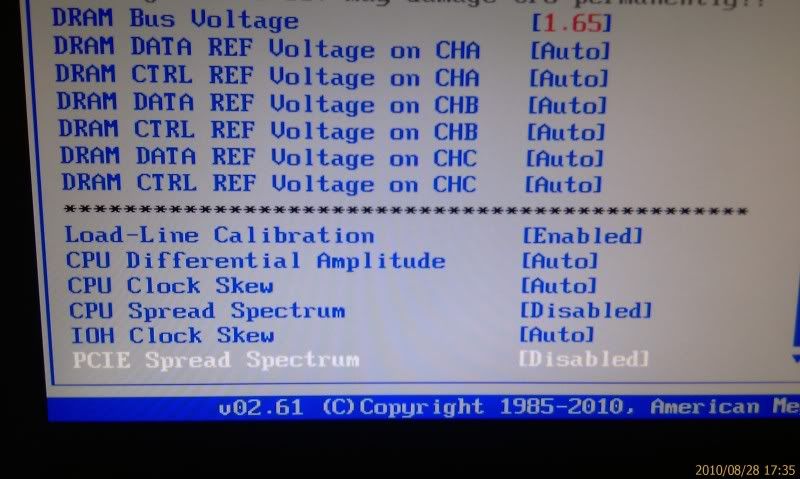
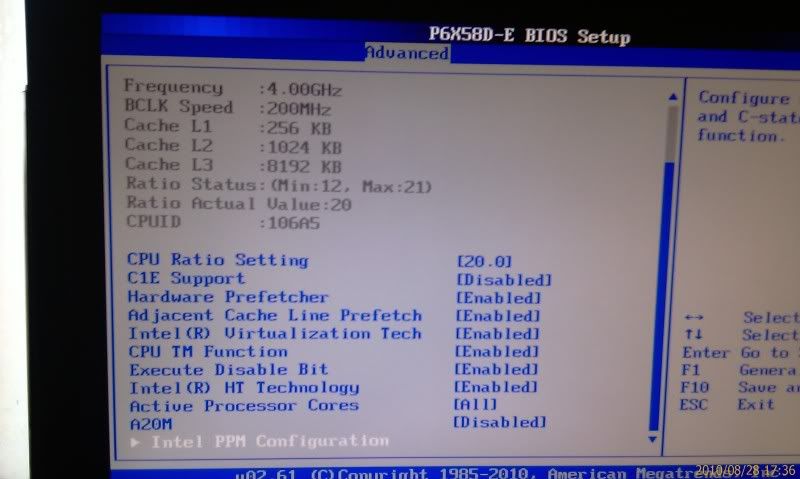
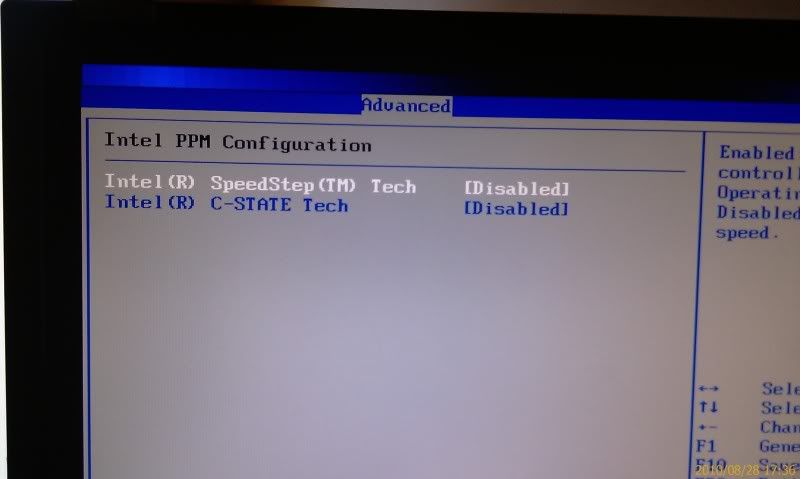
Here you go, you could use this a little guide what to set and what to turn off, as you can see a lot of stuff iv left as auto, as i don't really need to fiddle with a lot of stuff, memory i probably could tighten the timings but its fast enough for my needs lol. Hope this helps, bare in mind each cpu is different, and u may need more vcore/qpi, or u may need less, once we have everything else sorted out. The settings below, are F@H stable for my machine/set up, but as always each cpu is different.

076.jpg


077.jpg


078.jpg


079.jpg


080.jpg


081.jpg


082.jpg
 
Last edited:
Great, trying that now.

Well, it booted into windows, thats better than before

Just crashed on p-95 though after 1 min - stop code 124 as usual

I will just up the voltages 1 increment at a time and see how it goes.....will do QPI once if that doesnt work then vcore etc

The only diff I have to yours is i left it at 191x21 rather than 200x20, will that make a difference? (i did it as this puts the ram slightly slower at ~1530, less stress on the qpi im guessing)
 
Yeh that blck and multi will be fine, as its the 930's normal max one without turbo.

Atleast we got it to boot with far less qpi/vcore then before, so its a start, they will need tweaking as each cpu is different, hopefully u won't need to much more, but thats testing for you lol. Good luck.
 
*sigh* well, the voltages are creeping back up again, already at vcore 1.30 and QPI 1.35 and its still crashing on P-95

Doesnt seem i have a great overclocking chip. Oh well, i'll see what it ends up stable at and just decide then whether i want to run that high, if not i know its rock solid at 3.8 with minimal voltage.

Anyway, thanks to everyone for their help and input, has been much appreciated :)
 
Hopefully some others will pop in and have a look also, we may have overlooked something, or you just may have a poor clocker.

But as u say, if it ends up meaning u have to use high settings just for an extra 200mhz, may be best to use the lower clock and volts, but don't give up yet, im sure someone will spot something we have all missed, its usually the case lol.

There are far more experienced clockers that may know how to get the most out of ur chip, rich and naith spring to mind, don't be down hearted just yet, its still early days.
 
well, from reading the guides ( a good thing to do) it seems I over complicated things at the start with changing lots of options to what the guides said ("randomly" :-P )

So, since the advice of resetting things back to auto and just changing the vcore, VTT (QPI/DRAM), and vDimm it has been a lot more stable.

I finally got it initially stable (1hr on P-95) then dialled back the voltages 1 at a time until it fell over again. The aim will be to give it 14+hrs on P-95 when i'm ready to fully test the settings.

So it seems stable now at :
vcore - 1.325v in bios ( cpu-z : 1.312 idle, 1.320 load - this was the main key to getting it stable, anything less than this and it falls over on P-95 very quickly)
QPI/DRAM - 1.33125v (managed to reduce this from a max of 1.3625)
DRAM - 1.65v

Temps : 38* idle , 72/73* Load

Not great i know, but a lot less than i was giving it the other day and at a level that's pretty ok to run full time at do you think?

Anyway, my question is : should i just leave it as it is or are there other settings to look at now, (like say CPU PLL) which could help stabilise it and be able to lower the above voltages

Or is there no exact answer and i just need to try out on my machine?
 
Last edited:
Those are not the best volts, we all agree there, but if its whats needed for 4ghz, then its needed, those temps are very good considering the volts, gotta say that cooler certainly is worth the money.

Id go ahead and do a long prime (Blend) run now, to see if it will last at those settings. I am glad you have sorted a few of the issues out though, i did the same mistake myself at first trying to tweak every last thing, but was'nt needed lol. We all live and learn.
 
Those are not the best volts, we all agree there, but if its whats needed for 4ghz, then its needed, those temps are very good considering the volts, gotta say that cooler certainly is worth the money.

Yea, i'm very impressed with the noctua.

Have turned the case fans up to mid now and that dropped the temp to a steady 72* on core 1 (the hottest one)

Ive opened the windows now as well, but i think the only thing getting colder is me :D
 
My hottest core generally when i have my window open is low/mid 60's with low fan speeds, but then again im on custom water, so should be a lot lower.

Im still amazed at the performance of that noctua though, if i ever go back to air cooling, thats the cooler im deff gonna get.

Im just glad we where able to get u to 4ghz, and the temps are brilliant, just a shame the cpu is'nt the best of clockers really, but hey ho its luck of the draw really.

Hope the prime run goes well, as will be nice for you to have that clock sorted and get on with using the machine lol.
 
I should have put the if like this (IF) lol.

Dunno really, i only went custom water, as a challenge in computing that i had never tried before, so for me personally it was'nt about temps and going for max overclocks, ok the custom water helps both lol. It was more of an exercise in research and a learning experience for me. Saying that i am loving my custom water atm, and will probably next time i take it out to clean, upgrade my cpu block and pump for better ones.

But knowing me at some point i'll get bored of having to clean and re-fill (once a year, so not major), and at that point i'll go back to Air, can't really speak for others though, thats just why i went custom, and why i may stop. But that could be 6 months, or 6 years lol.

You may wanna take a look at bulldogs post on the noctua (ignore his insanely low vcore though) or look at freaks temps at the vcore he is having to use, its a top top cooler, and realisticly is only 10c worse then my water, for a lot less hassle.

If i did'nt want to challenge myself i would have bought that myself, it really all depends on each person really.
 
Back
Top Bottom