Turning 3x5.25" bay into a mount for an extra in-take fan?

Soldato
Joined
6 Feb 2010
Posts
14,583
Just received my Cooler Master 690II Advanced today. After a little of looking around the case, I noticed there are dust filter for the 5.25" bays. Since I'm only gonna use 1 of the 4 bays for a DVD Rewriter, was thinking if there are mounts/holder which I can intall into three 5.25" bays for installing an extra 120mm/140mm fan for intake?

So far I've found a "AC Ryan KXNG Baycover 3x 5.25" Bay for 120mm Fan"...not entirely sure if it would be compatable with me 690 II. Anyone got other suggestions for fan holders that use the 5.25" bays?

 
I've got a Scythe Kama Bay in a CoolerMaster CM690, dominator Black, not the advanced one but the original. Did exactly the same, only one DVD-RW and popped the Kama in below it along with a fan controller. No problems with fitting it and came with a dust filter and 120mm fan. Was tricky to get hold of however, picked one up new from a well known auction site.;)

http://www.scythe-usa.com/product/acc/008/sckb1000_detail.html
 
I've seen some feedback of people who got the Kuma Bay says that the fan that comes with it kind of suck at moving air :p

The price is kind of expensive as well, since I would need to replace the fan...
 
Another Kama Bay user here, though with a Viper fan installed. The supplied fan was fine for starting out and getting by, it's quiet but not amazing with air flow.

A couple of issues I found, with my budget case there is a wee bit of a gap around the edges, a few mm at the sides, 2m at top, 1mm at bottom. The filter is a foam membrane which can quickly fill up but is a pain to remove and clean, I usually hoover the front grill which gets rid of most but not all dust within the filter.
 
Just saw someone on another forum did this:
116751d1248060130-project-ambush-cm-scout-build-copy-100_1711.jpg

and he claims that his fan will stay in place just by using the the case's screwless locking in the 5.25" bay. May be I'll try to take off the top 140mm fan to test to see it can do the same in the 690 II Advanced. If it doesn't work out, I guess I could always try blu-tack :p
 
Updated, tried to put the 140mm fan like the example, but the 140mm fan turns out to be 3 and a half bays big, so that won't work since I need one bay for the DVD-Rewriter :p

So I guess back to looking at 120mm fans for putting there.
 
Last edited:
Pick any fan, use 3mm bungee cord threaded through the holes in the corners and around the case bay slots. Use cable ties to secure. win win. Isolates from case, and is v cheap way to do it!
 
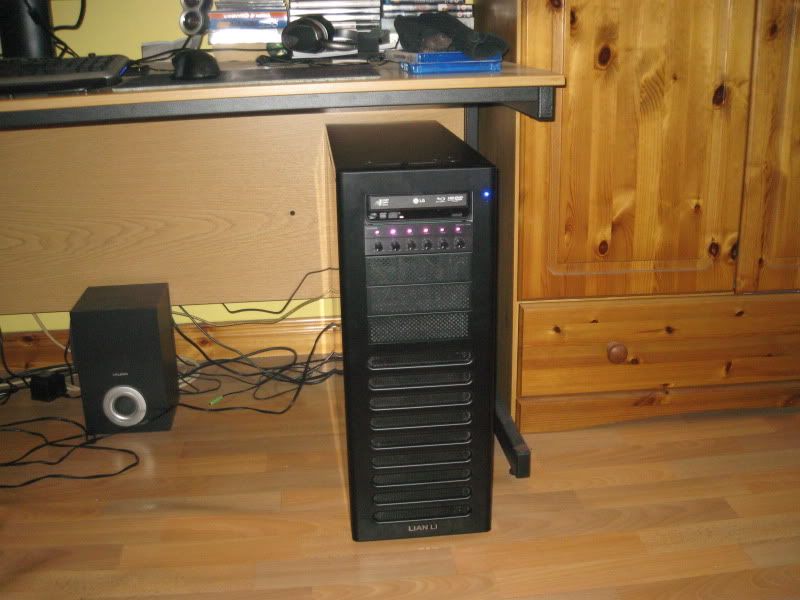
+1 for bungee mounting a fan, had a kama bay in my old eclipse 62, my current lian li a70f is fitted with mesh 5.25 bezels, ive got some bungee cord so i can add an extra intake fan in the three remaining bays.

IMG_1527.jpg
 
Did you have to mount the fan far back in the bays on the PC-P50 pastymuncher? As you know the sides of the lian li bezel covers are quite long.
 
Cable ties for me, no problems and really cheap way to do it (especially as they were left overs from the ones that came with the case)
 
Did you have to mount the fan far back in the bays on the PC-P50 pastymuncher? As you know the sides of the lian li bezel covers are quite long.

Had to go back far enough to allow the bezels to click in properly but it's only about 1.5cm further back than the fan on the hdd cage.
 
I went for the scythe kama bay on mine, it's not a perfect fit but its pretty damn close. And it looks fine.
I did consider the lian Li one, but its mire expensive and harder to get hold of.

I avoided a bungee type custom job, because if the fan is not tight up against the case vents, its going to be recirculating internal air, rather than pulling in air from outside the case.
 
Last edited:
End up ordering somewhere a "AC Ryan KXNG Baycover 3x 5.25" Bay for 120mm Fan UV Blue" for £1, alongside two Xigmatek 140mm White LED Blue Fan XLF-F1454 £9.99 each, plus deliver cost £4.59...which comes to a total £26.37, which ain't too bad.

Fingers-cross that the Baycover work with my CM690 II Advanced...if it doesn't, no big loss I guess.
 
Back
Top Bottom