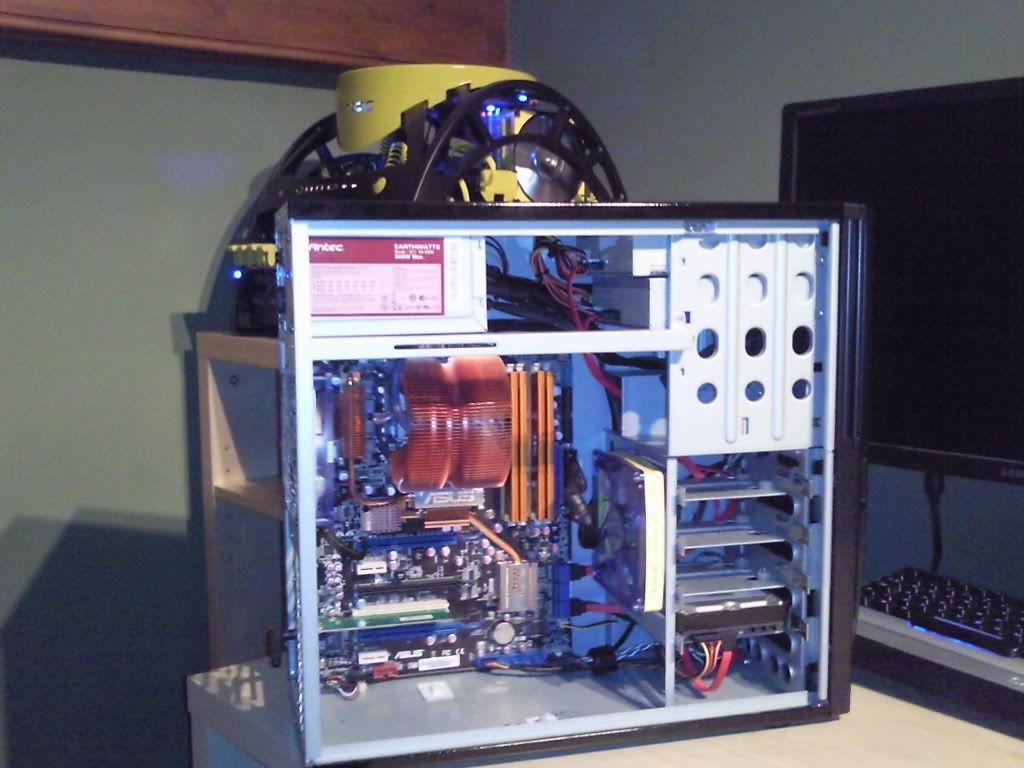
Cable management for numpties

Associate
Joined
25 Dec 2009
Posts
442
I recently had my graphics card cooked (8600GTS) and whilst partly I suspect that was due to a mix of a card thats known for overcooking, it being factory overclocked and playing a new game on fairly high settings I don't think my bog standard case cooling helped any. The mess of wires from a new PSU (CX400) running everywhere certainly won't have helped.

I don't want to spend any money on cooling as I'll be doing a big upgrade in the next few months, so instead I've decided to at least try and sort some of the cabling out. The case itself has a fair bit of space to stuff cables, but I don't actually know where I need to be keeping clear - is it the space around and between the motherboard and case fan? Is it okay to stuff as much slack as I can in the recess next to the PSU, or is that a no-no?

I'm just after a bit of basic guidance. I've done some googling but all the articles I've read talk about drilling holes through the case and motherboard etc, and thats something I'd rather not do - I'm not that confident - although the idea of reverse mounting the HDD seemed like a good one. Is there any other advice anyone can give me?

 
I took a load of photo's, but only one came out properly - see below. I'm going to have a bash at getting some of the stuff out of the way so I'll take a few more then.

The case is a Thermaltake Tsunami Dream (don't know any further details, will have a proper look later.) I've no idea if its great or rubbish - if its half decent then I'll keep it when I upgrade, and some ideas of cheap (sub £30) ways to improve cooling would be appreciated. If its mediocre then I won't bother.


100_1936.jpg
 
MY EYES! :(

On a more helpful note, do you know where all the wires go if they all magically came unclipped?

I installed the PSU myself and mostly worked it out as I went along. If you're suggesting disconnecting some and moving them about before reconnecting, I can take photo's so I've got a point of reference if need be - but I think I'd be alright.
 
you can try to place the cables in the space above the optical drive, there is normally enough room up there for a couple of molex cables.
 
Ok ez pz
-Count up how many of each connecter you need
-Disconnect everything
-Cable tie what you don't need and hide it in the optical bays
-Reconnect the rest and you're done :)

oh and you can also use cable ties to control the length of the wires you do need :)
 
Simply just start again and this time take a bit of time and care with it if your happy you know where it all goes back. :)
 
Dear god.......


As suggested, lots of cable ties, any holes in the mobo tray to route cables, or any other hidey holes. good luck.

Can be done tho,

 
When I scrolled down from the original post I actually recoiled when I saw the picture. Man that's bad

Ok as noted above, whip it all out and start again, using what you need, planning the routes, using right angles where you can and finding a good place to hide what's not needed (there are loads)

I've got a similar case without a modular PSU and acheived this. Only thing not connected is the graphics card.

Photo0731.jpg
 
Cheers, I'll give that a go.

Is the case worth keeping hold of for when I upgrade to a new mobo & CPU, PSU and GPU? Or should I add a new case to the shopping list? If its worth keeping and there are cheap ways of upgrading cooling without overloading the PSU like a side fan or something I'll do them before I do the bulk of the upgrade.
 
OH ****.

Tidied it all up, thought all was fine. Was only 50/50 as to whether I'd put the leads for the two top mounted USB ports in the right place, but was reasonable happy about the rest of it.

Turned it on and the fan and the case light came on for half a second but then nothing. Turned it on and off again with the power switch on the back of the case and repeated, same again. Have taken the side off and checked everything as best I can and I can't see what I've missed/forgotten to reconnect/done wrong.

HELP?
 
Panic over - disconnected iffy USB cables and PC has booted. Photos of the finished article below, the best I could manage. The bulk of the spare and slack is stuffed below the DVD drive in a huge recess.

Could someone help me reconnect the USB cables to the right slot please? Pic's below, but what they show is two single row of 5 pin connectors. Of the blocks I think they go into, they're shown in blue in the photo - they're 5 pins top, 4 pins bottom. One is marked USB 5 something, the next USB 7 something, the last USB 910 (or something close to.)

100_1954.jpg


100_1955.jpg
 
Back
Top Bottom