New Core i5 2500K install - advice pls....

Soldato
Joined
2 Jan 2004
Posts
7,811
Location
Chesterfield
I've received my shiny new components this morning and wanted to start a thread for advice on the overclocking and temps from a fresh reinstall....

CPU: Core i5 2500K
Motherboard: MSI P67A-GD65
RAM: 8Gb (2 x 4Gb) Corsair XMS DDR3

The rest of my ris is as per my sig below.....

I've just done a fresh reinstall of Windows 7 64-Bit and first wanted to check my temps while simply running windows and reinstalling drivers etc

Coretemp and CPU-Z as follows:

1stry.jpg


First of all, does all this look OK for the stock settings and how do the temps look?? I used the "small pea" sized arctic silver compound in the centre of the CPU method but I'm never very confident about it being right!

Thanks for any feedback before I start overclocking and tinkering!
 
Last edited:

I am in the same sort of position.

I recently got a core i5 overclocked bundle from OC but earlier today it crashed out and the bios reset everything to normal settings. Really not sure what to do on this but it was running fine last night while playing starcraft 2 and wow. Perhaps it is just very slightly over the limits and I need to drop it back a little.

If I am correct your temps are almost the same as mine when running at normal settings. Even when overclocked I didnt get much higher temps under normal conditions. Under load they did rise to about 55 or so degrees.

I do seem to have a lower Core 0 and a higher Core 3 at times is this normal as well?
 
I've received my shiny new components this morning and wanted to start a thread for advice on the overclocking and temps from a fresh reinstall....

CPU: Core i5 2500K
Motherboard: MSI P67A-GD65
RAM: 8Gb (2 x 4Gb) Corsair XMS DDR3

The rest of my ris is as per my sig below.....

I've just done a fresh reinstall of Windows 7 64-Bit and first wanted to check my temps while simply running windows and reinstalling drivers etc

Coretemp and CPU-Z as follows:

1stry.jpg


First of all, does all this look OK for the stock settings and how do the temps look?? I used the "small pea" sized arctic silver compound in the centre of the CPU method but I'm never very confident about it being right!

Thanks for any feedback before I start overclocking and tinkering!

Temps look fine now give that chip some grief! :D
 
I am in the same sort of position.

I recently got a core i5 overclocked bundle from OC but earlier today it crashed out and the bios reset everything to normal settings. Really not sure what to do on this but it was running fine last night while playing starcraft 2 and wow. Perhaps it is just very slightly over the limits and I need to drop it back a little.

If I am correct your temps are almost the same as mine when running at normal settings. Even when overclocked I didnt get much higher temps under normal conditions. Under load they did rise to about 55 or so degrees.

I do seem to have a lower Core 0 and a higher Core 3 at times is this normal as well?

CPU temp sensors can have all sorts of problems. Some times you get stuck one that only work above a certain temp. Pretty normal to have dodgy sensors.

Intel use them to detect high temps for thermal throttling and thats all they are designed to do.
 
I'm ultimately going to be manually overclocking but I'm also going to see what the "OC Genie II" function on the motherboard will do too!

Can anyone recommend me some programs to use to test the stability??

Thanks....
 
Have same Cpu /Board combo.

The Genie overclocked to 4.2 but was not too keen on volts it applied (1.35 'ish) if memory serves.

Decided that for now I'd run it at stock- It is plenty fast enough at that:) and when I've got a weekend free will see what I can get at standard volts and take it from there. ( From the reviews I've read I'm hopeful a stable 4.2 without any , or at least minimal , extra volts.)
 
Much the same here - Genie OC'd to 4.2GHz and used 1.360 as per the following pic - is that bad?? (sorry OC noob here!)

I was going to run Prime95 for a while to see what the temps go up to - is it safe to do this if the voltage is high/low?

42ghzidle.jpg
 
Keep dropping the vcore until it becomes unstable.
I'd be surprised if you needed more than 1.3v @ 4.2Ghz
Prime95 is ok at 1.36v
 
Why do I want the volts lower - is it because the higher the volts, the higher the temps?

(sorry for the noob questions!)

Here is my temps after 15-20 minutes of Prime95, still using the OC Genie 4.2GHz overclock:

42ghzprime95.jpg


60-65!?!? - Good, bad or indifferent??
 
Last edited:
Yeah higher volts = higher temps.
Lower volts/temps are better for the Cpu at the end of the day so try to get them as low as they will go but still fully stable.
60-65 degrees is ok & well within the limits considering its hitting 1.4v under load.
 
It does say not to tinker with the settings while you are using the OC Genie so I think I'll give it a go from stock myself!

Are there a lot of settings I need to change myself other than the multiplier??
 
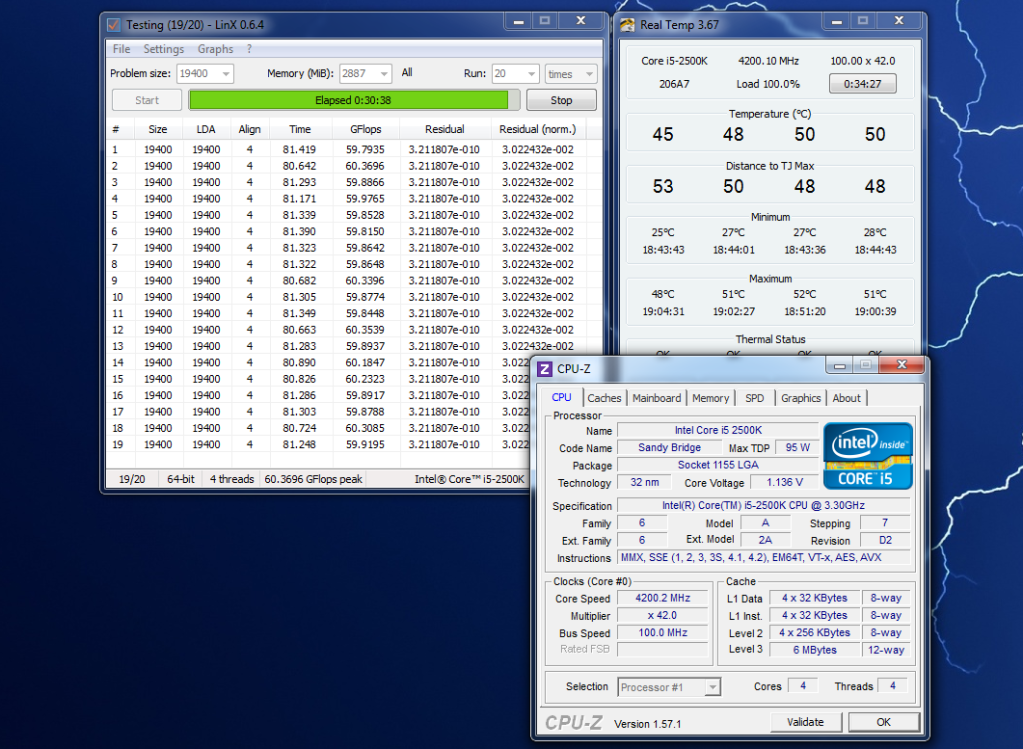
I was curious about the volts needed for 4.2Ghz so decided to try it myself.
Had it as low as 1.1v but that failed after a few mins, 1.136v seems pretty stable on mine after a 30 min LinX run.
Every Cpu is different though, some need more volts than others.
It shows that 1.36-1.4v is deff overkill at this speed though.

4200testpic.png
 
Heh, I've got pretty much exactly the same spec as you Bos! I've just built mine today and was seeing how high I could go...(would not recommend the voltage for too long :P)

ocstant0s.jpg


i5 2500k, P8P67 Pro, 4GB RipJawsX, MSI 560GTX, Vertex 2e SSD, Antec Kuhler 620

Will do better benchmarks though :)
 
Last edited:
Well I followed the guide for the 4.5GHz overclock...... and it wouldnt even boot! :confused:

Just kept powering on for 4-5 seconds and rebooted over and over until I pressed "Del" to get back in the bios - it then told me "The previous overclocking failed" press F1 or F2 etc etc!?!?!?

Can someone give me the step-by-step settings to alter to get 4.2-4.5GHz with a reasonable voltage??

If I knew where I'd gone wrong, I'd try it myself but some of the options it told me to change - I'd never heard of, let alone know what they do!

Thanks again guys......

*edit*

I seem to have changed something that hasnt changed back!?!? I pressed F6 to load the optimal default settings after my failure to boot, saved and booted into Windows and now CPU-Z is telling me I'm running at 1.6MHz!?!?!

lowersetting.jpg


Been back into the bios since and the multiplier is definitely set to 33 so I'm assuming it should be running at stock at 3.3???
And yet my first boot at what I thought was stock - was running at 3.7MHz with the multiplier at 37 - is this right?

**confused**
 
Last edited:
Sorry for all the updates but I'm a bit worried that I've done something to my mobo/cpu!!!! :confused:

When I first booted up this afternoon here is what I got:

1stboot.jpg


I then used the OC Genie to get 4.2GHz and then tried to do it myself and followed the guide in the post above.
This didnt work so I pressed F6 to re-load the default settings and I noticed the multiplier went to 33.

Here is the bios after loading the defaults:

bios1vn.jpg

bios2t.jpg


I'd imagine this to get me back to my stock speed but here is what CPU-Z is telling me:

bootafterdefaultsloaded.jpg


Does anyone know why CPU-Z is telling me I'm running at 1.6MHz if the multiplier is set to 33 in the bios????

Help........ :eek:
 
You shouldn't have to change much to get 4.5 running.
Try 1.35 vcore and see if it runs, if so then try lowering the voltage a little bit at a time until you find the limit.
If not then try a bit more voltage.

The 1.6Ghz is when your not doing much and the Cpu goes into idle mode to reduce power consumption.
The default speed is 3.3Ghz but then theres the turbo mode that ups the speed to 3.7Ghz when needed.

Don't worry m8 your fine :)
 
Last edited:
Does anyone know why CPU-Z is telling me I'm running at 1.6MHz if the multiplier is set to 33 in the bios????

Help........ :eek:

Basically do not worry - this is normal. To save elec etc intel automatically reduce the multiplier when chip is under-used. (speedstep , I think).

If you want to see it in action then keep the cpu-z window open and run mem test (or something else that will put the cpu under load and watch whilst speedstep does its th:)ing.
 
Last edited:
Phew! :)

Thanks guys - I really thought I'd naused it up on my first attempt!!! :confused:

Bos, when you say I shouldnt have to change much to get it to 4.5MHz, do you literally mean I should leave all the bios settings at their default values and simply bump up the multiplier to 45 and then change the vcore (btw, is this the "CPU Core Voltage" in the bios??) to 1.35V and keep lowering this bit by bit until it becomes unstable? - Its just that the guide I linked to above mentions changing all sorts of settings that I have no idea about!!!

Also, what is the official speed for CPU's - I mean the i5 2500K is supposed to be 3.30GHz but the "Core Speed" is rated in MHz - which is it????

Thanks for all of the continued help guys!!
 
Back
Top Bottom