


Check my 3570k OC settings please :)

Soldato
Joined
22 May 2010
Posts
13,031
Location
Minibotpc
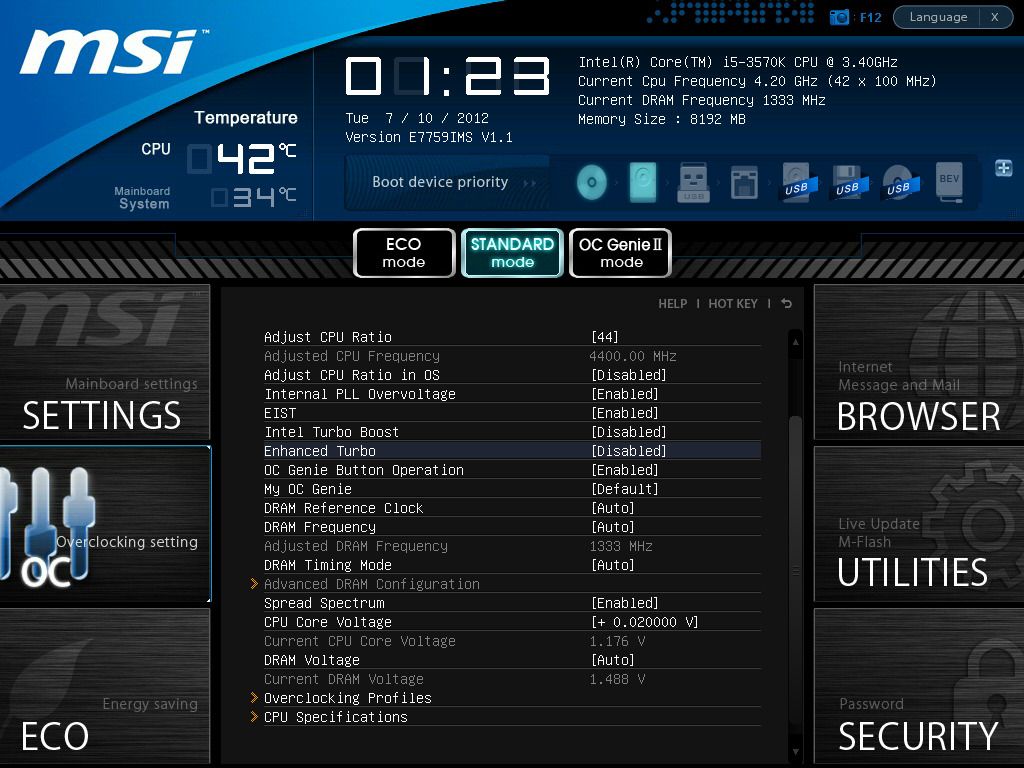
Just finished upgrading my system and managed a 4.4ghz overclock but wanted to make sure im not missing any steps here.

Here are my settings:

On my motherboard settings i have Spread Sprectrum and EIST disabled after taking this screen shot and also have all the power saving features disabled aswel. Pushing a slight voltage bump for 4.4 but i haven't tried 4.4 on stock yet so don't know if it can do it. My temps don't go over 65c and hovers around 63c most of the time. If these settings are okay i may attempt 4.6 on the same settings.

msBS0001.jpg


http://i181.photobucket.com/albums/x100/Munchbunch_01/Overclocksettings1.jpg

** Please resize image to no more than 1024px wide before replacing image tags - thanks **

 
Why would you wish to disable the turbo function...?

I much prefer to see my 4.4Ghz 3570k running at around 1600mhz, with lower voltage, when that extra CPU power is not needed, rather than always running at 4.4Ghz all the time.

I take it that the above is just a misreporting when it shows the CPU at 42x100 4.2Ghz when it has the multiplier set to 44 and CPU-z confirms the 4400mhz..?

Is your memory meant to be at 1333mhz rather than 1600mhz, not knowing which you have got of course..?
 
Last edited:
Why would you wish to disable the turbo function...?

I much prefer to see my 4.4Ghz 3570k running at around 1600mhz, with lower voltage, when that extra CPU power is not needed, rather than always running at 4.4Ghz all the time.

I take it that the above is just a misreporting when it shows the CPU at 42x100 4.2Ghz when it has the multiplier set to 44 and CPU-z confirms the 4400mhz..?

Is your memory meant to be at 1333mhz rather than 1600mhz, not knowing which you have got of course..?

I read that you can get a better stable overclock if you have this function disabled so i went ahead and tried and so far so good thats my only reason for it.

the 42x100 is my previous overclock when i did my first attempt to test for stability at that setting. Once i got that right i pushed a little more. I tried 4.6 on the +0.02000v but it couldn't even post -_-, had to reset cmos.

Yes my memory is from my old amd system which runs at 1333mhz, will be upgrading this when i get the chance.
 
I read that you can get a better stable overclock if you have this function disabled so i went ahead and tried and so far so good thats my only reason for it.

the 42x100 is my previous overclock when i did my first attempt to test for stability at that setting. Once i got that right i pushed a little more. I tried 4.6 on the +0.02000v but it couldn't even post -_-, had to reset cmos.

Yes my memory is from my old amd system which runs at 1333mhz, will be upgrading this when i get the chance.

I've heard that turning turbo off makes it more stable too, thats what i do. :)
 
I would be tempted to use the turbo function and the offset voltage option for overclocking, just to test. People sometimes do that without testing as they believe that it adds stability.

I have found zero issues when it scales from 1600mhz to 4.4GHz and the voltage scales well with it also. When coupled with the appropriate LLC levels it all seems to balance nicely.

Your choice of course but the turbo type speedstep function on a IB CPU seems to work fine.

0.02v is not much at all.
 
I don't think my board even supports LLC... i cant find it anyway unless its called something else.

I did have speedstep and other power saving functions enabled for 4.2 manual overclock since i can't seem to get oc genie to work for me. Primed on that and it worked fine also so i know where you're coming from although my Core temp app can't seem to report the correct speed where as cpu-z can.


I'm still very new to intel overclocking so no idea if that increment of voltage was a lot or too little.

What would you recommend for 4.6ghz? I'm running on a custom loop so my temps don't go that high roughly 60-63 under prime and 55 odd under gaming conditions.
 
I have not got a clue with your MSI board. But with my Gigabyte...


you can see above the offset voltage that I wish to apply as it scales up to 4.4Ghz.


You can see above the LLC calibration "strength" used - this varies on setting depending on vdroop encountered etc.

Do yourself a favour and read as much as you can from this thread....

http://forums.overclockers.co.uk/showthread.php?t=18398598

... I spent a while browsing that one and several others to get to grips with some of the terminology and settings now being applied to the chips. It will give you a great idea of the typical voltages being used and other settings which are useful as well. I must say again though that I have had no issues with using the turbo function with my board / chip and overclock.

I last overclocked my dual core E8500 at 4Ghz so I had been out of the loop for a while.

I found the official gigabyte forums was quite useful and as the Gigabyte boards are quite popular it meant that the setting terminology was the same.

You could do with finding a forum or users who also have the MSI board to see if the equivalent settings are there but just labelled differently.
 
Last edited:
I am wondering if its worth the set voltage or just let it be at auto. At auto its uses how much it need. If you set it then its constantly drawing max. Trying to make a green system after all. Feel 0.1 Mhz is not really worth it. Unless gonna push it to about 4.8...
 
You can see how I have set up some of my BIOS settings from the above pics. I leave all the turbo settings on (speedstep) and thus it will idle at 1600mhz. I find that the LLC at Normal is fine for me as I seem to get little vdroop. I set the 0.04v offset so that when the overclock ramps up to the 44x multiplier and thus give me 4.4Ghz the voltage takes it to what you can see in the last pic.
I am happy with 4.4 I suppose it would do more but I'm not bothered running the CPU to its max, there seems little point.

I would not leave it on Auto as I found that the voltage is not always appropriate for what you wish to achieve.

Read that thread I noted and take your time in small increments and test stability as you go.

Aim for a realistic OC and build up slow and test stability and watch your temps - just don't try and take too many shortcuts.

Best of luck.
 
For now i'm happy with 4.5ghz as i've read the thread and i guess it's down to my board thats the main limiting factor at the moment. I'm missing a whole load of features which i could use to help me reach higher but without them i'm kind of at the dead spot.
 
I'm not sure why I have this opinion, as I have never owned a MSI board, but for some reason I always think of them as being poor value for both money and features when I compare them against others on the market.

I came from a Gigabyte board and fancied a change and so I spent a lot of time reading about the boards with the Z77 chipset and their features. In the end I finished up with another Gigabyte as that seemed to be the best of what was available for what I was willing to pay.
 
I do like gigabyte boards dont get me wrong, my last amd system was from a gigabyte board before i changed to a msi board. The only the thing i dont like about them is the colour scheme. The boards that wetr available to me (matx) did not go with my theme so i had to make a rash choice. I know if i went for the asrock extreme board i would have the features but again i didnt want to pay the extra premium proce which hung around the £140-£150 mark where the RoG board was at.
 
I did not like it (but owned one anyway) when Gigabyte went over to the strange colours like a child had been let lose with a box of crayons.

I know money can be a strong influence on choice, at times, but, for me, i is also what you are left with which finally decides what I buy - I suppose that is why a MSI board has never been my choice.
 
Back
Top Bottom
