• Notice regarding image hosts and attachments. See here.

980Ti Vrms EK waterblock

Associate
Joined
19 Jan 2011
Posts
659
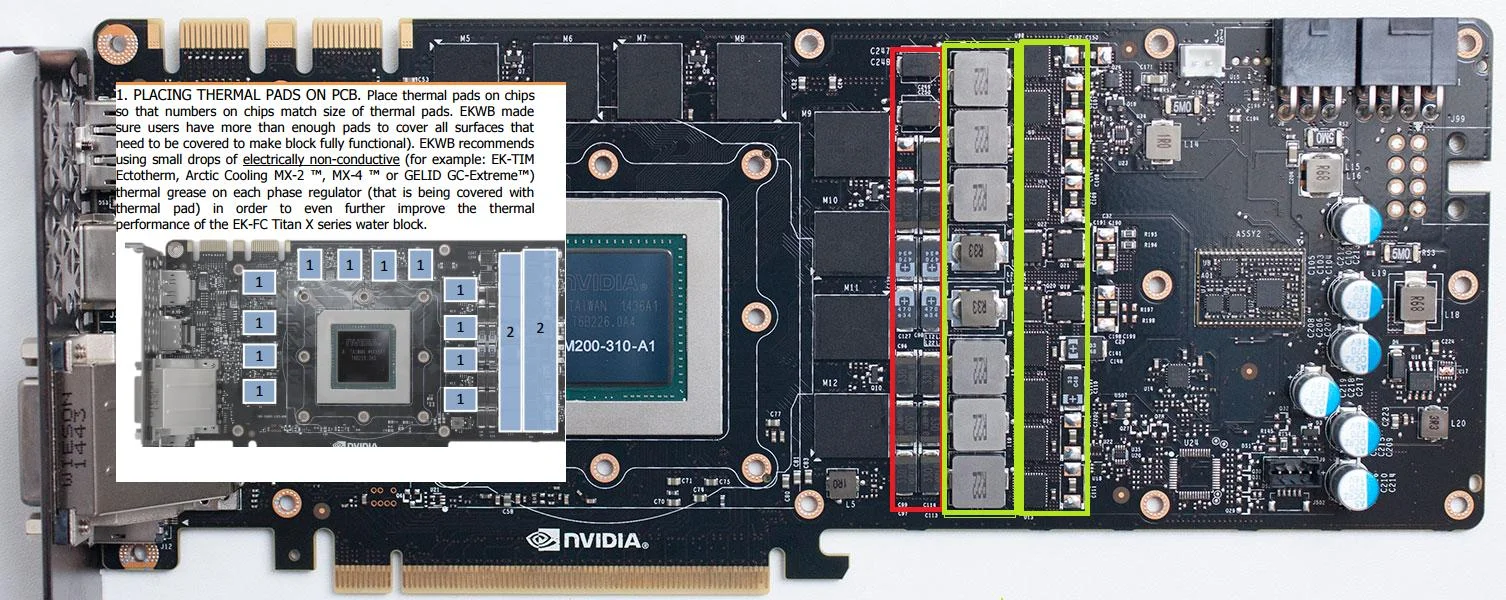
Hi i installed as the instructions said, but someone mentioned that maybe a pad should go on area in red as these had pads on when i took the ref cooler off.

Does any one know how you can see vrm temp on a 980ti, I cant see see in in MSI AB or Gpuz. would like too double check !

Iwxq2rH.webp
 
The mofsets are what you want to worry about which are on the far right in yellow. DO not apply thermal pads where EK don't specify. No-where else on the reference Ti will get hot enough with the current that it allows.
 
There's no temp monitoring for VRM's on the 980Ti cards.

I DID add a thermal pad to the area you have highlighted in red - I had some spare thermal strips and test fitted it to ensure contact was still ok all round. But if you've already installed the block I wouldn't be taking it off to do it.
 
yer i already fitted it, yes there's clearly a gap, i'll leave it for now unless someone knows for sure it needs a pad.
 
I installed an EK Titan X copper plexi block on my EVGA GTX 980TI SC. I took my time to dry fit and see where they had machined for contact via cooling and thermal pad placement. Clearly the left part marked in red AND the far right part marked in greenish-yellow. The central greenish yellow part, does not, from what I can see get a pad applied.

You can also check on your air cooler that you removed to be sure.
 
I installed an EK Titan X copper plexi block on my EVGA GTX 980TI SC. I took my time to dry fit and see where they had machined for contact via cooling and thermal pad placement. Clearly the left part marked in red AND the far right part marked in greenish-yellow. The central greenish yellow part, does not, from what I can see get a pad applied.

You can also check on your air cooler that you removed to be sure.

Erm, looking at the ek instructions, the green bits need pads, the red bit doesnt
 
I was a little bit confused as well when putting the block on my Ti.

I ended up following the instructions (pads on green areas only), and from what I can see the chokes actually do make contact with the block in the area that's machined out.

I don't remember there being any thermal pads on the red area when I took off the stock cooler.
 
I was a little bit confused as well when putting the block on my Ti.

I ended up following the instructions (pads on green areas only), and from what I can see the chokes actually do make contact with the block in the area that's machined out.

I don't remember there being any thermal pads on the red area when I took off the stock cooler.

Looking at stock cooler was pads on area in red, but i followed the instructions and left them out, shame no way to get VRM temp just to double check.
 
I have to say, I'm hugely impressed with the EK waterblock on my 980ti's, the ease of installation, build quality & temps are amazing.

At the moment I've been pushing them both in benchmarks at max stable overclock 1500 (without messing with bios yet) & they are hovering at around 39c/40c & totally silent.

A quick question, my overclock seems far more stable - is it possible other components were overheating or the thermal throttling was causing instability?.

I'm surprised I can not only get better speeds but also more stability without touching the bios (It's not like I let my GPU's get above 65c during benchmarks, I had my fan speeds pretty high).
 
Back
Top Bottom