120HZ or IPS Situation

Associate
Joined
28 Feb 2012
Posts
1,851
Location
London, UK
Im in a weird situation right now.
Ill highlight what the option are
IPS | 120HZ | IPS
IPS | IPS | IPS

Im a serious FPS gamer and I can hit over 60FPS so benefits will be felt but will the colour change between monitors be weird looking? Does anyone run a setup like this?
 
Ive been in this for about a month.
I had 3 ASUS VE247H's but two of which had a disgusting yellow tint so now im back to square one, but Im actually glad because I now have the choice to get myself better monitors.
I just need to see what people think.
 
What about LightBoost? You get about 10x sharper motion (during 120fps@120Hz) with LightBoost 120Hz, than with almost any IPS monitor.

CROPPED_60Hz-300x99.jpg
Standard 60 Hz LCD

CROPPED_100Hz-300x99.jpg
Standard 120 Hz LCD : 50% less motion blur

CROPPED_LightBoost50-300x100.jpg
120 Hz LightBoost : ~90% less motion blur

(Real photos, by the way -- from PHOTOS: 60Hz vs 120Hz vs LightBoost).
Also google "lightboost", it's now very popular for CRT motion quality on LCD. Perfect zero motion blur effect on LCD.
Almost all new 120Hz and 144Hz monitors, now support the LightBoost strobe backlight feature for CRT-quality motion.
Most 120Hz monitors have degraded color compared to IPS, so you want to compensate by getting 10x higher-definition during fast motion gaming.
 
Last edited:
Oh damn. I thought light boost only worked on 3D. Another note to everyone. I have no intentions of using 3D. Already have a 3D tv and that's never been used.
I'm just concerned that the setup would look extremely weird.
 
Oh damn. I thought light boost only worked on 3D. Another note to everyone. I have no intentions of using 3D. Already have a 3D tv and that's never been used.
LightBoost is good for 2D too.
There was a tweak discovered in the last few months, to allow LightBoost to be used without 3D. It is a strobe backlight that flickers like a 120Hz CRT -- see high speed video of LightBoost -- so you get the CRT perfect clarity effect, with fast pans that look as crystal-clear as stationary images. This is the first time an LCD has truly achieved this for gaming, thanks to LightBoost.

The thing is nVidia bundled LightBoost with 3D. Which not everyone is interested in. Fortunately, a tweak was found to enable LightBoost for 2D, without needing to enable 3D. See TFTCentral.co.uk: Motion Blur Reduction Backlights Including LightBoost, as well as other media coverage as well as google "LightBoost". Instructions are found in the LightBoost HOWTO. The good news is that the difficult hack method is being replaced with the new ToastyX easy method (see hyperlink at the top of the 'Hack' section), which takes only 3 minutes to do to enable LightBoost for 2D, without needing to buy a 3D kit.

Be noted that LightBoost can degrade colors because it was pre-calibrated for 3D usage, but can also be adjusted (via nVidia Control Panel, or google "lightboost crimson fix") to get most of the original color back. There are many rave reviews about motion clarity -- see some reviews listed on this page. Make sure, though, you are able to run at 120fps@120Hz, or LightBoost doesn't really benefit enough to compensate for the slight color downgrade.

 
Last edited:
That I didnt know about. Im running AMD cards so I thought lightboost was going to be useless anyway.

Thanks very much for the info. Youre luring me in to a 120hz panel
 
Lightboost is great but i found that it washed out the colours on my benQ 2411T (which were already terrible to begin with).
 
LightBoost is good for 2D too.
There was a tweak discovered in the last few months, to allow LightBoost to be used without 3D. It is a strobe backlight that flickers like a 120Hz CRT -- see high speed video of LightBoost -- so you get the CRT perfect clarity effect, with fast pans that look as crystal-clear as stationary images. This is the first time an LCD has truly achieved this for gaming, thanks to LightBoost.

The thing is nVidia bundled LightBoost with 3D. Which not everyone is interested in. Fortunately, a tweak was found to enable LightBoost for 2D, without needing to enable 3D. See TFTCentral.co.uk: Motion Blur Reduction Backlights Including LightBoost, as well as other media coverage as well as google "LightBoost". Instructions are found in the LightBoost HOWTO. The good news is that the difficult hack method is being replaced with the new ToastyX easy method (see hyperlink at the top of the 'Hack' section), which takes only 3 minutes to do to enable LightBoost for 2D, without needing to buy a 3D kit.

Be noted that LightBoost can degrade colors because it was pre-calibrated for 3D usage, but can also be adjusted (via nVidia Control Panel, or google "lightboost crimson fix") to get most of the original color back. There are many rave reviews about motion clarity -- see some reviews listed on this page. Make sure, though, you are able to run at 120fps@120Hz, or LightBoost doesn't really benefit enough to compensate for the slight color downgrade.


Does that only work with a certain 120hz/144hz monitor? As I have a SA750D which doesn't have lightboost technology, but was wondering if the motion clarity would work on mine too?
 
Lightboost is great but i found that it washed out the colours on my benQ 2411T (which were already terrible to begin with).

And so lies the problem I have.
I have a display on it's way out and people seem to be heavily buying into the whole 120hz/144hz (the old higher numbers have got to be better argument).
But I'm just not convinced any TN screen LCD will offer me the image quality and vibrant colours I demand.
I even saw in another thread "60hz is garbage" - really? Are you sure that isn't once again a "bigger numbers must be better" thing?

I think I'm going for an IPS based screen because vibrant colours far out-weight this whole 120hz/144hz to me - but just want to be sure!!
 
Lightboost is great but i found that it washed out the colours on my benQ 2411T (which were already terrible to begin with).
It does, but I got 80% of my colors back by recalibrating the picture via nVidia Control panel (and doing the crimson fix). Also, some LightBoost monitors (e.g. VG278H) has much better LightBoost colors than others (e.g. XL2411T) although there is less ghosting.

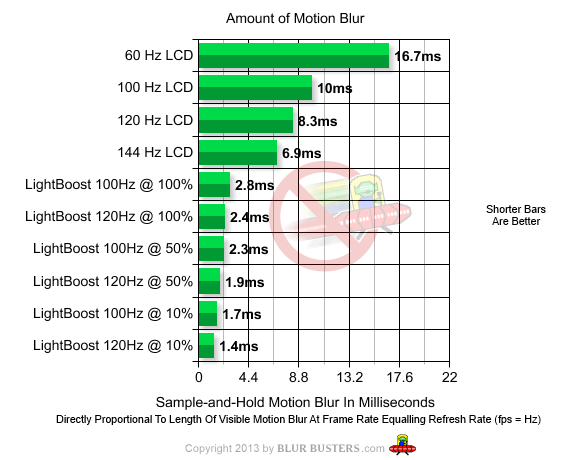
Also, to make LightBoost benefits outweigh the color quality loss, you need 120fps@120Hz. LightBoost is mostly ho-hum at 80fps and lower; so you need to really push the GPU.

See this chart:

motion-blur-graph.png
 
So I'm guessing I should go with 3 ips's. bear in mind, I'll only be using the middle monitor for gaming. Like I said before, I'm just concerned about having a 120hz in the middle looking weird.
Are there any superb Korean 24 inch 1080p screens?
Not sure if my 7950 can drive a 1440p for gaming.
 
Lightboost is great but i found that it washed out the colours on my benQ 2411T (which were already terrible to begin with).
The new GeForce 320.18 drivers have much better LightBoost colors on the ASUS VG248QE -- possibly also the BENQ XL2411T -- no more purple color tint. It's not as good color as 144Hz, but much closer to 144Hz color than it was previously.
 
Last edited:
The nVidia 320.18 drivers have a few issues (unrelated to LightBoost) I'd hold off for the next lot and/or not use anything more recent than 320.00 at the moment.
 
Back
Top Bottom