140mm recommendation

Associate
Joined
18 Mar 2011
Posts
810
Location
East London.
Can some one recommend 140mm fans that move a lot of air and are reasonably quiet - i understand the faster they go the more noise etc but im looking for that right balance.
They will replacing the front two standard 900 rpm fractal design fans in an arc midi. These are very quiet fans but dont really shift much air.
3 or 4 pin, non led preferred.
Thanks

 
The best I know of are TY-140 series fans.. any of them. The problem is they are 151x141x 26.5mm. I have cut them so they are 140x140mm (simple on a good table saw or miter saw) which leave a 60mm flat area on all 4 sides.. 2 of theses are full 26.5mm thick. I think the Arc Midi are clip in mount but don't know if the clips will clip onto 60mm flat area. Also might need to shave 1-1.5mm off of thickness at clip point.
 
The best I know of are TY-140 series fans.. any of them. The problem is they are 151x141x 26.5mm. I have cut them so they are 140x140mm (simple on a good table saw or miter saw) which leave a 60mm flat area on all 4 sides.. 2 of theses are full 26.5mm thick. I think the Arc Midi are clip in mount but don't know if the clips will clip onto 60mm flat area. Also might need to shave 1-1.5mm off of thickness at clip point.

Hi, Thanks.
I did look at these and the shape of them did put me off. Also i think they are on 120mm mounts are they not?
Ideally i would just like to clip in the new fans and be done with it.

Akasa Viper and Apache seem to get good reviews.
 
Yes, they are 120 mounts.
Do fans screw into 140mm mounts in Arc Midi front?

Akasa Viper and Apache are not as good as they claim. Not even close.
 
Yes, they are 120 mounts.
Do fans screw into 140mm mounts in Arc Midi front?

Akasa Viper and Apache are not as good as they claim. Not even close.

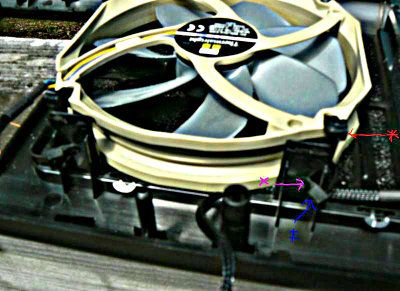
No, there are little plastic 'pimples', for want of a better word, where the 140mm screw holes are. The holes in a fan sit in these pimples and then four clips clip over the frame - its secure enough tho.
 
I drilled a hole in each of the midis stock fan mounts X , ran a zip tie through each of the holes in the fan *, then ran zip ties through the zip ties
on the fan, and through the holes in the mounts. It worked pretty well, but later looking at the setup, I realized I could probably just run the
zip ties directly through the holes in the fan, and the mount at the same time.
arcmidifrtty140_zps2aea96be.jpg
 
As above but after drilling holes in tabs as close to bottom of tab as you can slip zip-tie through tab and up through fan. Than take another zip-tie and zip it down onto the first zip-tie to secure fan. Do all 4 corners before tighten completely and then carefully pull then tight so fan stays centered.
 
Their performance is excellent.
Noise is variable depending on rpm you run them. They are PWM fans so you can easily use your motherboard CPU fan socket if you are running PWM fans on your CPU and control them all at the same time with PWM splitter. Get one of the PWM splitters that have a molex or sata power socket that plugs into PSU cable. The way it works is one fan (CPU cooler fan usually) is master for rpm signal to motherboard. Than motherboard sends PWM signal to splitter and to all fans and 12v from PSU supplies power through splitter to all fans. I've been using this kind of control for long time.. as long as I've had PWM fans ;)

On my system they idle at 700rpm and as cooler keeps CPU cool at 1050rpm that's as fast as they go. I can't hear them below 900rpm.

At 1050rpm I can hear them just enough to know they are running. Even at full 1300rpm they are no louder than my my heating radiator in here.
 
Last edited:
Their performance is excellent.
Noise is variable depending on rpm you run them. They are PWM fans so you can easily use your motherboard CPU fan socket if you are running PWM fans on your CPU and control them all at the same time with PWM splitter. Get one of the PWM splitters that have a molex or sata power socket that plugs into PSU cable. The way it works is one fan (CPU cooler fan usually) is master for rpm signal to motherboard. Than motherboard sends PWM signal to splitter and to all fans and 12v from PSU supplies power through splitter to all fans. I've been using this kind of control for long time.. as long as I've had PWM fans ;)

On my system they idle at 700rpm and as cooler keeps CPU cool at 1050rpm that's as fast as they go. I can't hear them below 900rpm.

At 1050rpm I can hear them just enough to know they are running. Even at full 1300rpm they are no louder than my my heating radiator in here.


Yeh just had a look. I will Have to mull it over.
I have some spare Gentle Typhoons laying around, if i can figure out a way to mount them into that space on the front cover it will be fine - they are fantastic fans.
 
Back
Top Bottom