


290X CF cooling nightmare

Soldato
Joined
10 Nov 2006
Posts
8,578
Location
Lincolnshire
I've been trying to perfect this since I bought my NZXT H440 case and still haven’t mastered it.

Allow me to tell you about my setup (please ignore the Noctua CPU cooler in the pic below that has now been swapped for a H100i)

3X 120mm HP case fans (not standard) are drawing the air into the case from the front, mounted in front of this is another 120mm HP fan blowing air between the GPU's.
I leave the front cover and mesh off the case at all times, with this on there's simply no hope of cooling.
1X 140mm standard fan pulling air out the back
The H100i is mounted at the top of the case pushing air out of the roof as you can see from the pics.

Now if you take the side cover off and stick your hand in there’s masses of air flowing through the case even between the cards, though not so much towards the back end of the GPU's above the sound card.
Gaming with the side cover off does help but after a while my top GPU still hits 94c. The bottom card, although close to the case is never an issue.
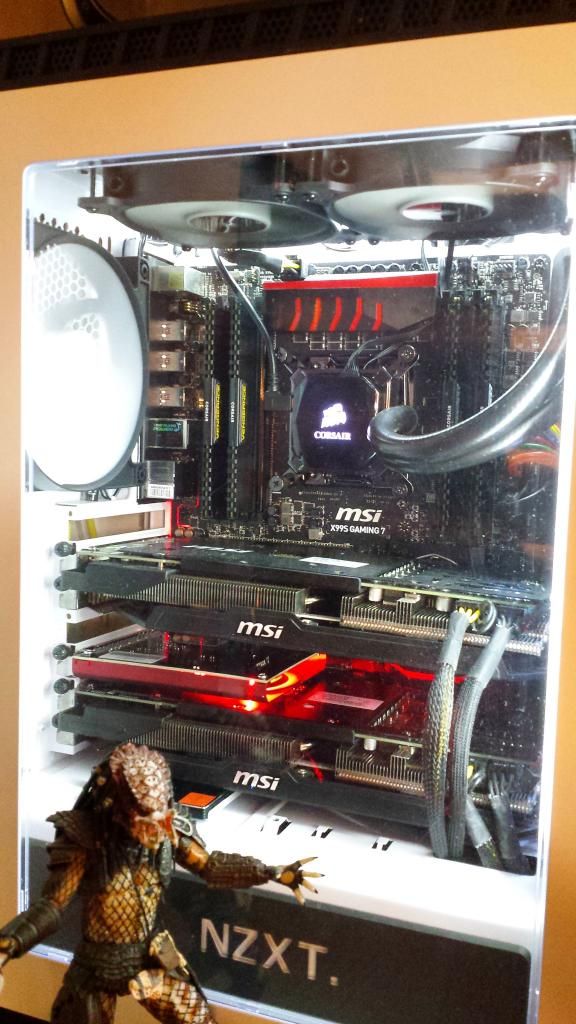
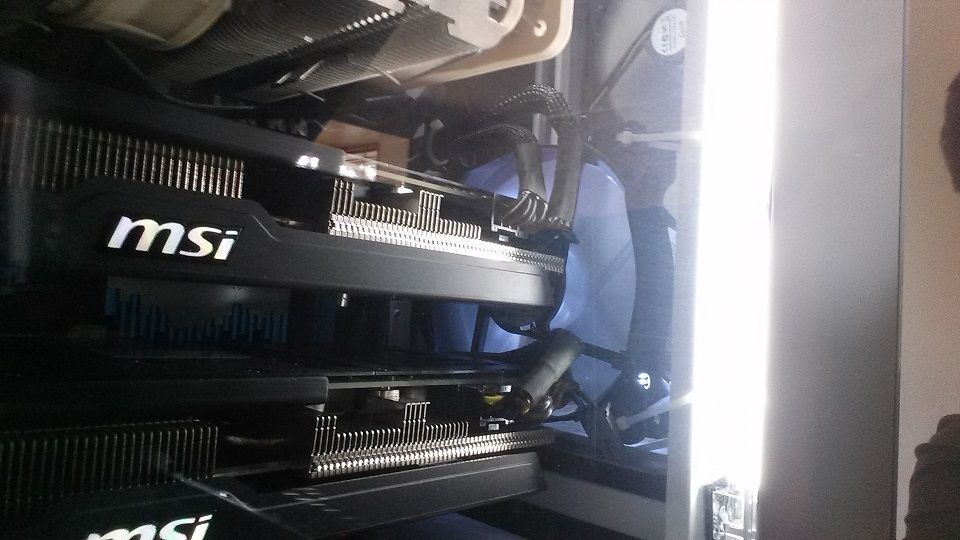
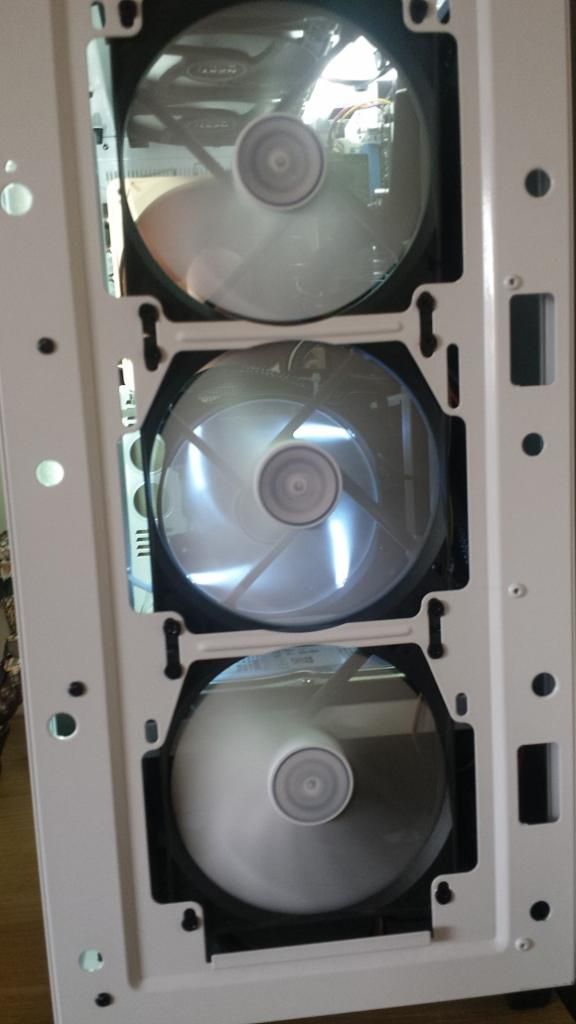


I don’t really want to spend another £200+ on Kraken’s, I'm wondering if another fan and the rear of the GPU's blowing air on them somehow might help.

Grateful of any suggestions or ideas.

Thanks

 
I have similar issues.

However I think you should look in to more negative air pressure in your case. You have too many coolers blowing air into the case and not many taking heat out.

Try and mount 2 intakes and 2 or more exhaust. You need to draw heat out and not have stagnant air in the case.

More fans =/= more cooling.
 
how much air are you pull out of the case v pulling into the case ? it sounds like you have positive air pressure and this is allowing it to slowly heat up and hold the heat in.

Also this may sound stupid but have you always had the extra fan blowing air across the GPUS ?? I ask this because this may be affecting the GPU fans and not allowing them to draw air across the GPU coolers in the correct way so if you are not pulling enough air out of the top and back this is just pushing warm air around the case allowing it to slowly heat up ??
 
Put rad fans between the case and the rad. I think hot air is spewing back into the case there.

Get a high performance 140mm fan for the rear exhaust, put it on a controller.

Put the blank plate back in under the exhaust fan too.

Undervolt the cards a little, maybe underclock, maybe both.


Fwiw the more I see these cases the more I dislike them.... I have 290's with an aircooled CPU in a shinobi, no side window... temps are great.
 
The top card is overheating with the side and front covers off? What is the room ambient?

The only two thing you can really do is upgrade the fans Noctua NF-f12 for the front and something better for the rear fan as well.

Mod the case. A side fan blowing air onto the gpu's would be good but ofc this would some what ruin the ascetics, it will probably be needed though.

Something you can do is unscrew the mesh grill from the top and front panels. Will help a bit.

I noticed that my h440 (with currently one 290) temps slowly build up over time a custom fan profile (for case fans) will help a bit, I have mine set to quite an aggressive curve once temps reach over 40c. Can't hear anything when gaming with headphones on anyways. I'm guessing with two 290s it's a lot bigger issue though.

I really do think you're gonna have to upgrade all your fans and remove the grills. If this doesn't work then you're gonna have to mod the case.

Here is a topic on the matter:

http://www.tomshardware.co.uk/faq/id-2137246/airflow-nzxt-h440.html

Edit

Didn't see you had already upgraded the fans, I think you just need to mod the case really. Assume those fans aren't terrible that you installed.
 
Last edited:
Oh god, with side off too, jeeze...


Could take the metal back plates off the cards, they ain't good for keeping cool neither.... What are single card temps? And what are they with the middle card removed?
 
I have similar issues.

However I think you should look in to more negative air pressure in your case. You have too many coolers blowing air into the case and not many taking heat out.

Try and mount 2 intakes and 2 or more exhaust. You need to draw heat out and not have stagnant air in the case.

More fans =/= more cooling.

I didn't think exhausting the air would be an issue with 140mm at the rear and the H100i with 2X120mm SP fans pulling it out the roof?

how much air are you pull out of the case v pulling into the case ? it sounds like you have positive air pressure and this is allowing it to slowly heat up and hold the heat in.

Also this may sound stupid but have you always had the extra fan blowing air across the GPUS ?? I ask this because this may be affecting the GPU fans and not allowing them to draw air across the GPU coolers in the correct way so if you are not pulling enough air out of the top and back this is just pushing warm air around the case allowing it to slowly heat up ??

As above with regards pulling the air out of the case.

No I added the internal fan which did help a bit I found, it delayed the temps hitting 94c by another 15 mins of gaming so must be helping the cooling between the GPU's
 
Put rad fans between the case and the rad. I think hot air is spewing back into the case there.

Get a high performance 140mm fan for the rear exhaust, put it on a controller.

Put the blank plate back in under the exhaust fan too.

Undervolt the cards a little, maybe underclock, maybe both.


Fwiw the more I see these cases the more I dislike them.... I have 290's with an aircooled CPU in a shinobi, no side window... temps are great.

I have given under volting a go, has little effects on the temps, and I start hitting system stability issues when using -25mV on both GPU's
 
The top card is overheating with the side and front covers off? What is the room ambient?

The only two thing you can really do is upgrade the fans Noctua NF-f12 for the front and something better for the rear fan as well.

Mod the case. A side fan blowing air onto the gpu's would be good but ofc this would some what ruin the ascetics, it will probably be needed though.

Something you can do is unscrew the mesh grill from the top and front panels. Will help a bit.

I noticed that my h440 (with currently one 290) temps slowly build up over time a custom fan profile (for case fans) will help a bit, I have mine set to quite an aggressive curve once temps reach over 40c. Can't hear anything when gaming with headphones on anyways. I'm guessing with two 290s it's a lot bigger issue though.

I really do think you're gonna have to upgrade all your fans and remove the grills. If this doesn't work then you're gonna have to mod the case.

Here is a topic on the matter:

http://www.tomshardware.co.uk/faq/id-2137246/airflow-nzxt-h440.html

Edit

Didn't see you had already upgraded the fans, I think you just need to mod the case really. Assume those fans aren't terrible that you installed.

I replaced the 3 fans at the front with Corsair SP120's in hope these would be good enough, I will remove the mesh although I'm not holding out much hope for this as I'm miles off gaming with the front cover on anyway, though I dont mind removing it to game.
 
The temps are building up, so obviously there isn't enough air being pushed out of the case. Same with my h440.

I'd look into getting a beefy 140mm for the rear letting motherboard control it and having it slow at idle and blasting away at load.

As for the rest I have no idea really, removing the top grill will help a bit at least.

only thing I can say is cutting time!
 
Last edited:
The temps are building up, so obviously there isn't enough air being pushed out of the case. Same with my h440.

As I posted your options are beefier 140mm, maybe upgrade the 120s with static pressure fans.

Or mod the case. Remove the grills or start cutting.

Don't think there is anything else you can do.

I will upgrade the 140mm fan as this is the only standard one left, though there isnt a build up of hot air in the top half of the case, it seems to be trapped between the GPU's with no where to go, the 140mm does little to remove air from the GPU's in this case.
 
Just had a thought, none of my case fans are set on controllers, they just run at a standard RPM, would this make a difference? Thats if they can even be increased.....

Thanks for all your help btw guys :-)
 
They running off of the controller on the back? Think it's 12v anyways so should be already running at full speed.

Do you know which 120mm fans you're using I.e. The model of the corsair fans
 
Try remove the top panel and front panel (keep side for now) and see how long it takes to reach 94c.

Just to double check you have tried the top card out before by itself, right? As in it isn't just a broken card :D
 
Last edited:
Try remove the top panel and front panel (keep side for now) and see how long it takes to reach 94c.

Just to double check you have tried the top card out before by itself, right? As in it isn't just a broken card :D

Will try removing the top panel tonight as well as the front and will report back.

Yeah tried one card, stays in the 70s the whole time.
 
I have given under volting a go, has little effects on the temps, and I start hitting system stability issues when using -25mV on both GPU's

Yes, then under clock and under volt again.

Same with the memory, how low can you go on the voltage? Then how low can you go after downclocking the memory a little?


Dunno if you missed my comment about the metal back plates on the actual GPUs. They are known to not help when it come to cooling.

Try removing them!


Edit: Hey! are the cards on auto fan profile too? Have you tried a custom fan curve on the top card at least?
 
Last edited:
Yes, then under clock and under volt again.

Same with the memory, how low can you go on the voltage? Then how low can you go after downclocking the memory a little?


Dunno if you missed my comment about the metal back plates on the actual GPUs. They are known to not help when it come to cooling.

Try removing them!


Edit: Hey! are the cards on auto fan profile too? Have you tried a custom fan curve on the top card at least?

I want to avoiding unclocking if possible, bit pointless in having a £600 CF setup and slowing them down :p

Fans are on a custom profile, 100% speed @ 85c.

And my back plates look really nice, I had noticed these to be almost to hot to touch :(
 
Better to make it work (omg, 85c at 100% fans with side off? what the freck) than have it not working very well though!

They are factory overclocked right? Try setting them to standard speeds at least! And try with out backplates... so you at least know...


Have you tried running then singularly? One of the cards will probably run a little cooler than the other...one of them is bound to have less power leakage... make sure that one is on the top.


Fwiw these cards are designed to run into the 90's, but you obviously need to cool them still.
 
Not so worried about the temps, just want to keep the throttling down to a minium as I'm running 4K so need the extra grunt.

Will give it a go with the back plates off tonight, singulary is fine and also there's no difference in temps between the cards, at least there wasnt when I tried them when I first got them.
 
Back
Top Bottom

