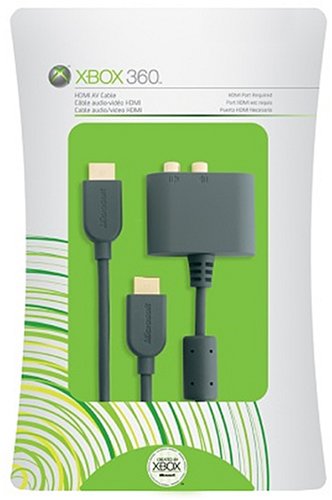
360 + Optical Out

Associate
Joined
30 Jul 2007
Posts
1,742
Location
Derby
Whats the best way to connect this to DD 5.1, I was told theres a cable for the 360 that has optical out, but I can't seem to find it.

What do you all do?

I have an amp with Optical Out, also have it on my TV and also HDMI out/in on amp, I tried connecting a HDMI from my 360 to my amp and then back out to my TV but I'm not to clever when it comes to sound connections so just finding out what is the best way? I love my 360/XBL for games compared to my PS3/PSN but the PS3 is equipped better for media streaming.

Thanks

 
Whats the best way to connect this to DD 5.1, I was told theres a cable for the 360 that has optical out, but I can't seem to find it.

What do you all do?

I have an amp with Optical Out, also have it on my TV and also HDMI out/in on amp, I tried connecting a HDMI from my 360 to my amp and then back out to my TV but I'm not to clever when it comes to sound connections so just finding out what is the best way? I love my 360/XBL for games compared to my PS3/PSN but the PS3 is equipped better for media streaming.

Thanks

All the official cables have optical out, or are you using an obscure 3rd party cable. :confused:

If you're amp has HDMI in, then you'll be fine using that.
 
The HDMI will carry the sound also. HDMI-amp-HDMI-tv. Make sure you set the sound to 5.1 in the xbox's menu.

I did try this but for some reason, I get no picture when I 360 > HDMI > HDMI IN/AMP > HDMI OUT/AMP > HDMI TV

Is this right?
 
AFAIK the hdmi on the 360 does not carry 5.1, only 2 channel audio. Thats why they have special hdmi 'breakout' box for optical out; the connector beneath the hdmi has a thinner casing to be able to accomodate both hdmi and optical cables. If i am completely wrong about this can someone please correct me?!
 
So what cable do I actually need to get DD 5.1?

One of these? Just connect that beside my HDMI cable aswell and just plug an optical cable to it?
 
Last edited:
AFAIK the hdmi on the 360 does not carry 5.1, only 2 channel audio. Thats why they have special hdmi 'breakout' box for optical out; the connector beneath the hdmi has a thinner casing to be able to accomodate both hdmi and optical cables. If i am completely wrong about this can someone please correct me?!

I'm certain it does.

The adapter is provided for people that have an older amp that doesn't support HDMI or are using a monitor that doesn't deal with sound over HDMI.

So what cable do I actually need to get DD 5.1?

One of these? Just connect that beside my HDMI cable aswell and just plug an optical cable to it?

I'd edit your post to remove the competitor link. I wouldn't touch any 3rd party cables apart from HDMI ones.

I'm pretty sure you have all you need to do this if your amp takes HDMI in. Have you tried reading your manual?

Try checking the trouble shooting pages, they tend to have a quick result for a problem like this.
 
I'm certain it does.

The adapter is provided for people that have an older amp that doesn't support HDMI or are using a monitor that doesn't deal with sound over HDMI.

I'd edit your post to remove the competitor link. I wouldn't touch any 3rd party cables apart from HDMI ones.

I'm pretty sure you have all you need to do this if your amp takes HDMI in. Have you tried reading your manual?

Try checking the trouble shooting pages, they tend to have a quick result for a problem like this.

No manual unfortunately, I'll get the model number and try find a pdf on the t'internet.

I did try this but for some reason, I get no picture when I connect the 360 > HDMI IN/AMP > HDMI OUT/AMP > HDTV

Is this right?
 
Last edited:
One of these should do the trick :

41lfHItkIVL.jpg


I have just read that it is possible but most people have problems setting up 5.1 through hdmi... the hassle free option is to use one of the dongles as pictured..
 
You could use the normal component cable (which has an optical out) with the HDMI lead, but you have to take the casing apart for them both to fit. Or buy a official one.
 
Whats the best way to connect this to DD 5.1, I was told theres a cable for the 360 that has optical out, but I can't seem to find it.

What do you all do?

I have an amp with Optical Out, also have it on my TV and also HDMI out/in on amp, I tried connecting a HDMI from my 360 to my amp and then back out to my TV but I'm not to clever when it comes to sound connections so just finding out what is the best way? I love my 360/XBL for games compared to my PS3/PSN but the PS3 is equipped better for media streaming.

Thanks

Leoncc,

First of all, we can help you further if you tell us what amp you are using :)

Secondly, the hdmi output on the xbox does carry both audio and video, however, 5.1 output over HDMI can be problematic for a lot of people, me included, so we have resorted to bodging the av cable so we can have both the hdmi and the av cabled plugged in at the same time - hdmi for video, optical for audio.

remember however, while 5.1 output over hdmi has been a problem, you should laso still have some kind of audio output. But yes anyway, what amp is it?
 
You could use the normal component cable (which has an optical out) with the HDMI lead, but you have to take the casing apart for them both to fit. Or buy a official one.

Far cheaper option compared to the rip off price MS charge for their official HDMI cable and audio adapter!
I currently run my old premium using the VGA cable to my LCD TV and I use optical too feed my 5.1 amp.
The optical port on the PS3 is built in and imo, MS have no excuse for not at least including the audio adapter with the Xbox 360's with HDMI.
 
You could use the normal component cable (which has an optical out) with the HDMI lead, but you have to take the casing apart for them both to fit. Or buy a official one.

This is what I currently do, although I didn't have to do any modding to the component cable as it fit perfect just above the hdmi cable.

Don't pay the M$ rip off prices!
 
Back
Top Bottom