


• Competitor rules

    Please remember that any mention of competitors, hinting at competitors or offering to provide details of competitors will result in an account suspension. The full rules can be found under the 'Terms and Rules' link in the bottom right corner of your screen. Just don't mention competitors in any way, shape or form and you'll be OK.

4770k @ 1.136v

Associate
Joined
2 Jan 2014
Posts
223
Location
Wiltshire, England
Hi Guys,

Before I put the 4770 in my build, I heard people saying that to even get 4.2 you need to be looking at 1.2v, and there were some scary temps being posted around forums.

I wondered if I did the right thing, but I just did a simple OC to 4.2ghz today and did a 20 min furmark CPU burn before closing it down for the night just to get an idea of peak temps, it seemed fine at 1.136v and wasn't generating too much extra heat as a result.

I just wondered what anyone on here has got out of their 4770 and what the voltage was for such an overclock. So far, even though I've just done a small overclock it seems pretty good, not too power hungry and not too hot.

It peaked at 60 on one core, but mostly sat around 57-58 under full load.
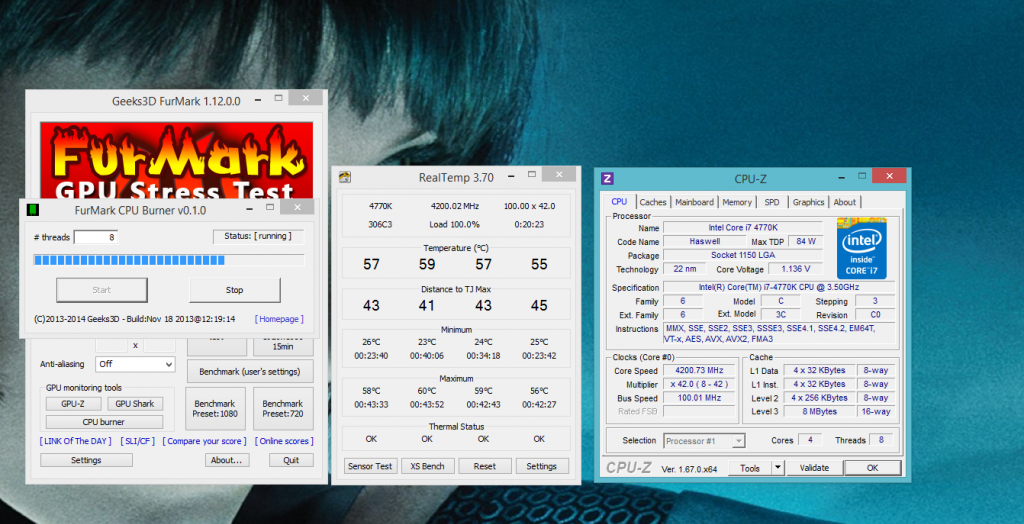
stresstesttemps.png


Cheers,
 
Last edited:
no program or application is going to load up your cpu in the way those ridiculous burnmark programs do.

20mins is more than adequate for a rough idea of temps, but unless you are handbraking or something similar then real temps for real situations will be less.

I say try and aim for some more speed ;)
 
Are you using an air cooling solution or watercooling? Including a closed loop solution?

Ive found with my closed loop that with 30 mins of heavy gaming it would look like its peaked at 55-58 degrees but after a couple of hours it would go up to 62-65 degrees. That's due to the liquid in the loop still warming up but after a hour or so it usually reaches its peak.
If your using air cooling then it should be fine after 20 mins trying to see your temps.
 
Tru, 20 min isn't that long, but fine to show it can handle intensive moments in games, and as mentioned by Dave, I doubt much will stress it anything like a burn program.

SiDeards, will be interesting to see, post back and let us know :)

I'm using a closed loop with one 120mm fan sized rad as an intake. I've had realtemp running while playing Crysis 3 for a bit, not sure if that's very CPU intesive, seems to hammer my cards mostly. The CPU's on factory clock we peaking at low 50's though.

I'll do some more testing later to see how it fairs, and then will bump it up some more :)

I was quite pleased with this voltage and temps though compared to what I thought.

Cheers
 
You can go faster than that and get away with much higher temps. Who cares about silly stress tests, they aren't representative of real world use. Unless all you intend to do is stress test.
 
You can go faster than that and get away with much higher temps. Who cares about silly stress tests, they aren't representative of real world use. Unless all you intend to do is stress test.

Cheers, any idea what vcore and speed I should be aiming at later? Not looking for shortcuts as such as I know each proc is different, but just some more opinions on what I 'could' be looking at :)
 
Thanks :) Looks like some good info on that thread.

I'd be happy with mid 4's for sure.

I hate to see CPU temp go much over 60 though so we will see!


Cheers,

Obviously temp will depend on your cooling solution and vcore. I have an average clocker and at 4.5ghz absolute maximum temps from gaming will equal 70C, most of the time just 60C. Of course stress testing will take it much higher, but I don't stress test on a regular basis :)

Just play around and see what you get. I could get higher than 4.5, but beyond that I need silly voltage, the temps become equally silly and to be honest I will see no benefit in any of the games I play from it.
 
Obviously temp will depend on your cooling solution and vcore. I have an average clocker and at 4.5ghz absolute maximum temps from gaming will equal 70C, most of the time just 60C. Of course stress testing will take it much higher, but I don't stress test on a regular basis :)

Just play around and see what you get. I could get higher than 4.5, but beyond that I need silly voltage, the temps become equally silly and to be honest I will see no benefit in any of the games I play from it.

Cheers for the input, I'd like to keep it in 60's max, I only have a basic cooler, but I'll report back later :)
 
There is no benefit to keeping it below 70c though. It's a number that lives purely inside your head :) Having said that, while playing games I never see the kinds of temps I do when running say AIDA64 or Intel Burn Test.

Haswell has a TJ Max value of 100c. The CPU will not be any better, or last any longer, at 60c than at 90c at the same frequency. I run my 4770K at these settings if you want something to work from:


VRIN - 1.85v
vCore - 1.256v
44x multi
Default Uncore (Auto multiplier)
VRING - 1.1v
LLC - Extreme

This is a very good thread, but ignore the fact that it's for Gigabyte boards. The theory will apply to any Z87 board.
 
Last edited:
There is no benefit to keeping it below 70c though. It's a number that lives purely inside your head :) Having said that, while playing games I never see the kinds of temps I do when running say AIDA64 or Intel Burn Test.

Haswell has a TJ Max value of 100c. The CPU will not be any better, or last any longer, at 60c than at 90c at the same frequency. I run my 4770K at these settings if you want something to work from:


VRIN - 1.85v
vCore - 1.256v
44x multi
Default Uncore (Auto multiplier)
VRING - 1.1v
LLC - Extreme

This is a very good thread, but ignore the fact that it's for Gigabyte boards. The theory will apply to any Z87 board.

Nice, thanks for the input, I guess as you said it just what I think is a nice temp :)
 
Haswell has a TJ Max value of 100c. The CPU will not be any better, or last any longer, at 60c than at 90c at the same frequency. I run my 4770K at these settings if you want something to work from:

Not so sure on that - while a lot depends on voltage, silicon based components tends to degrade at increasingly faster rates once above 80C even in modern CPUs. That extra 10C can potentially knock years off the CPU's life... however both a CPU ran at 80C and one ran at 90C will still last (premature failure aside) waaay longer than the useful life of the CPU.

Modern Intel CPUs though tend to be capable of taking a beating VCore and heat wise - I've thrashed the life out of various Core 2 Duo E6600 through to 3rd gen i7s with most of them standing up admirably - however you do need to be more careful with some of the additional voltages, I've seen a fair few die prematurely from too much VTT, PLL, etc. voltages.
 
Nice to see people saying how silly stress testing can get, I do 15-20 minutes, if it passes that then that's fine for me, just jump into your games and enjoy, they'll not likely ever hit the temps you get with stress testing.
 
Nhowever both a CPU ran at 80C and one ran at 90C will still last (premature failure aside) waaay longer than the useful life of the CPU.

That's what I was alluding to :) In reality, I very much doubt anyone will care about today's technology in ~8 years, even if the CPU itself could last much, much longer.
 
You got the 240mm Coolermaster Seidolon cpu cooler Steveoz? how do you rate it?

It's actually the 120mm as the larger one wouldn't fit in my case.

TBH for a budget cooler I was very surprised. I got it to get my PC up and running, I was going to get the silverstone, but planned on building out a different loop later, that was back in Nov and I have been so happy with it's performance I have been doing other things and didn't rush out to change it.

I installed it as an intake, and even used the pad that came with it as I had no spare paste, all cores sit at mid 20's around windows just casual browsing etc, and hit 51 under max load in a CPU burn at stock speeds. @4.2 ghz It's peaking at 60 degrees on a couple of cores but mostly sits at around 58 under full load.

The CPU Fan is noisy as most cooler masters are tbh, but only if you ramp it up, I sit it at 50% which is the sweet spot at about 1400 rpm and pretty silent, I set a fan curve to increase up to 100% at about 65, so near 60 it's about 80%, but it never seems to get anywhere near that in the games I play, so during gaming the fan stays at a reasonable RPM to keep noise down.

I wouldn't say it's amazing, but for the price and simplicity I have been seriously surprised, and I've got plenty of time now to plan what I want to do next :)

The screws that came with it are junk though, too short for any half decent case (I think they expected people to use a case thinner than paper as they only grip one-two threads when un-installed!). I had to make my own bolts but other than that an easy fit.


Cheers,
 
Back
Top Bottom




