£500 For New Build

Associate
Joined
27 Dec 2013
Posts
36
Location
Scotland, UK.
Hi
I have a monitor (DVI conection), SATA DVD writers, speakers, a mouse and keyboard.
I am also going to get Microsoft Windows 8.1 64-Bit DVD - OEM (WN7-00614) for the system.

I have the PSU from my old pc, it is a Corsair 620W HX Modular PSU - ATX12V v2.2 APFC, it is older, do you think this will be alright to use on the new build?

I like this case for the build, would there be any problems with using it Zalman Z3 Midi-Tower - Black

I recently bought a internal hard disk for my old computer, Western Digital WDBH2D0010HNC-ERSN 1tb
Can this be used in the build for my hard disk?

I will be using the pc for running DVDs with DVD Rebuilder, so i am looking for more a workhorse system than the fastest system i can afford, plus some usb connections because i use external hard drives.
My old system was an Intel system and i will build the system myself.

What would be a good build for £500 for the; motherboard, processor, memory, graphics card and Wifi card?
 
Last edited:

Stu
I edited the first post to include the hard drive i just bought today for my old pc.
Hopefully it can be used in the build.
 
YOUR BASKET
1 x Asus H81M-K Intel Core i5 DIY Micro ATX Motherboard, CPU & RAM Bundle £222.97
1 x Inno3D GeForce GTX 960 OC 2048MB GDDR5 PCI-Express Graphics Card (N960-1DDV-E5CNX) £149.99
1 x Crucial BX100 250GB SSD SATA 6Gbps 7mm Solid State Drive (CT250BX100SSD1) £72.98
1 x Zalman Z3 Midi-Tower - Black £34.99
1 x TP-Link 300Mbps Wireless N PCI Express Adapter (TL-WN881ND) £14.99
Total : £505.52 (includes shipping : £8.00).


How is that?

SSD to run the OS and programs from, use your new HDD as storage.

GTX960 so you can even game on this if you wanted.

Or ditch the card and use the onboard solution via the motherboard.
 
The build looks good.
If i didn't use the wifi card, is the onboard wifi option decent if i ever moved my tower to another room?

Is there a thread showing how to connect a SSD for the operating system and a HDD for the storage?
 
The board does not have built-in WiFi.

You use a SSD just like a regular HDD (but dont defrag it)

So fit the SSD (leave the HDD unconnected) install the OS and drivers, connect the HDD and just wipe/format it if there's nothing on it you want to keep.

The SSD will be the C: drive and the HDD D: or E: etc.
 
What did you mean when you said ditch the card and use the onboard solution via the motherboard?
Do you mean a wired connection instead of wireless and if i want wifi i will need to get a wifi card.

I see what you mean with the HDD, it's just the same when i connect up my external hard disks, it's just that hard disk won't be removable like my usb ones are.
 
If you dont ever intend on playing games then you can just hook your monitor up to the motherboard and use the CPUs built-in gfx core.

So spend the money that you would spend on the GFX card and get an even faster CPU or board with more ports and connections.

I included a WiFi card in the spec above, that is what you asked for.
 
Sorry, you talking about the graphics card and not the wifi card.
I thought you were talking about the wifi card, my confusion.

Thanks for the build, i think i will be going for it.
 
Your right there is no internal USB3.0 header.

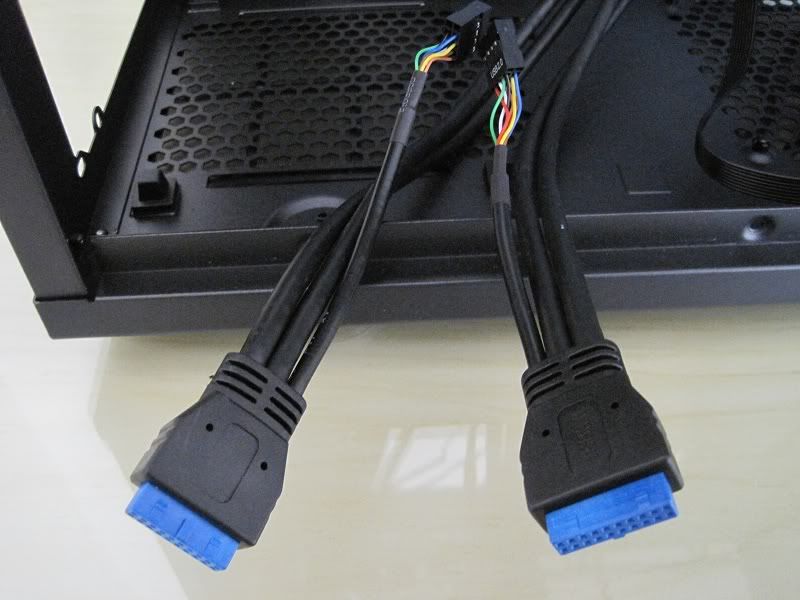
Does the USB3.0 cable have a cable that comes of it and looks like a USB2.0 connection?
 
Stu
There is a USB 2 cable from the front as well, connected it to the motherboard where the motherboard manual said.
The motherboard manual doesn't say anything about connecting a USB 3 header to it.
 
Sometimes a USB3.0 cable from the front of the case also has the option of using it on a USB2.0 header via a little spur cable that comes of it.

Like so,

IMG_0105.jpg~original


if it doesnt have that then a add in card/adapter would be needed.
 
Its not going to ruin your build a with it not connected as you have USB3.0 on the rear of the board and still two USB2.0 at the front
 
I got a cheaper graphics card for the build, just so i wasn't going with onboard video: EVGA GeForce GTX 750 SuperClock 1024MB GDDR5 PCI-Express Graphics Card
But my monitor cable doesn't have the right connecter for the graphics card.
My monitor cable will connect to the DVI-D port on the motherboards I/O plate, will this let me use my monitor until i get the right cable to use to connect my monitor to the graphics card?
 
If your monitor connects to the motherboard DVI then it will connect to the GTX750 DVI port that you have just linked to.
 
Thanks your right.
Connecting to the card is a very tight fight, i had to loosen the screw holding the card in place, connect the cable with the card loose, then hold the card up and refit the screw, but its fitting now fine.
 
Hi
An old post but the PC is still going 10 years on though time is catching up with it :D
I cannot upgrade to Windows 11 because something is not compatible on my pc, but the pc still runs fine and i am only mentioning that incase it affects my question.
I bought a game off Steam that needs 16gb of RAM to work and i only have 8gb on this pc.
Is it possible for me to upgrade my RAM to 16gb or even more on my pc, i just don't know if more Ram would work on my motherboard and what RAM could i use?
I have other things going on in my life just now which means a new pc is not viable just now and i was hoping an upgrade of the RAM might work and give me time to get a new computer.
Hope you can help.
 
Back
Top Bottom