• Competitor rules

    Please remember that any mention of competitors, hinting at competitors or offering to provide details of competitors will result in an account suspension. The full rules can be found under the 'Terms and Rules' link in the bottom right corner of your screen. Just don't mention competitors in any way, shape or form and you'll be OK.

5770 Core clock speed issue.

Associate
Joined
2 Apr 2012
Posts
302
Location
Northern Ireland
Girlfriends Sapphire HD5770 card is giving me an issue.

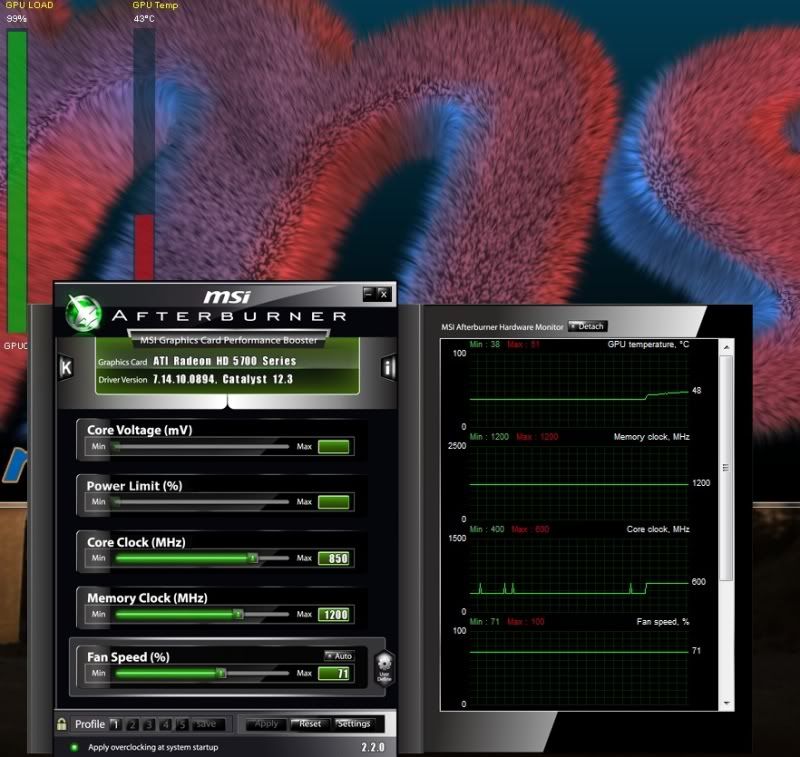
It should be 850mHz core clock but isn't going past 600MHz when doing anything underload. Memory clock is fine at 1200 like it should be

Have google'd a bit, and seen other people having this issue, but I'm not seeing any solutions.

Card is totally standard, not overclocked in anyway. Only change is the Fan speed raised. Not using the CCC overpower for this, using msi afterburner.

Anyone had this? with any solutions? Or is this just a bad card? :confused:

Cheers.
 
Last edited:
tried testing with ccc? does it ramp up to full speed in there?

load defaults in ccc and see if it works then,i had to do that because it wasnt downclocking at idle
 
It's the same on CCC.

The only thing I've found on here is this quote. Which means nothing to me.

EDIT: Just googled the 900mhz problem. Seems it's a common problem with the UVD settings to avoid crashing with the 5000 series. Anyone else suffer this problem? If so then I won't flash the BIOS, this 5770 is only a stop gap card, I want a 6970/580 ;)

hd5770.jpg
 
No idea what that means,that screenshot is correct though for full load,there's around 3 or 4 clock settings,idle,watching video,and full speed for gaming,never had problems with two 5770's I've used,they always clocked up and down depending on the load,most likely a driver issue
 
I can't say I have those problems with my 5770, and I'm on the same drivers. At pure Idle I'm around 150MHz on the Core. Right now with a bunch of video content I'm at 400 Core and 900 Memory.

Have you tried going back to a default profile (You probably have already), or try another driver set?
 
It's a bloody annoying problem with the Sapphire 5770s. Google it around and you can see it's pretty common (and I found my own thread about it from a year ago :o). There's a new vBIOS to fix it, but I was too lazy and manually made a profile where the 2D clocks was 850mhz instead of 600mhz.

And my Google-fu failed... I can't find the download link to the newer Sapphire 5770 vBIOS...
 
This happens on all ATI and AMD cards. It happened to my friend with a 6950 TF power edition. It's a driver bug. Clean them off using Driversweeper and try again.
 
Back
Top Bottom