


• Competitor rules

    Please remember that any mention of competitors, hinting at competitors or offering to provide details of competitors will result in an account suspension. The full rules can be found under the 'Terms and Rules' link in the bottom right corner of your screen. Just don't mention competitors in any way, shape or form and you'll be OK.

660 in SLI

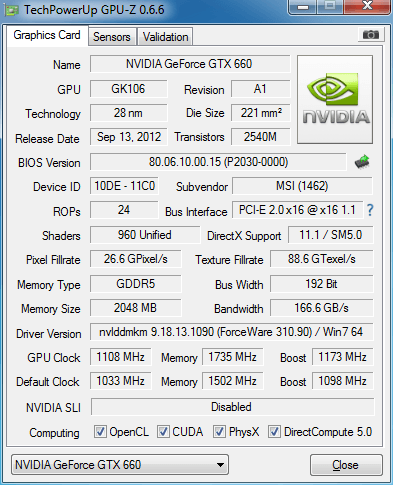
So far, this is what I have:
3fk.png


I've had to reduce the clock my almost 150mhz, as it caused screen tearing. Once reduced, it appeared to be ok running full settings on Heaven. Increased FPS by an average of 25/30.

EDIT:

Batman AC just crashed out, think I'll leave the O/C.
 
Last edited:
Put the clock speeds back to where they were.

The screen tearing is because you're rendering more frames than the refresh rate. Just use Vsync (unless benching/testing for stability) :)
 
Put the clock speeds back to where they were.

The screen tearing is because you're rendering more frames than the refresh rate. Just use Vsync (unless benching/testing for stability) :)

I'll give that a try, thanks Rusty!

I take it a 120hz monitor would resolve this? Not that I've got the money yet!

EDIT: I also got screen tearing with Heaven, should I use the same principle? It blacked out twice also. Just lost the screen, had to reset the machine.
 
Last edited:
I'll give that a try, thanks Rusty!

I take it a 120hz monitor would resolve this? Not that I've got the money yet!

120 Hz monitors don't suffer from tearing as much in my experience. Mainly because the refresh rate is higher so the time spent above the refresh rate (without vsync on) is lower.

They're also a lot smoother.
 
I've now spent some time overclocking my 660 after replacing my old kit with an Intel 2500k and Asrock Extreme 7 Gen 3. CPU Overclocked at 4.5ghz and stable in Prime with temps hitting 61/63, and here is all I have managed to get out of my GPU.

Stock

Overclocked:
2645qn6.jpg


vddfkl.jpg


This was all I could get out of it. The Core BSOD'd at +45, where it was comfortable at +40 and the memory clock BSOD's at +185, so set this to +180. Stable in 3DMark Vantage, happy with the results.

I'm really only doing this as I would like to compare this to my new 7970 which should be here tomorrow and the performance increase should be quite significant at stock and when overclocked.

I should prob add that this is a single card, not SLI. The 2nd developed a fault and was RMA'd. MSI replaced with a new card and since my sister was in the market for a new card, I sold it to her to fund the upgrade. :D
 
Last edited:
Back
Top Bottom

