• Competitor rules

    Please remember that any mention of competitors, hinting at competitors or offering to provide details of competitors will result in an account suspension. The full rules can be found under the 'Terms and Rules' link in the bottom right corner of your screen. Just don't mention competitors in any way, shape or form and you'll be OK.

7970 cooling plate

Associate
Joined
16 Jan 2003
Posts
1,236
Location
by my pc. :D
Hi,

I've had a his 7970 (original stock version) for a while now, and a few months ago fitted an arctic accelero extreme cooler to it. Nice and quiet. :)

Only recently bought a 2nd his 7970 with the newer twin fan cooler. While testing things out I noticed that a couple of the ram chip heatsinks on the old cards had fallen off. I had some problems with the original paste so ended up using some Artic Alumina thermal adhesive - supposedly permanent stuff?? :confused:

I was able to pop off other heatsinks really easily, and the adhesive was really dry and could peel it off as an intact square. :(

Also noticed the card is sagging badly when in the case, especially compared to the new one.

So - given I'm having issues with these fiddly little heatsinks for whatever reason, is there a cooler plate available at all which covers all the ram and support components but leaves a gap for the accelero main cooler? Maybe something originally intended for water cooler blocks?

I did look into to modifying the stock cooler - the previous gen (6970?) seems to allow you to take off the gpu heatsink and leave the rest of the plate there - but unfortunately they are bonded together on the 7970. :(

It's either get a plate type cooler, or some more thermal pads to refit the stock cooler. May be better anyway since it's the bottom card on a crossfire setup and exhausting the heat out the back would be preferable? Just shame about the noise.....

 
I just use this stuff to attach ram heatsinks :

http://www.overclockers.co.uk/showproduct.php?prodid=TH-001-AK

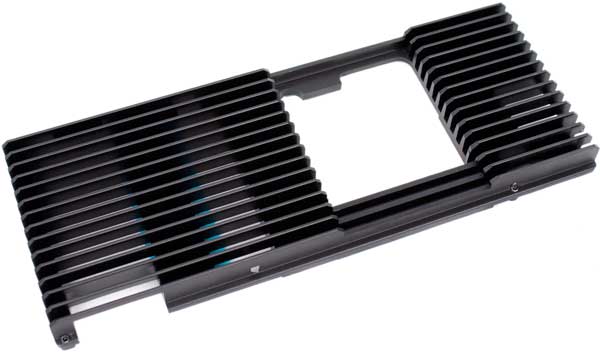
The only heat plate that sprnigs to mind is this:

HD7950-HSFX600.jpg


(just google "swiftech HD7900-HSF HEATSINK")
 
I just use this stuff to attach ram heatsinks :

http://www.overclockers.co.uk/showproduct.php?prodid=TH-001-AK

The only heat plate that sprnigs to mind is this:

HD7950-HSFX600.jpg


(just google "swiftech HD7900-HSF HEATSINK")

Thanks - I've used that thermal tape before. Seems good on reasonably large flat surfaces (like chipsets or ram chips) but how does it hold up on the small vrm chips?

I suspect that heatsink is going to cost more than the accelero did.. and not sure if the heatpipes would clear that hole. Thanks for the pic though.

It may well be a case of almost buying a new card with better cooler by the time I price some of these options up. :D
 
I am using the akasa tape for the VRMs/RAM, its fairly solid at keeping things attached but the temperatures are much higher than using glue type stuff. My VRMs go up to 115C+ using the tape, but I don't have any stability problems and the VRMs are rated up to 125C I think.

I probably would have been interested in a plate too, but when I tried using a gelid vrm heatsink (which screws down on them instead so you can use normal thermal paste) it stopped the card working! Put me off using anything which isn't specifically designed for the 7970 (gelid one is for a 6950 i think).
 
That Akasa tape can hold a big Alpenfohn VRM sink (I still used glue because it gets the best temps though), so it should easily hold the lightweight Arctic sinks.

That Swiftech plate would clash with the heat pipes unless you're handy with a dremel.
 
Well, that didn't go well. :(

Bought some thermal pad material, 0.5mm thick stuff for the memory chips. Spent some time cutting up into required sizes, but some MX-4 on the gpu and put everything together using the stock heatsink/fan assembly. All other original thermal pads still intact.

Refitted in pc as 2nd card. Everything detected. Enabled crossfire - tried running valley benchmark and it hung straight away. Oh oh....

Rebooted - re-enabled crossfire. Check temps - seemed ok for stock cooler. Fan was at 20% as expected. Thought I would reinstall drivers again, removing current ones first. As soon as driver uninstalled, card goes to 100% fan.... ahh.

Reboot - goes normal.. into windows and 100% fan. Something not right!

Take out card, remove cooler to find that hardly any paste has transfered from gpu to cooler... ahh. Wierdly all screws were fastened tight, no gaps I could see and since the heatsink it welded to the rest of the cooling plate it's not free to move independently.... eh? :confused:

Then spotted a small surface mounted component half hanging off the far end of the card. Oh sugar... :( Tried soldering back on but not easy with standard soldering iron with small SMT parts.

Refitted cooler, using thermal pad for gpu so I KNOW it's making contact since it leaves a nice imprint.

Installed in other pc and it boots fine, post text etc. Installed ati drivers, rebooted - and display goes off just after loading up windows. Looks like it's had it... :( So either chip overheated, SMT component messed up or both - or something else.

My crossfire 7970 setup was short lived. :( Good job I still have the new one I can use standalone.

I have had the first card since launch so had a reasonable run I guess. :D
 
Well - I think it's one of those nights. My old tft screen I was using on the other pc seems to be having issues as well. Was using DVI connection - and tried with VGA and screen now up ok! Hmm... will have to try some 3D stuff and see how I get on... fingers crossed!!

edit: nope, crashed after doing a dxdiag 3d cube test. Then desktop starts going a bit weird when using IE looking for a benchmark app. Fan stays pretty quiet during this time too, and temps as expected. Not looking good. :(

Only recently bought the 2nd 7970 so not sure on upgrading - but will consider my options again in a couple of weeks. :)
 
Last edited:
Hard to believe that this can happen to a component. Does stuff fall off from nvidia cards too?

Not starting an nvidia vs amd thread. :D

Given the location of said component (small capacitor or link) on the edge of the card, I can only surmise that I caught it while removing and installing various heatsinks. Probably when refitting the stock cooler item since it covers the entire board.

Besides, the overall issue seems to be heat related - give it a 3d benchmark app and the fan ramps up to 100% for a brief second, screen goes off then fan goes back to idle again - probably since the app or driver has crashed.
 
Well - 'cos I'm an insomniac mad scientist type I decided to try something. Had a rummage around in my spares draw and found what was left of the Akasa thermal tape I had used before. Refitting the heatsinks and the accelero and tried again - was able to run direct x cube test without issue.

Started to think it was a fault somehow with the original cooler. Downloaded 3dmark06 and gpuz (it's a windows xp test machine I was using) and got gpuz to log to file.

With fans running off 12v (i.e. full speed) and running 3dmark06, lasts about 5 secs on 1st test before screen goes off, and I have to power cycle the pc. Log shows last entry for gpu temp is 87c. :eek:

Knocked the GPU speed down to 500mhz, and tried again - same result....

So looks like gpu chip is basically cooking itself, and has definitely had it. :(
 
It's alive!!!!!! (I think - for now. :) ). Junpus thermal pad sheets have "beats silver based TIM" on the packet. Unfortunately this isn't the case with GPUs anyway (unless I'm missing something obvious, and yes I did remove the protective film from both sides! :) ). I used it for a quick test, and given the heat issues decided to give one last try with the last of my MX-4 paste.

Ran through first couple of 3dmark06 tests fine - and max gpu temp was 37c, and at stock clocks too. That's more like it!

Will have to see how it holds out with more extensive testing but looking more promising.
 
Final verdict - all looking good. Back in main PC as 2nd card, and worked fine running the valley benchmark for a couple of passes in crossfire mode.

Panicked for a short while when I noticed that the fans weren't working - then realised it was ULPS kicking in and switching off the card. :D I had reinstalled the drivers so it had all been enabled.

If anything else goes wrong with the card after this, it's probably trying to tell me it's had enough - in which case I'll look into maybe a 290X. :)
 
Back
Top Bottom