


abit ip35 pro bundle bios version needed

st1.jpg
[/IMG]

Antec 1200 arrived to day so was busy building it up plus biting the boys pc and putting in my old p4 system in his case.So i did'ent wanna prime95 my new rig for to long being a new build.
Anyway while that was running i played poker online for a good 90 mins and had the abit hardware monitor software running as well so it did get a decent workout i think.Cpu temp never went higher than 42c....:D
Of course i had all the 5 case fans at top speed,could bearly hear the tv lol
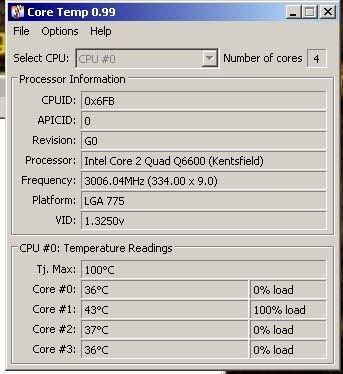
 
Ok finally got it running at @3ghz using bios version 14,ran primetime for 30 mins i know thats not long kids waiting to use PC,anyway heres are the settings.While prime was on i also ran coretemp 44c was the highest temp i saw on any 1 core at a time.

Ex clock 334(did set to 333)?
Multi x9
dram speed 1:1:50 ddr2 1002
Pci express clock 100mhz

cpu core v 1.3550v
ddr2 v 2.200v
cpu vtt 1.2v 1.27v
mch 1.25v 1.41v
ich 1.05v 1.15v
icho 1.5v 1.55v
ddr2 refv 0%
cpu gtlref0&2 67%
" " " 1&3 67%

c1e function disabled
eist function disabled

Dram timing
5-5-5-15
init display first PCIEx


ct.jpg
 
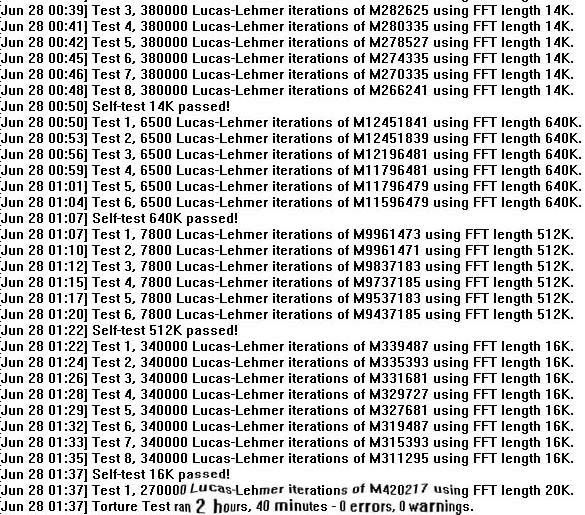
At least your 600mhz faster than stock, but the prime you're running is only testing 1 of the 4 cores. To thoroughly test all cores you'll need this version of Prime;

http://mersenne.org/gimps/p95v256.zip

Run that for a good couple of hours if you can. If it reports no errors then up the FSB on CPU, but remember to change your RAM ratio to suit this so you aren't overclocking the RAM as well as the CPU (to see if the CPU can cope with 3.3Ghz). If it wont boot try increasing the voltage a stage or 2 up to what the overclockers guide states

It'll be trial and error from this point on!
 
try upping the voltage a notch or 2 in the bios and keep doing that (if needed) until you get to what OCUK guide suggests
 
ok ran primetime today for 3 hours with no errors,coretemp checking all 4 cores highest was 60c.
Got the settings saved prob try for 3.2ghz next.Bios 14 seems to be working best on my pc,had to push cpu v up to 1.4450v.
 
Its getting better then!

As long as you can keep the temps under load below 65, you should be ok. Try upping the speed without any increase in voltage, run Prime again for a good few hours, and keep increasing the speed until you hit an error in Prime, and up the voltage a step more.

EDIT: The reason you couldn't set the voltage as low as mine before is that by the looks of it (going by your Coretemp screenshot) your VID is 1.325v which I believe is the required minimum voltage for your chip to run, as mine says 1.275v, unless someone can correct me on the VID reading
 
Last edited:
the lower the vid the better for O/cing in most cases anyway but still some nice clocks have been hit even with vid 1.3250.
cpu voltage now on 1.5 prime fails as soon as it starts.guess i'll just have to live with 3ghz:( do not fancy putting 1.6v through the cpu
 
But didn't you buy the guaranteed to 3.3Ghz bundle? Surely you can argue that your CPU wont reach that....
 
just spoke to support and they told me to try settings with 1 stick of memory
also up the voltage on northbride,so cpu v 1.5150 mch 1.41v it will boot into windows now but fails prime as soon as it starts.
They have given me an rma number so it looks like it's going back to them:(
 
Back
Top Bottom
