Advice on cooling

Associate
Joined
4 May 2016
Posts
8
Hi guys,

I'm looking for some advice on cpu cooling. I've overclocked my i5 2500k to 3.8 GHz but when doing a prime test, the temp was getting to about 75 degrees after 7 or 8 minutes maximum. At the moment, it's got what should be a Prolimatech cooler on it (I'm not convinced that it is, i'll check it tonight). So I'd just like some advice on what to buy. This is what I'm using:

CPU: Intel i5 2500k
Motherboard: Gigabyte Z68AP-D3
Case: Bitfenix Merc Alpha (https://www.bitfenix.com/global/en/products/chassis/merc-alpha#specs)

I've never used watercooling. I've had a look at a couple of these, namely the Corsair H80i and Antec Kuhler 920, but I'm not sure whether they may be too big for my case or just a bit outdated now. Any opinions are welcome :)

In terms of budget, I don't want to spend hundreds on cooling. I'd been looking around the £80 mark but will go a bit higher if it is worth it.

Thank you all

 
I've had a coolermaster 212 evo for 3 years on my 2500k, and have been running between 4.2 and 4.4 on stock voltage, and the max temp i've seen is 68c in the prime 95 stress test over an 8 hour run. I would highly reccomend this cooler, especially with an older cpu theres no point in spending loads on it.

I'd reccomend arctic silver 5 thermal paste as well. Makes a big difference.
 
i used a phanteks PH-TC14PE on my old i5 2500k running at 4.6 with 1.36 volts, max temps were 64.

what are volts running at at the moment for 3.8?

have you tried re-seating and re-pasting your cpu?
 
i used a phanteks PH-TC14PE on my old i5 2500k running at 4.6 with 1.36 volts, max temps were 64.

what are volts running at at the moment for 3.8?

have you tried re-seating and re-pasting your cpu?

At the moment, voltage hasn't been touched. I'm new to overclocking and adjusting voltage seemed scary :)

I haven't re-pasted it. I did consider that but wasn't sure how much difference that would make? It's almost 4 years old so I guess that would be a sensible first step?
 
At the moment, voltage hasn't been touched. I'm new to overclocking and adjusting voltage seemed scary :)

I haven't re-pasted it. I did consider that but wasn't sure how much difference that would make? It's almost 4 years old so I guess that would be a sensible first step?

that is the first thing i would do, re-apply paste and see how your temps are after that and go from there.

when you say you haven't touched the voltage, does that mean its on auto? i am just wondering if auto is applying to much voltage. if you get something like hwinfo and just have a look at what your voltages are doing.
 
Last edited:
Hi guys,
So I bought the Gelid GC-Extreme thermal paste and the ArctiClean thermal remover. Used the remover to clean the CPU and cpu cooler off before applying the paste to the cpu and cooler. Used Prime95 and hit temps of 80 degrees+ within 2 minutes. So, not sure whether I should now look at a new cooler maybe? Or will the paste take a while to have an effect?
 
Sounds like you may have used too much. A little dot no bigger than a grain of rice is all it takes. We want metal to metal contact with TIM filing the voids, not a film of TIM between the two surfaces.

That or our mount is not evenly holding the cooler on the CPU IHS.

Taking 10-20-30 minutes to get real hot is usually an indication of having insufficient case airflow or improper airflow. What happens when cooler is not getting enough cool air or the airflow is now moving the exhaust out of the case the heated exhaust mixes with intake air raising the air temp going into cooler. Every degree hotter the air is translates into a degree hotter the CPU is. The more times the air is recycled the hotter it gets .. and the hotter the CPU get. ;)

You might find this link helpful https://forums.overclockers.co.uk/showpost.php?p=26159770&postcount=7
 
Thank you for the responses

I've tried to tidy my cabling up inside the case as admittedly it was messy. I've now got a fair bit more space for the air to flow within. I also took the chance to reapply the thermal paste in case I'd put too much on - this time I put a small amount on the cpu and nothing on the cooler (which is a Corsair A50 I believe).

Switched it back on, ran Prime95 and the same thing again unfortunately. I managed to touch one of the cooler pipes and it wasn't warm in the slightest. The cpu fan itself has actually upped from 1600RPM to 2000RPM but it hasn't made a difference

So I guess my question now is - what should I buy? My initial thought is to buy a fan controller and upgrade what i've got there as there is only one fan that came with the case. In fact, i've already ordered a dual pack of Corsair AF120's to remove the existing fan and also add one in. If I do that, buy a fan controller and then a high pressure fan (or two) I'd imagine that i'd be substantially improving what I have there. My only concern is what if it is the cpu cooler that I need to replace....?

Any views would be appreciated.
 
What cooler do you actually have? If it really is A50 it shold do the job reasonably well.

If you read the link I posted, you should have noticed my saying to monitor airflow temp inside of case going into cooler. Without knowing what the air temp going into cooler is we have no idea if your problem is bad airflow, bad cooler or combination of both .. maybe even bad thing you have done. ;)
 
I have looked at it. And I've read it twice. However, I haven't really looked at cooling in this depth before so I'm asking for advice which is what forums are generally about.

I appreciate the time you're putting in to replying, I'm just wanting to do the right things.
 
This is what is posted in #9 about how to do it:
How to monitor air temperature different places inside of case:
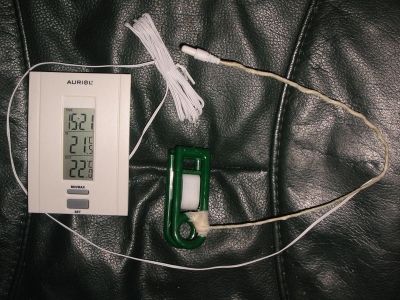
  • A cheap indoor/outdoor thermometer with a piece of insulated wire and a plastic clothespin works great (aquarium / terarium / fridge remote sensor thermometers too)
  • Made up with floral wire and tape. (or single strand insulated electrical wire) If sensor is metal, wrap it with tape too. We don't want anything to short out with metal. ;)
    e65759c3-fbf9-414f-9f1f-f5941d540397_zps2fe90c77.jpg
  • Clip and position sensor where we want to check the temp. Make it easy to see what the air temp going into components actually is relative to room temp. ;)
  • When system is working air temps going into coolers will be 2-3c warmer than room.. up to about 5c is okay.
I see only two possible reason for your last post
1/ You can't understand that.
2/ You are a troll​
Which is it?
 
I have none of that equipment. That's why I asked. I thought I'd see if there's any other way of doing it.

It's fine, I'll work it out myself. I thought this was going to be a place where I could ask questions if I wanted clarification. Obviously not.
 
I have none of that equipment. That's why I asked. I thought I'd see if there's any other way of doing it.

It's fine, I'll work it out myself. I thought this was going to be a place where I could ask questions if I wanted clarification. Obviously not.

"None of that equipment" is a £5 digital indoor / outdoor thermometer, a piece of stiff wire, a closthespin and some tape.

You never asked for clarification, nor did you didn't ask if there was something else that would work, you posted:
Originally Posted by Gideetudee
What's the easiest way to monitor the temp inside the case? Just a thermometer in there near the cpu cooler?
You could use a terrarium or aquarium thermometer. Whatever thermometer that you can put it's sensor about an inch in front of the middle of the cooler intake fan.
 
Back
Top Bottom