• Competitor rules

    Please remember that any mention of competitors, hinting at competitors or offering to provide details of competitors will result in an account suspension. The full rules can be found under the 'Terms and Rules' link in the bottom right corner of your screen. Just don't mention competitors in any way, shape or form and you'll be OK.

Afterburner 2.2.4

Soldato
Joined
17 Aug 2005
Posts
2,828
Location
SW Scotland
Yet another new version just released:

http://event.msi.com/vga/afterburner/download.htm#

MSI Afterburner Version 2.2.4 (2012/9/18)
- Added new graphics cards support
- Change the NVIDIA Kepler series voltage control mode

And it's the 2nd item that is maybe of interest to those of us with Kepler based GPU's! Basically the GPU core voltage has been now locked for all cards (including the 680 Lightening and the 670 PE) to 1.175v. This by all accounts was by the direction of Nvidia/MSI themselves.

Suggested reading is the last few posts on this thread at Guru3D (post #67 onwards):
http://forums.guru3d.com/showthread.php?t=364858

One quote from Unwinder:
it will be standard 1175mV, similar to all other 680 on the market. Advanced core voltage control of Lightning will be totally disabled, so it won't be different comparing to any other 680.

Though there are still two ways round this.
1) Continue to use version 2.2.3
2) Use 2.2.4 (or later when it becomes available) but use the work around that Unwinder gives in a later post.

Looks like Nvidia is continuing to put the pressure on to prevent any sort of meaningful voltage adjustment.
 
Last edited:

No big deal then for Lightning owners, stick with 2.2.3. I was originally under the impression MSI had been told to either change the BIOS or change the voltage regulators, would seem they were just told to adjust afterburner.
 
Some black magic for 680 Lightning owners:

On 2.2.4 you may edit Lightning hardware profile files (.\Profiles\VEN_10DE&DEV_1180....cfg) and add the following lines there:

[Settings]
VDDC_Generic_Detection = 0
VDDC_CHL8318_Detection = 46h
VDDC_CHL8318_Type = 1


Those lines disable NVIDIA's capped voltage control module, enable voltage control via direct access to CHL8318 and select offset voltage control mode for it.

Note: each card profile must be edited for SLI configs

At least Unwinder is sympathetic :)
 
Just a quick slightly off topic question about afterburner. But when I increase the Power Limit to the max (IE. 114%), the Power% showing in Afterburner still only shows a max of around 100-104% even if I increase the core clock and voltage. I was sort of expecting the Power% in Afterburner to now show up to 114%+ Or am I misunderstanding what this figure being displayed by AB represents?
 
Some black magic for 680 Lightning owners:

On 2.2.4 you may edit Lightning hardware profile files (.\Profiles\VEN_10DE&DEV_1180....cfg) and add the following lines there:

[Settings]
VDDC_Generic_Detection = 0
VDDC_CHL8318_Detection = 46h
VDDC_CHL8318_Type = 1


Those lines disable NVIDIA's capped voltage control module, enable voltage control via direct access to CHL8318 and select offset voltage control mode for it.

Note: each card profile must be edited for SLI configs

At least Unwinder is sympathetic :)

Indeed.... until Nvidia/MSI spot this work around and put yet more pressure on Mr Unwinder to tighten things further :(
 
OptimaLnrg said:
Poor show.

I'm getting that 'should've bought 7970s' feeling.
Does it state anywhere on the boxes that the GTX 680 Lightning has voltage adjustments? If so then it's false advertising?
 
Does it state anywhere on the boxes that the GTX 680 Lightning has voltage adjustments? If so then it's false advertising?

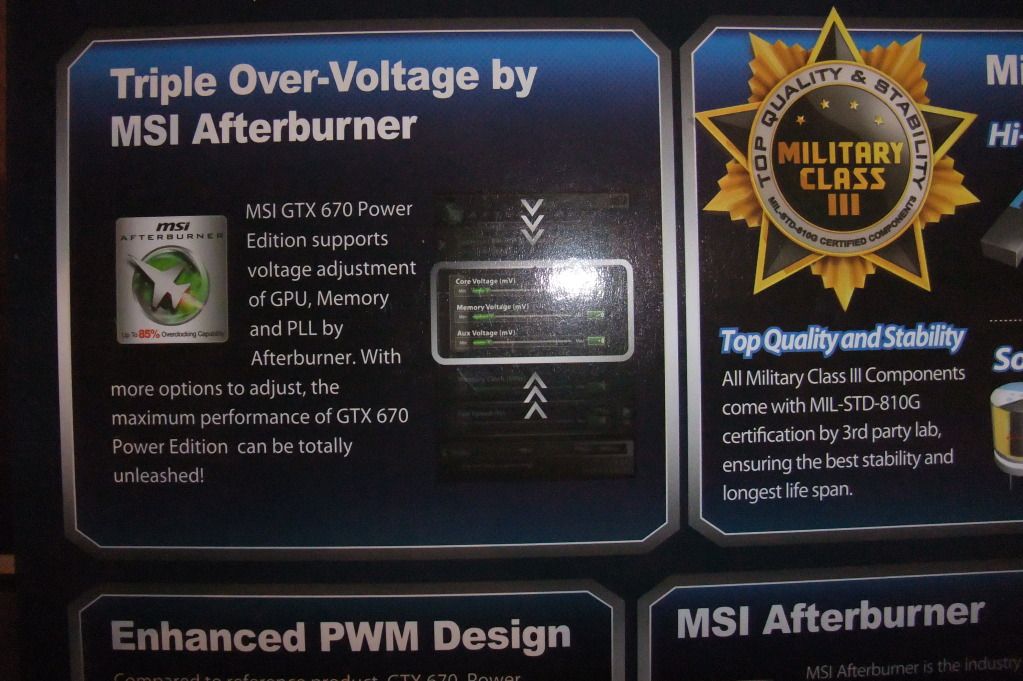
It certainly does on the retail box that the 670 PE comes in.
In several places actually.

001_zpsee966016.jpg
 
Last edited:
Btw, the shader clock has been absent for a several updates. I don't know why this is?

No it's there still. The "problem" is the nVidia drivers. After Forceware 301.42 the shader clock doesn't appear in MSI Afterburner and they are no where to be found. I noticed that when I installed forceware 306.23 where shader clocks where gone, and then I reverted back to 301.42 and they were back in Afterburner. ;)
 
No it's there still. The "problem" is the nVidia drivers. After Forceware 301.42 the shader clock doesn't appear in MSI Afterburner and they are no where to be found. I noticed that when I installed forceware 306.23 where shader clocks where gone, and then I reverted back to 301.42 and they were back in Afterburner. ;)

Thanks for the info, I've been wondering why it was like that. :)
 
That's what i was thinking Liam.

Looks like its just a update for Nvidia users though. :(

Ah man never mind then Matt, trixx seems to be the only application that gives me full control over everything. GPU tweak gives me voltage control but has a limit of 1070 on the core so im just running trixx for my core clocks and using AB for on screen monitoring
 
Back
Top Bottom