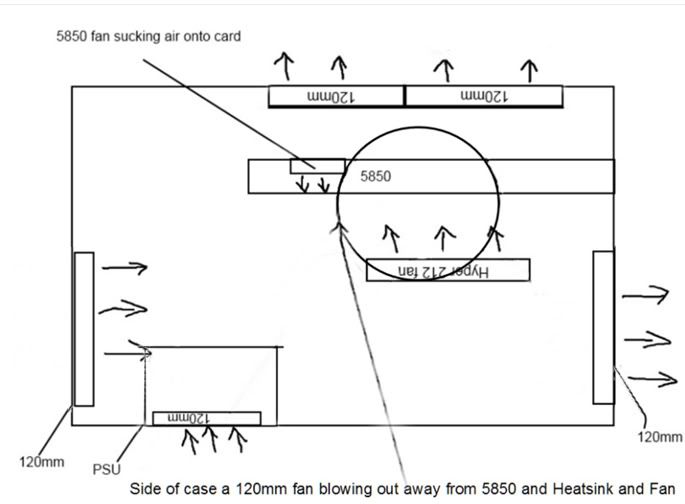
Airflow direction advice please :)

Soldato
Joined
7 Aug 2009
Posts
4,994
Location
London
Hey guys,

I have recently swapped my case from a NZXT lexa to a Lian-Li A05-N.

Temps are slightly higher than what they used to be despite having more fans in place.

Here is a very rubbish drawing of my fans and airflow, can any of you cooling experts see anything wrong with the airflow?

Is there anything you would change?

Thanks for any advice!

cooling.jpg


Here is a link to a blank copy of the pic if anyone would like to show me the correct airflow!

http://dl.dropbox.com/u/37251449/coolingblank.jpg
 
Last edited:

Heat rises, so sucking the hot from the top and venting cold in from front AND back wont hurt...

Seems a strange layout, to me anyway that your GPU is so high!

I have a 120mm at front sucking fresh air into case, 140mm Viper at bottom of case sucking fresh air up into xfire gpus and rest of case, corsair h80 sucking air push/pull through rad into case and two 120mm vipers at the top sucking all the stale air out and a couple of Akasa ambers on a bridge from front to back blowing fresh air onto my GPU's. Works great!
 
Last edited:
An overall draft, blowing air in the case upwards over the components that generate heat, from the front to the rear, always produces the best results in cooling and quietness. Inside your case needs to be like catching a chill from sitting in a drafty room because someone left a window slightly open. I have altered your plan to produce this effect, you need to change the directions of several fans including the one on the CPU cooler.

FanDirections2012.jpg


-----------------------------------------------------------------
AsRock Z68 Ex4 G3, [email protected] , G. Skill RipsawsX 8GB,
5850 1GB(CFX), CM90 II Advanced, Crucial M4 256GB, 4 HDDs,
NH-D14, XFX 850W BE, Xonar Essence STX, BlackGold HD DVB.
 
An overall draft, blowing air in the case upwards over the components that generate heat, from the front to the rear, always produces the best results in cooling and quietness. Inside your case needs to be like catching a chill from sitting in a drafty room because someone left a window slightly open. I have altered your plan to produce this effect, you need to change the directions of several fans including the one on the CPU cooler.

FanDirections2012.jpg


-----------------------------------------------------------------
AsRock Z68 Ex4 G3, [email protected] , G. Skill RipsawsX 8GB,
5850 1GB(CFX), CM90 II Advanced, Crucial M4 256GB, 4 HDDs,
NH-D14, XFX 850W BE, Xonar Essence STX, BlackGold HD DVB.

:D
 
A whoop left is the front!! An overall draft, blowing air in the case upwards over the components that generate heat, from the front to the rear, always produces the best results in cooling and quietness. Inside your case needs to be like catching a chill from sitting in a drafty room because someone left a window slightly open. I have altered your plan to produce this effect; you need to change the directions of several fans including the one on the CPU cooler.

FanDirections2012-1.jpg


-----------------------------------------------------------------
AsRock Z68 Ex4 G3, [email protected] , G. Skill RipsawsX 8GB,
5850 1GB(CFX), CM90 II Advanced, Crucial M4 256GB, 4 HDDs,
NH-D14, XFX 850W BE, Xonar Essence STX, BlackGold HD DVB.
 
Thanks a lot guys! Will change the fans around later this evening.

The graphics card is close to the top as the Lian Li is a bit strange in that the motherboard is kinda flipped upside down, not sure why it's designed this way to be honest.

Thanks again :)
 
Back
Top Bottom