• Competitor rules

    Please remember that any mention of competitors, hinting at competitors or offering to provide details of competitors will result in an account suspension. The full rules can be found under the 'Terms and Rules' link in the bottom right corner of your screen. Just don't mention competitors in any way, shape or form and you'll be OK.

Asus 570, high temps??

Associate
Joined
10 Apr 2003
Posts
1,002
Location
hither
Hi folks

I've finally got my system up and running near to how it should be running, but for some reason, my card temps are very high compared to other peoples + reviews etc

Basically, as I sit here now, my card is idle and has been for around an hour and the temp is 67-68 degrees according to smart doctor. Review suggest it should be mid 40's

To take airflow out of the equation, I have set up a 24" room fan (leaf blower stylee which litterally sounds like a jet) on full whack is making my house shake, and the temps arent shifting. Card is at stock. Anyone else had weird temp readings with their cards? How important is ambient air temp with these vapour chamber coolers?

Its in a pretty warm room, I'd guess its about 24 degrees

Is it worth taking the card out and having a look at it to see if everything is ok?

Bar the temps, the card is sweet. Been playing on mafia 2, dead rising 2, and resi 5 and its smooth as butter with everything on full at 1920 x 1080 res

Thanks

 
Use msi afterburner to drop your voltage also reapply tim the stuff they come with is pretty crap

I'm using ek blocks on mine and my idle temp is 24 on each card
 
sure you're looking at celsius? 67-68 idle is not normal. if you've done nothing to the card and it's stock then it's faulty. RMA it, dont bother opening it up etc.
 
Hey

Definately looking at celcius :D

Interestingly, I've just moved my mouse to turn on monitor, and temps were mid 40's according to smartdoctor which was on screen, and then 90 secs later, they were back to mid 60's. Hmmmm

Is there some sort of profile which is fubared do you think? First time with nvidia for a long time, so theres a chance i'm missing something pretty basic

How easy is it to take the cooler off, and will it definately void the warranty? I've now opened a door the the outside world and the leaf blower is now blowing the cool air into my case and it still aint shifting the temp

And Ejizz, got it running a monitor with an extended desktop to my 1080p tv. Make a difference?

Cheers
 
Well, think I've found the problem

Had a search around and it seems to have something to do with having 2 displays plugged in. I've just disconnected from my tv and as soon as I pulled the plug, the temps started going down. Gone down from 66 to 49 in the last 2 mins.

Seems like a stupid sort of problem for a £300 card?
 
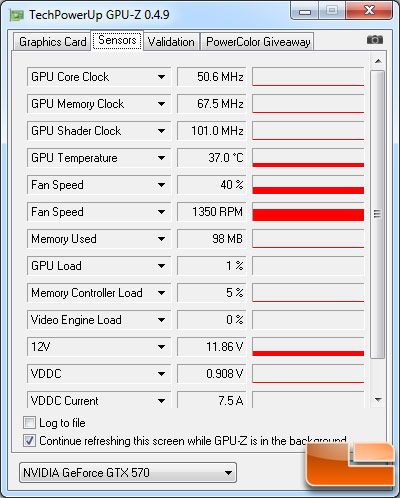
Its how nvidia cards all work. If there is 2 displays plugged in, the cards run at 3d clocks 24/7. You'll notice that, with a single display, the core clock will drop to 51mhz when idle, as well as a voltage drop (hence the lower temps)
 
Well, at least I know it aint broke i suppose

Just have to live with the high temps I suppose as I aint gaming on my wee 22" monitor :)

Thanks for the help
 
Do you have 'Prefer Maximum Performance' enabled under Power Management in the Nvidia Control Panel? If so, the graphics card won't downclock to 50.6Mhz that it's supposed to do by default and will therefore run at 732Mhz when idle, thus you will see higher temps.

Also, if you have more than 1 monitor connected then the graphics card won't downclock to 50.6Mhz & will run at 732Mhz also - it's a bug that Nvidia should fix in the new driver apparently.
 
Last edited:
Do you have 'Prefer Maximum Performance' enabled under Power Management in the Nvidia Control Panel? If so, the graphics card won't downclock to 50.6Mhz that it's supposed to do by default and will therefore run at 732Mhz when idle, thus you will see higher temps.

Not true:)

Power management setting does not affect idle clocks.
Just means that it will always run full 3D clocks when set to "PMP"

I'm not totally convinced that adaptive power works well with all games and I tend to set on a game by game basis:)
 
I've heard this happening before when running dual monitors with these cards. Best to just check your clocks in afterburner with and without dual monitors. Mine idles at 38c/40% fan after a few hours of bc2 and a room temp of 25c so it's definitely not right :confused:
 
Thanks for the suggestions folks

Kinda found a solution though using ultramon. I've now set up hotkey combos so that if I press ctrl+alt+g it sets my TV to main display, and if I press ctrl+alt+w it sets my monitor to main display

Then, by pressing ctrl+alt+d, it disables the secondry display. Definately works, and works well. As soon as the secondry display is disabled using the combo, the cards temps drop and the clock frequencies etc drop

Theres a 30 day trial, and I'd recommend it highly if you set up similar to me. Its much quicker than using nvidia control panel, as it just does it instantly intead of all the 'Are you sure?' blah blah questions :)
 
Not true:)

Power management setting does not affect idle clocks.
Just means that it will always run full 3D clocks when set to "PMP"

I'm not totally convinced that adaptive power works well with all games and I tend to set on a game by game basis:)

It certainly is true - I've been messing around with it all evening. With 'Prefer Maximum Performance' selected, the idle clock is 732Mhz. Changing to 'Adaptive', followed by a reboot results in the idle clock sitting at 50.6Mhz.

See here for more info: http://www.legitreviews.com/article/1482/15/

geforce-gtx570-gpuz2.jpg


Notice 50.6Mhz as the Idle clock. Select 'Prefer Maximum Performance' and reboot. Load GPU-Z again and you'll see Idle clock working at 732Mhz.
 
It certainly is true - I've been messing around with it all evening. With 'Prefer Maximum Performance' selected, the idle clock is 732Mhz. Changing to 'Adaptive', followed by a reboot results in the idle clock sitting at 50.6Mhz.

See here for more info: http://www.legitreviews.com/article/1482/15/

geforce-gtx570-gpuz2.jpg


Notice 50.6Mhz as the Idle clock. Select 'Prefer Maximum Performance' and reboot. Load GPU-Z again and you'll see Idle clock working at 732Mhz.

Hi:)
Try monitoring clocks with Afterburner;)
When I launch GPU-Z, the clocks jump to full 3D settings and when I close they fall back to idle 50Mhz clocks.

With "Prefer Max perf" set in Nvidia control panel:)

As stated previously, all adaptive power does is monitor the GPU load and contol clocks accordingly, thus saving on leccy:)
 
Back
Top Bottom