• Competitor rules

    Please remember that any mention of competitors, hinting at competitors or offering to provide details of competitors will result in an account suspension. The full rules can be found under the 'Terms and Rules' link in the bottom right corner of your screen. Just don't mention competitors in any way, shape or form and you'll be OK.

ATI 4870 Owners temps

Associate
Joined
10 Sep 2008
Posts
392
Location
Uk
A guy posted a topic on 4870 x2 temps at idle and full load,

So i thought i'd do the same for the 4870.

the 4870 seems to run very hot while idle unless you have enabled the manual fan control.

If anyone has done this,Then what speed have you set you fan speed at??

 
A guy posted a topic on 4870 x2 temps at idle and full load,

So i thought i'd do the same for the 4870.

the 4870 seems to run very hot while idle unless you have enabled the manual fan control.

If anyone has done this,Then what speed have you set you fan speed at??

So what are your temps at idle and full load?
My Force3D HD 4870 idles at 55C and hits 75C loaded. Fan speed is at 70% in ATI Overdrive.
 
Depends on the model, doesn`t it? Passive, one fan or two :)

Folk tend to set their fan percentage in accordance with acoustics so another variable pops in, quality fan(s) or cheapo fan(s). 30% with **** fan(s) vs quality fan(s) at 60% may sound the same ;)

Some folk realise that a gpu can be quite happy sitting at 90+°C and don`t mind so long as it doesn`t crash and/or have any undesirable effects on other hardware, so sticking any high end card in a case with one 80mm exhaust fan is just asking for trouble perhaps, especially if the card vents into the case rather than out the back, the fan(s) are then drawing hot air back onto the card:D

My specific 4870 though, an Xpertvision 1Gb version is ca 50°C on idle and 63°C under load with manual fan percentage at 55% (I settled at this because it is still barely audible at this setting) and at stock, though I modded the bios for a lower 2D mode and the card idle temp is now 43°C :)
 
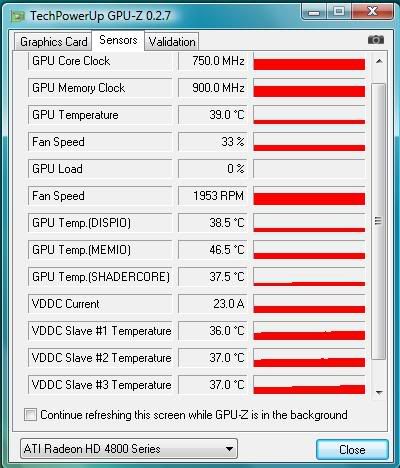
Am running mine at stock speeds at the moment (750/900), idle with fan at 30% it's 48 degrees and when pressing the test custom clock button to get 95% activity it's only 56 degrees under load. Lol, putting my fan at 55% would have my neighbours complaining :eek: :D
 
Nice one. Good idea to compare and check temps, after all it is due to this reason that my last two cards died. Previous to me forking out for the X2 I bought the 512 4870 by powercolour which also has the passive cooler. Great card. When the 8.10 drivers came out I increased the fan from 2% (yes, it was set at 2%) to 20% and idle I was getting 30's - 40's. Playing stalker clear sky on full settings and it never went higher than 48C! :)
 
well my system temps are: cpu 28°C and mobo is 30°C.

I'm also running my card at stock speeds (750/900)

But my card (HIS 4870 512mb) fan is also set 30% and my temp is 62°C :confused:

And when i press the (test custom clock button) on 95% activity my temp is 67°C

If i turn the fan to 40% (which i have just done) my card temps drop to 50°C idle and 57°C testing clock.

Playing crysis on very high the temp went to 64°C witht the fan on 40% (which i have just tested)

anyone recommend a stable setting for the fan?? without doing any damage to the card lol :P

I only say that coz i tested it on 100% the other day and it sounded like a motor bike went through my house and like my computer was about to implode lol.

But on 40% it does not seem noisy at all.#

I have this in the antec 1200 if that makes any diff.
 
What is the card manufacturer dude? Since all cards vary slightly, even the same models / experience etc can vary as I'm sure you know.
 
Last edited:
Untitled-24.jpg
 
I really don't get this :confused: in my ccc my GPU Core say's it's 750MHz,

But in the Techpowerup GPU-Z when loading up it jumps from 750MHz to 500MHz :confused:

 
I really don't get this :confused: in my ccc my GPU Core say's it's 750MHz,

But in the Techpowerup GPU-Z when loading up it jumps from 750MHz to 500MHz :confused:


It's because of the power saving feature. If you look at the bottom of CCC where it says "curret values" it says the same as GPU-Z. It will change when the card goes under load.
 
Back
Top Bottom