


Hi Guys
i bought the below for my bitfenix shinobi case
http://www.overclockers.co.uk/showproduct.php?prodid=FG-049-BX
I fitted all fans yesterday in my case how i want them for some nice air flow. (im waiting for my mboard replacement to be delivered today ) but when i was testing one of them the other day. i plugged it into the 3 pin fan slot and it turned on sure enough spinning away. but no LED came on.
there is another 2 pin adapter which you can hook up to the fan for the LED + and -
my question is. should the LED's work solely off the 3 pin fan connector then the + and - 2 pin cable is just used for turning on or off? or do i need to connect the 2 pin led cable also?
if so, i have an msi g45 z77 mboard. would these then plug into the JLED socket? or do i need to buy something that comes of a molex connection to connect them?
I bought the below to help connect all my fans up, would this also work for the led's if the 2 pin connector is needed?
http://www.overclockers.co.uk/showproduct.php?prodid=CM-190-BX
thanks for any help
i bought the below for my bitfenix shinobi case
http://www.overclockers.co.uk/showproduct.php?prodid=FG-049-BX
I fitted all fans yesterday in my case how i want them for some nice air flow. (im waiting for my mboard replacement to be delivered today ) but when i was testing one of them the other day. i plugged it into the 3 pin fan slot and it turned on sure enough spinning away. but no LED came on.
there is another 2 pin adapter which you can hook up to the fan for the LED + and -
my question is. should the LED's work solely off the 3 pin fan connector then the + and - 2 pin cable is just used for turning on or off? or do i need to connect the 2 pin led cable also?
if so, i have an msi g45 z77 mboard. would these then plug into the JLED socket? or do i need to buy something that comes of a molex connection to connect them?
I bought the below to help connect all my fans up, would this also work for the led's if the 2 pin connector is needed?
http://www.overclockers.co.uk/showproduct.php?prodid=CM-190-BX
thanks for any help


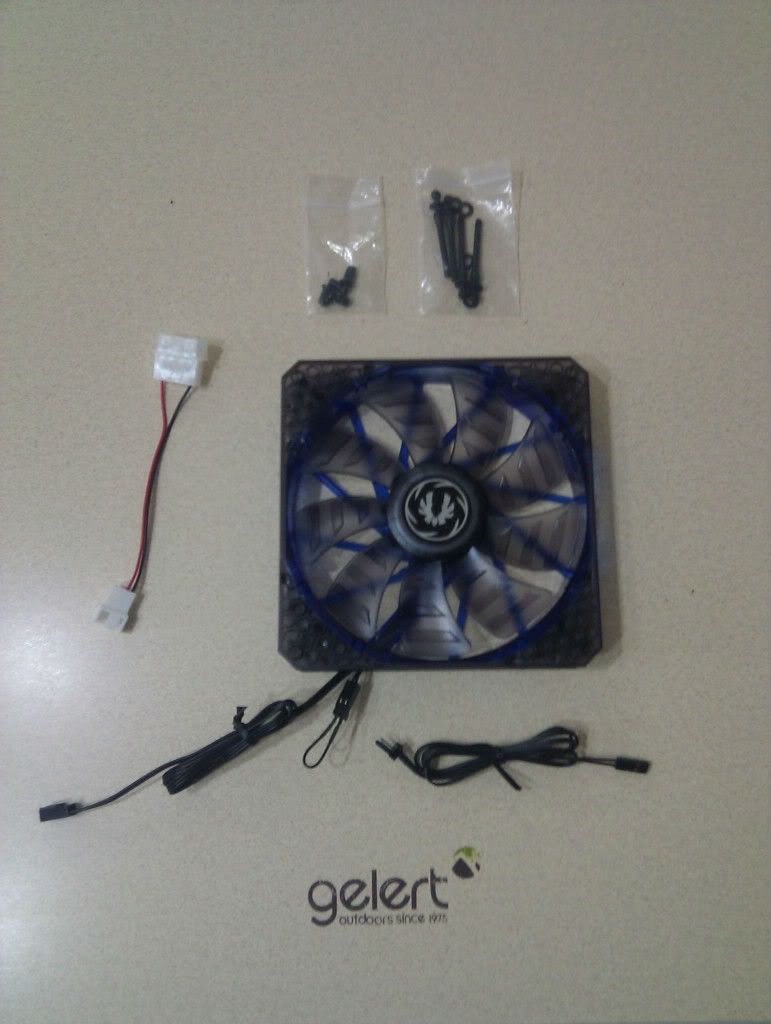
 Sorry about the quality of the photo but I thought it would help you visualise what Tealc, Jeff and myself were trying to explain.
 . saved me ahell of a lot of time taling to you guys. i would have pulled the two pin cable out which closes circuit and would have been trying to find somewhere to connect the led + and - wires too XD.