BitLocker Alternative

Soldato
Joined
17 Dec 2004
Posts
8,854
So I have all my drives BitLocked, but due to a windows update just recently I cannot "auto unlock" my D and F drive anymore option due to a error.. So is there a BitLocker Alternative I can use so I can make a batch file or something to auto unlock these drives when I log into windows
 
Last edited:

Control Panel\All Control Panel Items\BitLocker Drive Encryption

Turn on auto-unlock for each drive you want to unlock.
 
Control Panel\All Control Panel Items\BitLocker Drive Encryption

Turn on auto-unlock for each drive you want to unlock.
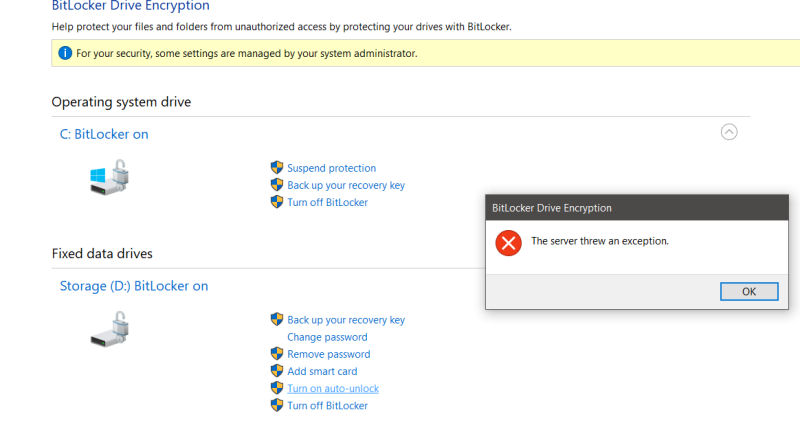
the auto-unlock dont work anymore, as I have to re enable the auto-unlock to my drives when I restore my boot drive as it restores the drive not encrypted it... So now when I click auto-unlock, an error message pops up with "The server threw an exception"
 
Disable BitLocker and then re-enable it.
That didnt work,,, Any other ideas??
Image2.jpg
 
I suspect there may be some local group policy going on here. Have you always had the "for your security, some settings are managed by your system administrator" flag show on this window?
I have researched into that and that security message at the top and it pops up anyhow, as that was my same thought as yours.

But I wonder if this will work though because I can unlock the drive fine manually if I use the password or key... https://learn.microsoft.com/en-us/windows-server/administration/windows-commands/manage-bde-unlock
And I make a batch file and set it to run when I log on, ummmmm?
 
Last edited:
What's the error detail in the event log?


Did you clear TPM in the BIOS after disabling Bitlocker?
Theres no errors in the event viewer and I always clear the tpm key thing in the bios after restoring the boot drive.. And I run this before turning back on the auto-unlock, as the drives wont auto-unlock without running this command first in the CMD..."manage-bde -autounlock -ClearAllKeys C:"...

But a ms update has deffo messed up the auto unlock because if I restore the boot drive to a earlier image, the auto unlock works perfectly and its only been not working this last mouth or 2. I cant find anything about the auto unlock not working due to a ms update. Plus theres no info on the error bitlocker pops up with either?
 
Last edited:
May not be the same as there is a event logged, but I've had auto-unlock fail after a image restore (or was it a BIOS update, but not a Windows update)

Command > manage-bde -autounlock -clearallkeys C:

Then you should be able re-enable auto-unlock.
 
Back
Top Bottom