Bluescreen probs, hmmm ?

Associate
Joined
20 Jan 2009
Posts
811
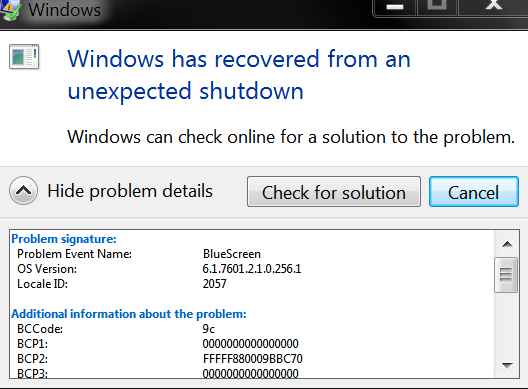
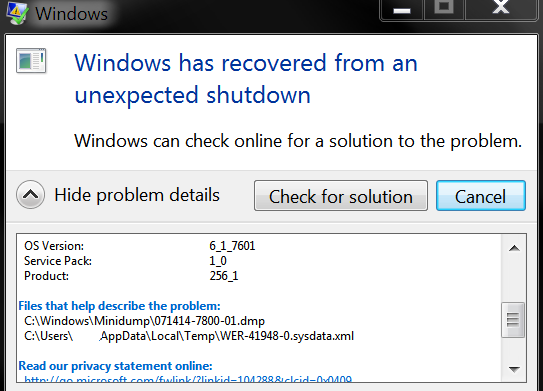
I have got the dreaded old bluescreen of death twice now in a matter of a few days and I don't know what is causing it, have a look at the screenshots.

I cleaned my magnet micromesh air filters etc and the temps really are pretty much ok, nothing out of the ordinary really, pretty cool infact.

So I don't know whats going on, does anyone know ? :confused:

bluescreen1.png

bluescreen2.png
 
9c usually means the delta between VTT, IMC(VCCSA) and vcore voltages is out of whack (either one or more isn't high enough for a stable overclock or their relationship to each other is out of spec).
 
Last edited:
9c usually means the delta between VTT, IMC(VCCSA) and vcore voltages is out of whack (either one or more isn't high enough for a stable overclock or their relationship to each other is out of spec).

thanks mate, I have been running this same overclock now since the i7 3770k first came out and its been fine, so I dunno man.

What I can ask you is, I have lowered my overclock to 4.3, would that help if there was a prob with the clocking mate, I just thought it would ? thanks.
 
Lowering clock can help but if a CPU is BSODing due to not enough voltage however after running a stable overclock for awhile it can sometimes be an indication of degradation - what VTT were you using with that overclock?
 
Last edited:
Lowering clock can help but if a CPU is BSODing due to not enough voltage however after running a stable overclock for awhile it can sometimes be an indication of degradation - what VTT were you using with that overclock?

Thanks mate,

Firstly, I Lowered my overclock from 4.5 to 4.3 to hopefully be on the safe side.

I looked all over the Bios for this VTT option you are talking about and I cannot see it, could you possibly tell me where its hiding or if infact it is an option on my Asus board (the board details are on my Sig) ?

Also, I looked on cpuz and it says my cpu core voltage is 0.97v (approx), that was just with the radio playing via the computer on the internet, so very little stress.

I also looked in the bios and it says my cpu voltage is set at 1.064 (approx) and I have the offset function enabled and that has always been set at +0.015, I always found that using offset correctly is the best way to allow the voltage to move up and down very slightly under less or more stress as you will know, I don't see much point in having a constant voltage set solid as I just don't see the point unless I had a mega high overclock which I never ever had.

But yea, since the i7 3770k came out I have just always had my bios set like that and running nicely @ 4.5, but as I said, after two blue screens in a matter of a week I have now kicked it down to 4.3, I didn't touch any other settings in the bios though, the 4.5 overclock always has worked a charm even on the maximum stress tests using intel burn test x10 runs on maximum setting which no computer would ever get anywhere near those kind of extremes as ya know, lol.

I also notice in my Aida64 extreme edition that its been saying much cooler temps, example right now my temperature in my room here is approx 26c and the temps on the 4 cores are approx hovering around 29c to 34c, thats just on idle though with no stress apart from looking at this web page, lol.

So yea, that's about that, but I still didn't see that VTT setting in the bios that you were talking about, hmmm :confused:
 
Last edited:
VTT goes by different names depending on board make, on some Asus boards IIRC its combined as the VCCSA (QPI/IMC and VTT in one) but not 100% on what it is on your board.

The reason I ask is on another forum there is a guy who was running 20-30x 3770Ks (24x7 load) and the ones that required 1.3v or higher to get whatever clock it was he was running were degrading stupidly fast whereas the ones at 1.2 and below were going on forever.
 
vtt is vccio or vccsa (system agent voltage on asus)

can also look in windows event viewer for any warnings/errors relating to cpu/memory
 
vtt is vccio or vccsa (system agent voltage on asus)

can also look in windows event viewer for any warnings/errors relating to cpu/memory

ahh, thanks guys :) ;)

I now see both the vccio and vccsa voltages in my bios :)

vccio is at 1.062

vccsa is at 0.925

I have to say that I do not ever in my life remember tweaking any of those settings ever.

Anyways, main thing is, with all the voltages I have showed you in this post & previous post too, are they all good or bad ?
Bearing in mind that I have dropped the overclock down from 4.5 to 4.3 for now and haven't touched any other bios settings at all.

I have to also say that I haven't gave the insides of my PC a good blow out for maybe 6 months (I have one of those electric very high powered and excellent blowers that are meant for the job and they work brilliant although expensive to buy), but what I do have to protect the pc is a couple of those excellent
DEMCiflex magnetic micromesh filters which catch all the dust very well before it even gets a chance to sneak into the pc through other gaps and things, lol, so its never really very badly dirty inside at all, but I guess even some dust and grime inside could cause a bit of trouble, but I doubt very much there is anything bad enough inside like that to cause a problem, its just a pain in the neck to have to carry the VERY heavy computer outdoors and blow it all out etc, yes I am lazy, LOL, at same time though, I think my temps would be telling me just how dirty it was and you have seen the temps.
 
Last edited:
those voltages look alright to me for 8gb,you only have to mess with them if running more memory

it could be the hotter weather affecting the once stable oc? could need touch more vcore usually idk

event viewer might get you closer to the cause of lockups
 
What does the voltage get upto under load? Intel's recommendation IIRC is that vccio and vccsa should be within 300mv (0.3v) of the vcore, 9c if often caused by that. I can see the possibility there with that offset voltage and vccsa is at 0.925 that it might be going outside spec under peak load.
 
those voltages look alright to me for 8gb,you only have to mess with them if running more memory

it could be the hotter weather affecting the once stable oc? could need touch more vcore usually idk

event viewer might get you closer to the cause of lockups

thanks mate, sounds good to me then :) not too bothered if I run it at 4.3, 4.4 or 4.5 to be honest as really there is no difference apart from lower temps which is obviously better, I may just wait until I carry the big heavy so & so outside and blow the heck out of it with that electric blower I have and then stick it back up to 4.5 again and see how it goes, I don't like nudging the vcore up on the 3770k as we all know that the slightest increase means a big jump in heat and its the same way for me too as I have tried it all before, I even had it up at 5.0G'z when I first got it just so that I could see that miracle figure and then quickly took it back down to 4.5 because the heat was mega mega hot man, lol.

I Looked at that windows event viewer and its saying there is 3170 events :eek: , I will be honest, that's the first I have ever even looked into event viewer, I don't have the slightest clue in how to read it or check whats what in it man, lol
 
most errors are fine they can be software related

the ones that cause bsod's for me were memory and cpu related,if you click on each one it will say what they are

as for vccio/vccsa ive never had to touch those if just running 8gb of ram,idk how true the .3v rule is on ivy

it was .5v rule on older x58 boards
 
What does the voltage get upto under load? Intel's recommendation IIRC is that vccio and vccsa should be within 300mv (0.3v) of the vcore, 9c if often caused by that. I can see the possibility there with that offset voltage and vccsa is at 0.925 that it might be going outside spec under peak load.


thanks mate,

How do I check and do what your telling me to try mate ?

Do you mean for me to run say intel burn test and keep an eye on the voltage in cpuz and note it down, yea ? if so I can do that and let ya know ;)

p.s
the 2 times the machine has blue screen in one week has not been under load either, maybe just the radio playing or summit like that possibly.
 
as for vccio/vccsa ive never had to touch those if just running 8gb of ram,idk how true the .3v rule is on ivy

it was .5v rule on older x58 boards

Not sure how true it is but I know I start seeing 124 BSODs with my 4820K if they are out by more than roughly about that no matter how much vcore I throw at it.

Do you mean for me to run say intel burn test and keep an eye on the voltage in cpuz and note it down, yea ? if so I can do that and let ya know ;)

p.s
the 2 times the machine has blue screen in one week has not been under load either, maybe just the radio playing or summit like that possibly.

That would work for atleast getting a rough idea if its even vaguely a possible cause or not.

Could easily be the heat thing too - I found my 780 was picking up an extra 3-4C in this weather even though it didn't seem all that extra warm.
 
Last edited:
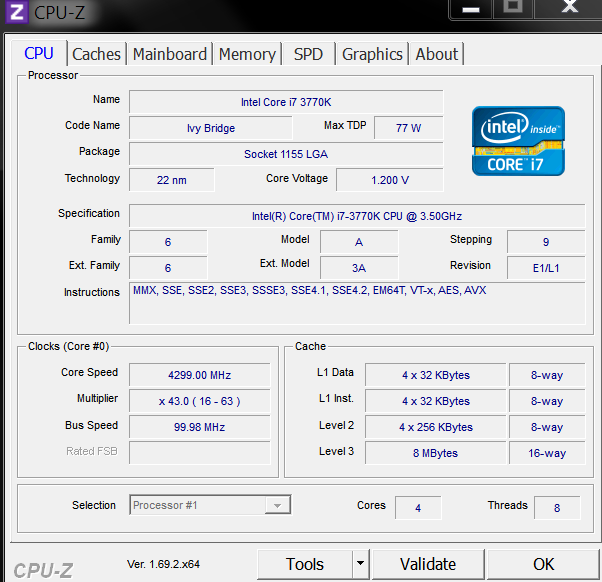
Ok here is some snapshots, hope this helps :)

the core temps sometimes ventured into the low to mid 70's but not much, the ones in blue are the graphics card so don't bother with them.

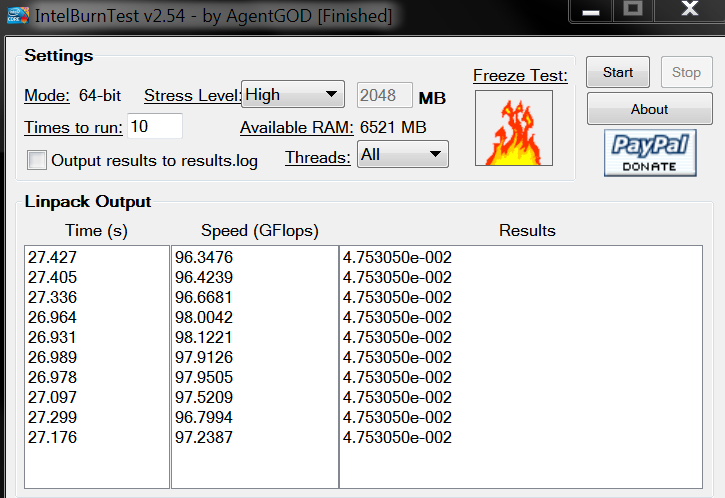
The intel burn test was just run on 10X high level rather then maximum as there is no need at all to set fire to the computer on maximum mode, although it usually always passes on the maximum test anyways, please keep in mind too that I have always had the overclock at 4.5 but because of those couple of blue screens as you can see I have clocked it down to 4.3, no noticeable difference in performance really at all anyway man, no big deal.

Anyways, I hope these show you'z the things you were after :)

P.S, my house/room temperature now is at about 26.6c !

cpuz-2.png

intelbt.png

Capturetemps.png
 
Last edited:
p.s, by the way, I found on another website there is a simple way of downloading a batch file which you simply run as admin and it totally clears out all those thousands of events in windows event viewer , I see that some people say its good to leave them all, but I would say not so unless your maybe starting to have problems, because having thousands of events if just extremely confusing and just as "wazza300" says, most are just silly software events anyway, so I cleared all mines out, I would post the link but as this is a forum and the link is on another forum I didn't think it was sensible to do that otherwise I would get moaned at, LOL, but its simple to find it with a simple google search anyway, I will just say the page name/site starts with the word seven, lol
 
Gave it a good blow out today etc and cleaned it up a little, it was very clean inside as I expected, but I gave it a good blow out anyway, and now I have it back up at 4.5Ghz too, so we shall see how it goes :)
 
BTW if its at 1.2v running 4.3GHz a good chance there is a bigger than 300mV gap on the VCCSA at 4.5GHz (not 100% sure how offset works on that board) which may be the problem if that 300mV relationship is a thing with Ivy CPUs.
 
Remember its been running this same overclock with same bios settings since the i7 3770k first came out really, well maybe at most a couple of months after they first came out, but very close either way to date of their release, and very very seldom does it ever blue screen, it may hopefully just have been a total flook that it blue screened twice in a week this time though, I have no idea, hope so, lol.:)

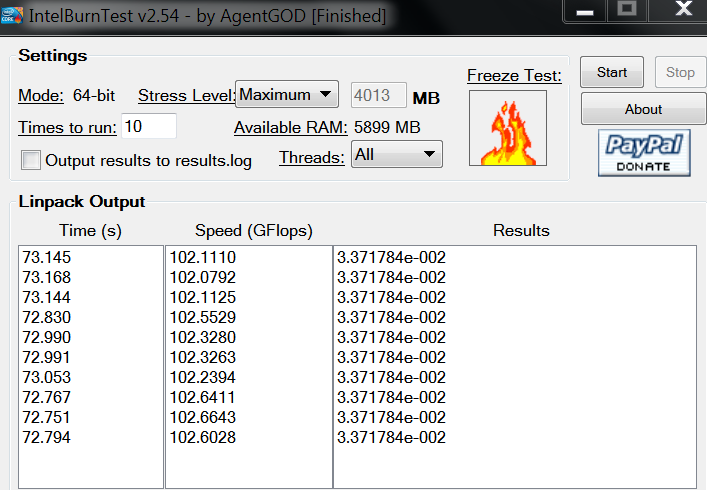
Its been running @ 4.5 again since last night and just out of curiosity I decided to give it a good thrashing, lol, I ran it on the non-recommended too extreme test on intel burn test using the "maximum Stress" setting and x10 too, it passed it easily (see photo).:)

I still didn't touch anything in else in bios and cpuz still reports the cpu volts @ 1.200v.

During the test, Aida64 reported the core temps at approx 60 to about 80c (on idle its still about 30-35c), couple of times nudged 81c but only once or twice, most of the time it just slowly went up and down the 60s & 70s, my room temperature is about 26.5 - 27c.
maximumIBT.png
 
Last edited:
Back
Top Bottom