C2Q RAM dividers question

Man of Honour
Joined
5 Apr 2009
Posts
26,956
I've got a Q9550 (C1 sadly), Gigabyte EP45-UD3L and 4GB (2x2) PC2-6400 XMS2 RAM.

Now, as I understand it the overclocking will work as follows for example:

333x8.5 = 2830MHz, RAM @ 667MHz (stock)

400x8.5 = 3400MHz, RAM @ 800MHz (good spot for the RAM)

450x8.5 = 3825MHz, RAM @ 900MHz (not so good for 800MHz RAM)

Looking around, I can only find talk of using dividers to make the RAM run faster than the FSB relatively, whereas on my A64 machine, it made it slower.

Will I be able to set the RAM divider up so that it was at say 4:5 (450MHz FSB + 360/720MHz RAM), rather than the 5:4 (450MHz FSB + 562/1125MHz) I keep seeing?

Or will I just have to cry and contemplate buying some PC2-8500 instead at some point if I want to go much beyond 3.4GHz?

 
Hey Kenai,

short of overclocking your DDR2-800 you have no choice but to buy faster memory if you want to hit higher than 3.4GHz from your Intel® Core™2 Quad Processor Q9550, there is no provision on the Intel® LGA775 boards to allow the memory to run slower than the FSB and to be honest you wouldn't want to do that anyway!

I'd give your memory a good test before buying new stuff, you may be suprised and it overclocks really well! :)

If you look at the diagram below you will get a basic idea of how the Northrbdge Straps/Memory dividers work, as you can see even a Core™2 Quad Q9550 running at stock speeds (8.5x333) can utilize DDR2-1066 memory using the 5:8 divider! :cool:

straps.png
 
Lame, I will just have to see how far the XMS2 is happy to go.

I'm somewhat regretting not researching this fully before I bought stuff, the PC2-8500 would barely have cost any more cash at all :(
 
If you reset your system back to stock the BIOS should set-up the memory using the [SPD] info and default to DDR2-800 using the 6:5 memory Multiplier, this is with your FSB running at 333MHz.

At that point all you need to do is slacken the ram to 5-5-5-15, adjust the vDimm to a reasonable level (1.9/2.0v) and slowly start increasing the FSB. If you make it to 400MHz-FSB then the ram will be running at 480MHz (DDR2-960MHz) and you will need to go all the way to 441MHz-FSB to see if your memory is good for 533MHz (DDR2-1066).

Obviously once past 400MHz-FSB you will likely need to make adjustments to the vCore to keep the CPU happy, either that or drop the chips multi so it doesn't rise in MHz to much while you test the memory! :)
 
I'll give it a go, thanks for the help. (well, I will once it's built, waiting on a part before I can)

I have some settings off of someone with basically the same set up, albeit with a UD3R instead of UD3L who got to 3.8GHz with his PC2-6400, so i'm reasonably confident I can squeeze a bit more than 3.4GHz with a bit of fiddling around :)

Thanks very much for your help, this is all a bit more different to S939 clocking than I was expecting! :D
 
I've got a fairly similar set up. 4ghz needs 944mhz from your ram, so I think you're going to be fine. I've not played with corsair ram, but the last set of 800mhz I tested [ocz gold edition] went to 1000mhz at 1.96V 5 5 5 15, couldn't get it to 1066.

Very good table from Wayne, that's helped me too. Cheers
 
Yep, a very useful table that, regarding tRD setting, ive clocked my q9550 a bit higher and memset is now listing my performance level at 10.:)
 
Sounds promising setter! :D

Did you have time to test your memory not running 1:1 sync yet?

I was thinking if you used 5:6 it would speed up your memory and lower your tRD even more! :cool:
 
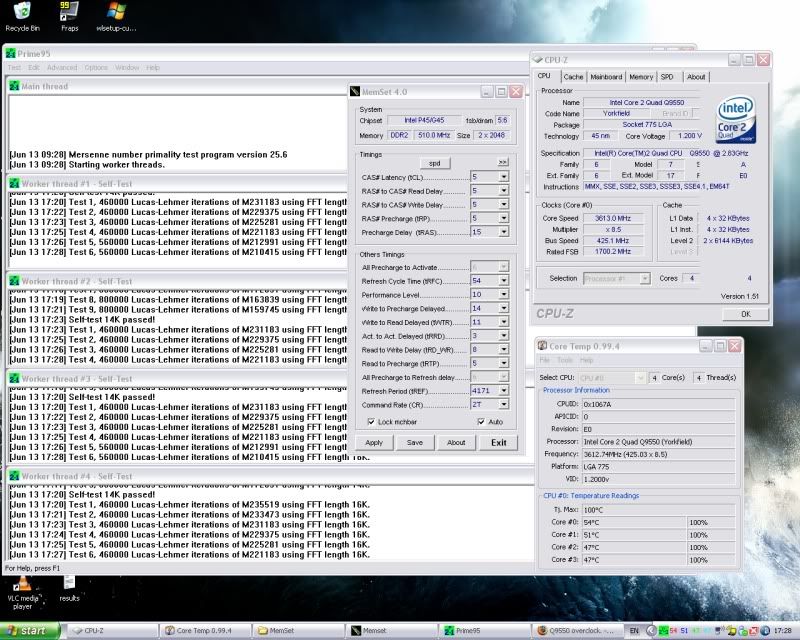
Currently running 8.5x425 fsb, memory on 5:6 ratio @510mhz upped chip voltages to.

PLL, 1.54
NB, 1.14
VTT, 1.14

8 hrs small fft stable.
q955036ghzv2.jpg


Also tested succesfully with 10 runs of IBT last night on standard setting. Only a slight rise of 4-5c with IBT compared to p95.
 
Back
Top Bottom