


Last night, my computer crashed, and it seems pretty bad to me.
Its a new system and there had been some instability issues.
It's on Win 11 and there was a problem with the Bluetooth connection/driver.
Next there was an issue connecting to the displays.
But nothing like yesterday, when the system froze entirely.
On restart, it is extremely slow and now cannot even boot into Windows.
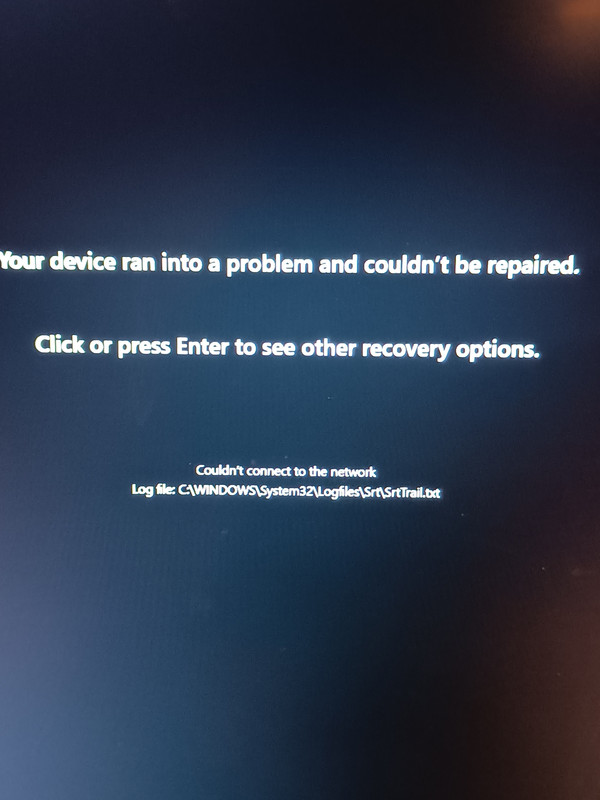
The first error message was when trying repair was:
I ran some commands that google recommended to check system files, it said it repaired some but it didn't help.
Following this, I attempted a 'local' system reinstall, and during the reinstall, it crashed again, which does not seem to be good.
I tried taking the RAM sticks out, one after another, but it didn't help.
(I tried, somewhat foolishly probably, to change the RAM voltage from 48 to 6000Mhz).
I thought it might be the RAM because I didn't do any proper due diligence when building the system. I just plugged it in
and it seemed to work properly.
After messing with the RAM frequency, I tried resetting CMOS, but it didn't help.
I cannot even get into safe mode.
It wont even be triggered into the 'System Repair state' now.
I can only get to the BIOS or to the Windows pop-up saying it needs to restart.
When I try to boot up now, I get a generic looking windows popup saying that it ran into a problem and needs to restart.
But I'll just get to that screen again.
I am waiting for a new USB stick to arrive today and will try a fresh install with it.
If anyone can suggest something else I would appreciate it. A bit worried that something is wrong with the hardware.
Its a new system and there had been some instability issues.
It's on Win 11 and there was a problem with the Bluetooth connection/driver.
Next there was an issue connecting to the displays.
But nothing like yesterday, when the system froze entirely.
On restart, it is extremely slow and now cannot even boot into Windows.
The first error message was when trying repair was:
I ran some commands that google recommended to check system files, it said it repaired some but it didn't help.
Following this, I attempted a 'local' system reinstall, and during the reinstall, it crashed again, which does not seem to be good.
I tried taking the RAM sticks out, one after another, but it didn't help.
(I tried, somewhat foolishly probably, to change the RAM voltage from 48 to 6000Mhz).
I thought it might be the RAM because I didn't do any proper due diligence when building the system. I just plugged it in
and it seemed to work properly.
After messing with the RAM frequency, I tried resetting CMOS, but it didn't help.
I cannot even get into safe mode.
It wont even be triggered into the 'System Repair state' now.
I can only get to the BIOS or to the Windows pop-up saying it needs to restart.
When I try to boot up now, I get a generic looking windows popup saying that it ran into a problem and needs to restart.
But I'll just get to that screen again.
I am waiting for a new USB stick to arrive today and will try a fresh install with it.
If anyone can suggest something else I would appreciate it. A bit worried that something is wrong with the hardware.
Last edited:






