CPU cooler suitable for Q6600, Antec 300 case.

Associate
Joined
8 Nov 2008
Posts
121
Hi,

I am upgrading my graphics card from a nvidia 9800GT to a nvidia 660 GTX. I have a Q6600 CPU G0 version, and to get the most out of my upgrade I have been told that I will need to OC it to 3Ghz+. I have tried OC'ing the Q6600 however the temperatures reach quite due to having a stock fan cooler. The temps usually reach around 85 on full load.

I have been looking for a decent cooler so that I can safely OC and keep the temp's stable. This is the cooler that I am currently thinking of getting Noctua NH-D14. If anyone has any cheaper suggestions that are similar in quality then that would be great.

Specs:

OcUK Value Bundle Antec 300 Three Hundred Ultimate Case / Corsair VX 450W ATX PSU.
Zotac GeForce 9800 GT Eco 512MB GDDR3 PCI-Express Graphics Card
Gigabyte GA-EP43-DS3L Intel P43 (Socket 775) PCI-Express DDR2 Motherboard
4GB RAM
CPU - Q6600 Quad Core @ 2.4Ghz


Any advice appreciated,
Thanks.
 
Last edited:

Which ram do you have as its height can limit what you get and whats your budget? im sure good coolers like the Noctua NDH14 fit in that case it misses most ram
 
OCZ Gold Edition 4GB (2x2GB) PC2-6400C5 Dual Channel Series (OCZ2G8004GK)

Nice low profile RAM. :) All cooler will fit over that easy..

The D14 will fit and its a great cooler and will fit in the case easy, (maximum seems to be 162mm-165mm)

Though you can get a decnet cooler for £30-£35 if you want to save a bit of cash.

But if you can splash out on the D14 by all means do it. :)
 
As Doomedspeed said you don't need a super cooler for your Q6600. But if you think of it as an investment to use for years to come on different mobo - CPU systems it might be worth spending the extra now.

Any reason you are picking NH-D14? Nothing wrong with it, just curious as there are others as good.

Edit: Should be NM-13 mounting kit. N-1 is for 2011 only :o
If you do get NH-D14 may I suggest getting the NH-D14-2011 for £59.99 and Noctua LGA2011 Mounting Kit NM-I 2011 for £5.99. For extra £3.00 you get better PWM fans. Get NM-13 mounting kit. ;)
http://www.overclockers.co.uk/showproduct.php?prodid=HS-015-NC&groupid=701&catid=2330&subcat=2346


If you want to pay less, we can suggest some good £30-35.00 cooler.
 
Last edited:
Thanks guys, no particular reason just from suggestions and from the reviews. Yea it would be great to see the other options, ideally I would like to make the order today.
 
Last edited:
As Doomedspeed said you don't need a super cooler for your Q6600. But if you think of it as an investment to use for years to come on different mobo - CPU systems it might be worth spending the extra now.

Any reason you are picking NH-D14? Nothing wrong with it, just curious as there are others as good.

If you do get NH-D14 may I suggest getting the NH-D14-2011 for £59.99 and Noctua LGA2011 Mounting Kit NM-I 2011 for £5.99. For extra £3.00 you get better PWM fans. ;)
http://www.overclockers.co.uk/showproduct.php?prodid=HS-015-NC&groupid=701&catid=2330&subcat=2346
http://www.overclockers.co.uk/showproduct.php?prodid=HS-020-NC&groupid=701&catid=2330&subcat=2346

If you want to pay less, we can suggest some good £30-35.00 cooler.

Hmm isnt that cooler Socket LGA2011? Mine is LGA775 so it is not compatible?
 
Hmm isnt that cooler Socket LGA2011? Mine is LGA775 so it is not compatible?

Good catch. :eek: You are absolutely right.

The mounting kit I wanted was NM-I3 SecuFirm2™ mounting kit, but it doesn't fit on LGA 775.. only LGA 1366, 1150, 1155, 1156

I don't think Noctua sell a mounting kit for 775 separate from cooler.

Really sorry for that. Glad you caught it.
 
Good catch. :eek: You are absolutely right.

The mounting kit I wanted was NM-I3 SecuFirm2™ mounting kit, but it doesn't fit on LGA 775.. only LGA 1366, 1150, 1155, 1156

I don't think Noctua sell a mounting kit for 775 separate from cooler.

Really sorry for that. Glad you caught it.

No worries. What are the suggestions for £30-35 mark?
 
I think Antec 300 has 170mm CPU clearance so almost any cooler will fit

Thermalrigth True Spirit 140 £34.99 is very good for the money.
http://www.overclockers.co.uk/showproduct.php?prodid=HS-108-TR&groupid=701&catid=2330&subcat=2352

Thermalright Macho HR-02 £39.98 equally as good
http://www.overclockers.co.uk/showproduct.php?prodid=HS-082-TR&groupid=701&catid=2330&subcat=2352

Thermalright True Spirit 120 £24.98 is a couple degrees warmer
http://www.overclockers.co.uk/showproduct.php?prodid=HS-107-TR&groupid=701&catid=2330&subcat=2352

Alpenfohn Matterhorn Pure £29.99 is also a good deal.
http://www.overclockers.co.uk/showproduct.php?prodid=HS-037-AL&groupid=701&catid=2330&subcat=2337

There are many more.
 
That link is very miss-leading.. My understanding it's for LGA 1366, 1155, 1156, 1150.

First says
The NM-I3 SecuFirm2™ Mounting-Kit makes all Noctua CPU coolers compatible with Intel's LGA1156/1155 & LGA1366 sockets for Core i5 and Core i7 processors.
Than
Please use the new NM-i115x kit for upgrading older heatsinks to LGA1150, LGA1155 or LGA1156. The NM-I3 kit is now only available to provide LGA775 and LGA1366 support.
Than
Owners of Noctua CPU coolers* can obtain the NM-I3 Mounting-Kit free of charge via this form. A proof of purchase (photo, scan or screenshot of the invoice) of both a Noctua CPU cooler and either a socket 1156/1155/1366 mainboard or socket 1156/1155/1366 CPU are required.
So I really don't know what all the NM-13 supports. :eek:

Kinda sounds like the NM-13 is to support users with old LGA775 and LGA1366 mount to be able to mount their coolers to LGA 1150, LGA1155 and LGA 1156 CPUs?? :confused:

Edit:
Nothing mentioned about fitting on LGA 775 here:
Backplate with Screw-Threads
SecuFirm2™ utilizes a backplate with screw-threads that simply installs on top of the stock LGA1366/LGA1156/LGA1155 backplate. Not having to remove the stock backplate significantly reduces overall installation time and eliminates the risk of damaging the CPU socket. Thanks to the screw threads, the backplate can't slip during the installation process.
 
Last edited:
I will go with the D14 I think guys. As you said, it keeps my options open for upgrading the mobo/cpu in the future. I just really hope it fits :) It looks huge.
 
I will go with the D14 I think guys. As you said, it keeps my options open for upgrading the mobo/cpu in the future. I just really hope it fits :) It looks huge.

It will fit, if i can stuff one into my TJ08-E you can fit one in yours..

I warn you, start working on your biceps now, you'll need them to lift it. :) (or you could hire 8-pack to do it :))
 
:p
As Doomedspeed said you don't need a super cooler for your Q6600. But if you think of it as an investment to use for years to come on different mobo - CPU systems it might be worth spending the extra now.

Any reason you are picking NH-D14? Nothing wrong with it, just curious as there are others as good.

If you do get NH-D14 may I suggest getting the NH-D14-2011 for £59.99 and Noctua LGA2011 Mounting Kit NM-I 2011 for £5.99. For extra £3.00 you get better PWM fans. ;)
http://www.overclockers.co.uk/showproduct.php?prodid=HS-015-NC&groupid=701&catid=2330&subcat=2346
http://www.overclockers.co.uk/showproduct.php?prodid=HS-020-NC&groupid=701&catid=2330&subcat=2346

If you want to pay less, we can suggest some good £30-35.00 cooler.

I linked that one purely as i knew it would fit sone are a few mm taller which may have not if the OP can find better that fits by all means get it :)

Nice call doyll on the ones that will fit :)
 
Just finished fitting my cooler and graphics card. Everything seems to be working - no weird noises :P The cooler was b**** to fit, I had to take the power off the top fan of the antec case, because the fan clip was being hit by the fan blades.

Idle temps are high 30's to 40. That's good right? :) Looking forward to OC'ing.
 
Last edited:
Sounds like a job done. High 30's to 40c is maybe a little warm but not bad. Load temps are what's really important. What are cooler fan speeds?

The important thing is to supply cool air to components. This usually means that more cool intake air directed toward the CPU / GPU coolers helps, but we have to be sure the hot air coming off of components is exhausted from case without mixing with / warming up the air going to components.

With the high heat generated by many of today's GPUs the old "air in the front/bottom and out back/top" is not always a good idea. Reason is the hot GPU exhaust can pre-heat the air going into CPU cooler.

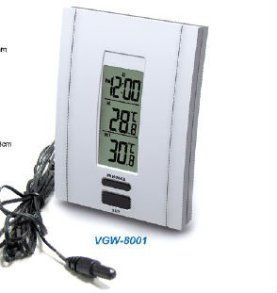
To monitor how case is cooling a cheapo indoor/outdoor wired remote digital thermometer works great. You can monitor what the temp of air going into CPU / GPU cooler intakes actually is. Refrigerator or terrarium thermometer of same basic design work good too. Can be had for £3-4 on auction site. Twist a piece of insulated wire into the last 6" or so and mount it in front of cooler about 1-2" and set the readout where it's easy for you to keep an eye on to see what the air temp going into cooler is at idle and load. They shouldn't be more than a few degrees warmer.. 5c at most than the room. Every degree warmer is a degree warmer the component will be.
1280888924634_hz-fileserver1_272621_zps28d1d990.jpg
 
I do not have anything to measure the temperature right now like you suggested. Although when I was initially fitting the cooler, I was a bit concerned about the airflow. I am a little concerned that the heat is being circulated into the case, rather than out. You can jugde yourself from this photo.
http://i.imgur.com/w1NNLug.jpg

The fan speed at idle are around 600-700RPM. The temps at load using prime95 are 50 - 55. The fan speeds vary.
http://i.imgur.com/DqIL4kn.png
 
If you can get one it will make figuring out what your airflow and temps are much easier to do.

Yeah, looks like you could do with some cable management. :D

Assuming you have stock rear fan is it on high speed?

I don't see any change in fan speed. One is 819-825rpm and other is 665-676rpm. Only GPU fan is changing much 990-1050rpm.. still only 60rpm.

Adding a couple of front intake fans will make a huge difference.. if you haven't already done that. I might even have a couple of the 3 speed Tri-Cool fans here somewhere if you need some.

Moving HDD's down so top front fan has less blocking it will also help airflow.
 
Last edited:
If you can get one it will make figuring out what your airflow and temps are much easier to do.

Yeah, looks like you could do with some cable management. :D

Assuming you have stock rear fan is it on high speed?

I don't see any change in fan speed. One is 819-825rpm and other is 665-676rpm. Only GPU fan is changing much 990-1050rpm.. still only 60rpm.

Adding a couple of front intake fans will make a huge difference.. if you haven't already done that. I might even have a couple of the 3 speed Tri-Cool fans here somewhere if you need some.

Moving HDD's down so top front fan has less blocking it will also help airflow.

Ha ye its quite messy. So I had connected one of the fans to sys_fan pin thinking that would work .... The fan in the middle was not spinning properly, so I used the y-split cable they gave to split the cpu_fan pin header, and both fans are going through that.

I am getting only one reading in HWMonitor, so I am guessing the RPM for both fans is the same.

I actually moved the HDD up when fitting the graphics card because they were pushing against each other.

Well since the top fan is turned off, I have a slot for a fan on the cover, I just did not fit it there because it would be annoying to remove the cover, to have to pull on the fan cable everytime. However, if I am happy with everything inside I guess I wont need to pop the cover too much.

Is it safe to start OC'in now?
 
Last edited:
Back
Top Bottom