• Competitor rules

    Please remember that any mention of competitors, hinting at competitors or offering to provide details of competitors will result in an account suspension. The full rules can be found under the 'Terms and Rules' link in the bottom right corner of your screen. Just don't mention competitors in any way, shape or form and you'll be OK.

Dead X1800XT???

Soldato
Joined
7 Dec 2002
Posts
4,088
Location
UK
Dead card?

Had an X1800 XT since yesterday, was using it last night, Ran 3D mark 2001 & 03 a few times to see how it compared to my 9800PRO, then installed Steam & HL2 and browsed the web for about an hour.

Tried to start HL2 & realised it had to patch so thought, "GAH cba waiting i'll let it download & go to sleep"

Woke up to find that "Windows XP" screensaver on, looked fine.

Grabbed the mouse, put my password in on the XP login screen, again, everything fine.

Hit enter and BLAM! scrambled screen.

Rebooted, screen still garbled before it gets to windows :( so left PC off 15 mins & rebooted again, everything fine, booted into windows & start to get lines on the screen after 30 seconds followed by a garbled screen again.

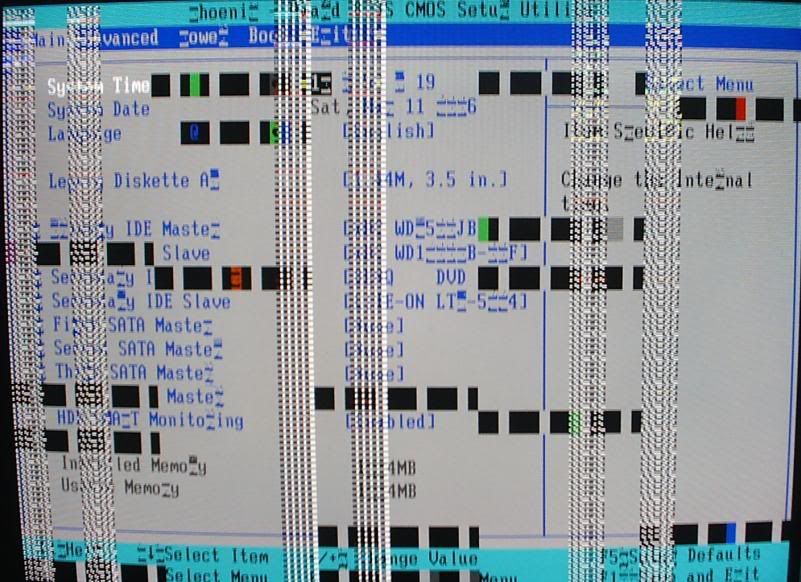
So rebooted & went into BIOS, 15 seconds later BIOS becomes garbled, can still see that PC is running tho but cant make out most of what is on the screen.

Is it dead????

 
Sounds like the memory on the card has issues.
Maybe a longshot but try reinstalling the drivers for the gfx card.
Make sure you clean the system of the previous drivers completely using driver cleaner.

If the problem persists, if you have the possibility, try the card in a different system. If the same symptons occur then you have a borked card I would say.
 
I cant re-install drivers, i cant see what i'm doing in windows :(

Besides, after a few mins it gets really messy and monitor turns off.

A screenshot of my BIOS -

scrambled.jpg
 
Looks like the memory is broken mate.

RMA I would say.

If you can, try the card in another system, but Im pretty sure the card is unusable.
 
With certain drivers i use to get that or something very close i had to reinstall drivers and even reinstall windows once but i am using x800xl with lastest drivers overdrive overclocks card to high and i get something like what you got but worst.

Q
 
Just cant understand how it would be fine then break running the Win XP screensaver.

Surely it would have even still been running at its 2D clocks?
 
It's overheating. He said it fixes after leaving off for a few minutes then garbles soon after turning on. RMA tbh, so you don't have any void warranty for taking off the cooler. Either that or one chip (probably just one) is dead and the moment the card addresses to it, it garbles.
 
Iamzod said:
Just cant understand how it would be fine then break running the Win XP screensaver.

Surely it would have even still been running at its 2D clocks?


not necessarily, if running the "flower" or "3d pipes" etc screensavers i beleive these run using the 3D clocks of the card & may have died after running all night long, from overheating perhaps - how good is your case cooling?
 
Hi mate,

I dont wanna make myself sound like an idiot but i had a similar problem like you had and i had almost pooed myself when it happened - fairly new card apparently artefacting (even in BIOS). I did a number of things which didnt work. I then moved the DVI cable around and it was fine. I had not used the screws on the plug because of maintenance to the pc so the top end was sliding out :rolleyes: . It caused almost identical effects as to whats on your screen except for the black squares.

From what i can remember if it is a problem with the card it is most likely the memory.

Sos if this is no help, just what happened to me.

Andy
 
Was just the standard XP one that is default when XP is installed, the 2D one where the XP logo is on a black background and changes position every few seconds.

Case cooling aint bad, 5 80mm case fans, 7 if you include the ones in the PSU, kept my old XP2500 Barton cool at 2.4 - 2.5GHz

/edit, just managed to get into windows OK and opened the graphics control panel before it started artifacting, core temp was 45c when it hit 47 it all went nuts again.
 
Last edited:
!n$oMniA said:
Hi mate,

I dont wanna make myself sound like an idiot but i had a similar problem like you had and i had almost pooed myself when it happened - fairly new card apparently artefacting (even in BIOS). I did a number of things which didnt work. I then moved the DVI cable around and it was fine. I had not used the screws on the plug because of maintenance to the pc so the top end was sliding out :rolleyes: . It caused almost identical effects as to whats on your screen except for the black squares.

From what i can remember if it is a problem with the card it is most likely the memory.

Sos if this is no help, just what happened to me.

Andy

Aint a cable :(

If you look at the pic all of the R's are replaced with artifacts too and some of the other letters.

I never even got to play a game on it :'(
 
Unlucky buddy, it's just unfortunate when you get something new like that and it is DOA :(. All you want to do is stretch its legs and bam, you have another wait on your hands.
 
Ouchy mate, I feel sorry for you! Same thing happened to me except it was a 2day old top-o-the-range laptop that cost me close to £1500. Everythign was fine and dandy, even watched a film on it. Then, all of a sudden, for apparently no reason, the screen just went 'garbled' just as you said. Turned it off for a while, let it cool down.... fine..... for about 5 minutes then BAM garbled again, even in the bios.

It was so frustrating as I had to RMA my entire laptop as opposed to just the gfx card. The worst part was that the replacement laptop (they replaced the entire thing not just swapped out the gfx card back at base) didn't have the special metallic paint that the first one did :'( I cried myself to sleep.

DeathByMonkey
 
Thanks to Tim lending me his "Tseng Labs ET6000" PCI card i can now use my PC again, guess it confirms it was the card as it now runs fine. :D

A tad slower in 3D applications though :p

Just need the replacment back for Oblivion day on the 24th now!
 
Back
Top Bottom