• Competitor rules

    Please remember that any mention of competitors, hinting at competitors or offering to provide details of competitors will result in an account suspension. The full rules can be found under the 'Terms and Rules' link in the bottom right corner of your screen. Just don't mention competitors in any way, shape or form and you'll be OK.

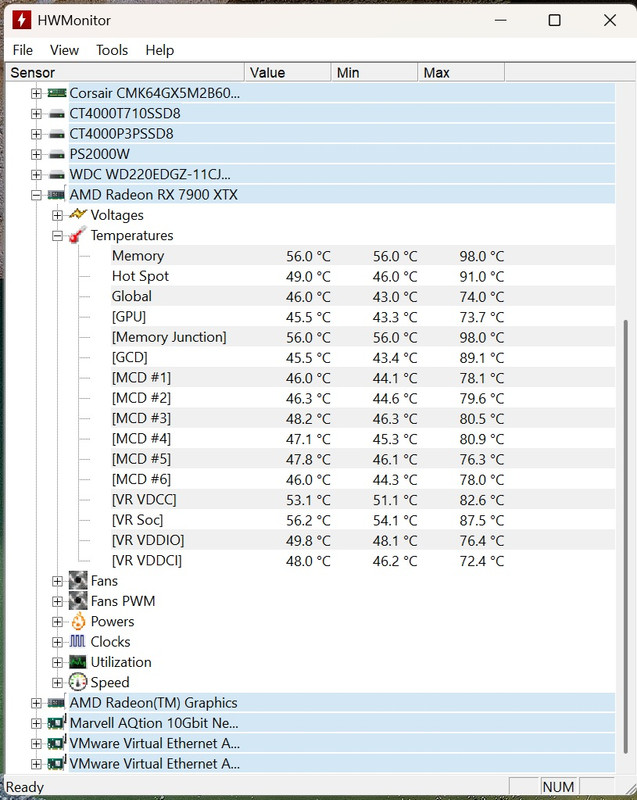
Do these GPU temps look ok while gaming?

That's quite a fan curve! :eek: Just checked mine (albeit a totally different card so totally irrelevant). P5 is 55% at 80 degrees. Quick 2 min blast of the inbuilt stress test, card only pulls 205w (I run undervolted) :cry: and temps hit ~65 degrees. That's about in the 40% fan speed area for me. I can't imagine going over 75%! Do you not fancy opening it up and replacing the paste/pads? It's a fun little job. I had to do mine as it was hitting over 90 and when opened it had nearly no paste left on the GPU lol.

Well I came back to my PC this afternoon at 12:02 pm after having it set to auto shutdown at 10:54 am and it was stuck shutting down. Held the power button to switch it off and tried to boot it.

It wouldn’t load windows just got stuck with the spinning circle. So I somehow managed to get it into a recovery mode where I did a system restore from 10/06/26 which worked.

It’s back to the way it was in the adrenaline software before I undervolted it. I guess the undervolt wasn’t stable. Won’t be trying that again and it didn’t make much difference anyway.

Strange, as if it was unstable and crashed out, Adrenaline reverts to defaults so it shouldn't cause a problem loading Windows. But I am glad you got back up and running!
 
Do you not fancy opening it up and replacing the paste/pads? It's a fun little job. I had to do mine as it was hitting over 90 and when opened it had nearly no paste left on the GPU lol.
No because everything I’ve read via googling suggest the 7900 XTX memory runs hot, in fact it’s safe up to 105c to 110c before throttling. My temps are normal even prior to setting a custom fan curve.

Just google it and you’ll see, every card is different of course so what might be normal for me may not be for you.
 
No because everything I’ve read via googling suggest the 7900 XTX memory runs hot, in fact it’s safe up to 105c to 110c before throttling. My temps are normal even prior to setting a custom fan curve.

Just google it and you’ll see, every card is different of course so what might be normal for me may not be for you.
Okie dokie. I was more focusing on the GPU temp to be fair. Reading that first screenshot suggests memory was 98 degrees. GPU was 73.7 degrees, call it 74 degrees, and Hot Spot (GPU) was 91 degrees. I don't recall ever seeing a Memory hot spot reading so that must be GPU. Even if memory is "safe" to 105 degrees, personally I'd be opening it up and improving things (new paste and pads). But as you say, you do what you feel is best. :)
 
I don't recall ever seeing a Memory hot spot reading so that must be GPU. Even if memory is "safe" to 105 degrees, personally I'd be opening it up and improving things (new paste and pads). But as you say, you do what you feel is best. :)
Yeah my old 6750XT had a hotspot reading and it was high, so it’s common for a card to have a high hotspot reading.
 
Well I've just downloaded the latest version of HWMonitor and it no longer shows the Hotspot or Memory reading, it only shows the Memory Junction...

 
I've been building and swapping parts out on a SFF case recently (Jonsbo C6 Max), and with a 5060Ti I was fine, hitting ~65C max on Quantum break at highest settings, 1440p ultrawide, 120fps.

Recently upgraded it to a used ProArt 4080 super and idle temps are fine (45C), but this game pushes the card to 80C. I've tried an aggressive undervolt but it's not really changed much.. I am waiting on some noctua fans to arrive, so currently running just one fan at the bottom instead of two, and wondering if that may be the cause of the high temps. Although Titanfall 2 at similar settings runs at a cool 55-60C..

Ideally I don't want to go down the repaste route as I'm new to the PC building scene and terrified I'll mess something up and create a £700+ brick :cry:
 
Last edited:
Recently upgraded it to a used ProArt 4080 super and idle temps are fine (45C), but this game pushes the card to 80C.
The Proart cards have a blower cooler right? That's why your temps are where they are.

This FE card idles at 30 and goes no higher than around 60 Celsius due to its massively overengineered cooler (which I love). However, your temps are still within spec so I wouldn't worry too much about it.
 
The Proart cards have a blower cooler right? That's why your temps are where they are.

This FE card idles at 30 and goes no higher than around 60 Celsius due to its massively overengineered cooler (which I love). However, your temps are still within spec so I wouldn't worry too much about it.
No it does have a triple fan setup but it is a bit slimmer and less long than the usual 4080s

Need to test if its only this game that pushes it, as titanfall 2 kept temps within ~55C
 
Last edited:
No it does have a triple fan setup but it is a bit slimmer and less long than the usual 4080s

Need to test if its only this game that pushes it, as titanfall 2 kept temps within ~55C
Sounds like a repaste is due then.

Edit: Totally misread your reply and replied with rubbish :cry: It does sound more like a game specific problem, 55 Celsius is what I'd expect from a 4080. They're not super hot chips, which is why I like them so much.
 
Last edited:
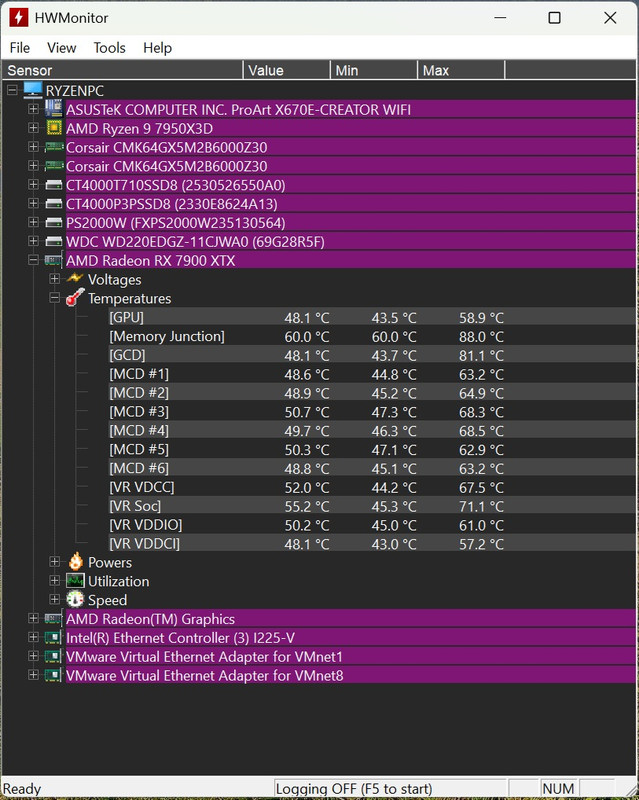
This is what Google AI says about my fan adjusted temperatures...

These temperatures are excellent and completely safe for your RX 7900 XTX. A GPU core at 60°C means your cooling is highly effective, and 88°C at the memory junction is well within the safe operational limits.

Understanding your metrics:
  • GPU Temperature (60°C): This is the average core reading. Under load, these cards typically run anywhere from 60°C to 75°C, making 60°C a stellar result.
  • Memory Junction (88°C): This is the instantaneous heat at the GDDR6 memory modules. The manufacturer's safe operating limit is up to 105°C–110°C, with thermal throttling only kicking in around 108°C to 110°C. Your 88°C is comfortably in the safe zone.
 
Yeah I wouldn't worry too much. As a comparison point, a lot of 3080s with its earlier gen GDDR6 back in the cryptomining days would throttle when cryptomining as it was super heavy on the VRAM, so most miners had to run thier VRAM BELOW stock clocks due to the heat unless they had really overbuilt cards. Without tweaking, the cards would sit at 105-115 all day long and keep throttling results/throughput right back once they hit 110C; and AFAIK, most of those cards are probably still running!

So I really wouldn't be worried about 88 if thats the peak hottest part of the memory; that's well within tolerances for GDDR6! :)
 
Last edited:
Tried to knock a further few degrees off by undervolting it. I used some settings I found for my card, in the end it turned out to be a few degrees warmer. I guess because those settings increased performance which in turn increased temps. I’d rather have a few fps less and cooler temps.

I’m happy with my 60C GPU and 88C memory junction.
 
Yes, realistically without physically improving the thermal material/cooling to the chips, the only real way to cool the memory would be to underclock it. A bit like GPUs, some VRAM is pushed outside its comfort zone, and downclocking it a bit can have a fairly decent impact on temps, whilst not really impacting performance that much...but its hit and miss how much difference it makes, especially as you don't have access to VRAM voltage, and I suspect its already on normal timings rather than fast. All you could do would be trying knocking say 250MHz off the memory speed and see if you notice any difference.
 
Last edited:
Do these GPU temps look ok while gaming?

I too would be very concerned not just concerned if this were my rig. Seem at least 10-15C more than I would ever be comfortable with. Seems your fan curve has done the trick to a large extent and the new temps seem much more livable with.
 
Last edited:
I too would be very concerned not just concerned if this were my rig. Seem at least 10-15C more than I would ever be comfortable with. Seems your fan curve has done the trick to a large extent and the new temps seem much more livable with.
In my original post the difference between the GPU temp and the Hotspot was about 18C which is well within normal range, in fact anything between 20c to 30c hotter is OK. Its only an issue when your GPU is like 60C and the Hotspot is 110C.
 
Back
Top Bottom