


DS3 kicked the bucket?

Associate
Joined
31 Mar 2006
Posts
1,793
On christmas morning (naturally) I turned on my PC... Fans spun up, lights on, nothing else. Monitor goes into powersaver mode. Boo. Mucked about, checked seating of cards etc, removed various unneccesary bits, still the same. Fans on, light on, no sign of it posting. USB ports apparently not active. Now, I'm not 100% if it's posting and not giving a video output, or if it's not posting, but either way it doesn't work. I've transferred all the other bits- drives, graphics card, etc- into my old Dell chassis and it all works. Moved it back, doesn't. Logical conclusion, dead mobo. Tried clearing CMOS, no result. My suspicion is that it's not posting- the USB ports are powered (my oh-so-stylish USB light works- but the USB keyboard doesn't have any functionality (caps lock light) which you'd expect if it was posting but not displaying, I reckon.

Spoke to OC and got a return number to RMA the thing, but is there anything else I should try before I do that? I'm not the best with this sort of thing, I can make PCs go but when they won't I' a bit stumped...

Might be rather slow coming back to this thread, while I set the Dell back up (boo) my only access to this site is through this old wreckage we had in the spare room, very vry slow... But any help is appreciated.

Oh aye, almost certainly not relevant, but I fitted a new Corsair PSU 2 days before the failure, so you never know. Swapped that back and forth with the old Akasa, no difference.

 
'fraid I just finished my new build with my DS3 and I've got exactly the same problem. Lights on, fans spinning, no POST, no video-output, not even a beep from the chassis speaker. Think I'll have to RMA the thing as well.
 
This one's run for a couple of months... Ah well, I suppose it's good to know I'm not the only one, should make the replacement process simpler. Thanks folks.

You know what? The rebuild might just be the excuse I was looking for to replace the processor ;)
 
:( Mines blown too, its 4 months old, just waiting for an RMA.


Had exact same symptoms as orignal posters but mine was restarting itself over and over without getting to post.
I Just hope the new ones are fixed !!!!!!.
 
Begs the question, as I've asked elsewhere - how do you remove a tower HSF backplate from a motherboard safely, so you can RMA it? Any good tips on how to do this, anyone?
 
Got an RMA for my board today, gonna send it back after the weekend. Checked the PSU's 12v rails were okay and whatnot, pretty sure the problem is the board.

I read on the Gigabyte thread that some of the DS-series boards still on the shelves have problems with Core 2 Duo and DDR800 RAM because they were released back before these things were commercially available. When these boards are plugged in with the new, faster components, they act exactly as we're describing here - fans spin up, but no POST.

Now, I'm wondering, did Gigabyte change any of the hardware on the DS-series boards to enable Core 2 / fast memory support? Or could this problem be solved by flashing the BIOS?

As a last resort, I'm considering putting an old Pentium 4 into the motherboard tomorrow, to see if it will POST. If it will, maybe I can flash the BIOS, shut down and finish the rebuild with my spiffy new components. The problem is, there's no guarantee it's a BIOS problem, and I don't have any slower DDR2 RAM than my Corsair Dominators. Seeing as it's likely as not the Dominators that are causing the problems for the DS3, I'm not hopeful putting a P4 chip in there will solve anything.

What do people think? Anyone had any success by flashing the BIOS? Anyone able to say if there's anything physically different about the DS3/4 boards that support Core 2? Anyone reporting the same problems with their DS3s while using Pentium D's / Celerons / Pentium 4's ?

Is it all worth the effort or should I just RMA the thing and buy an nForce 680-series board?
 
Thats what we have done, well hopefully gonna give em a ring tmorrow. Our specs were

Enermax 600w
E6600
Corsair Dominator PC2 6400 C4 2Gb
XFX 6800GT
 
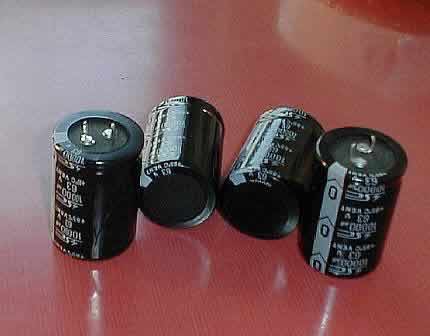
What are the caps by the by?

I don't get what they are :p I got the S3 and was told the only difference is the DS3 has solid caps, no idea what that means though!
 
Jihad said:
What are the caps
Caps= Capacitors

caps.jpg


Below is a normal capacitor, sometimes they can bulge and leak, no good

leak.jpg


Blown and Leaking Motherboard Capacitors - A Serious Problem?
 
Orison said:
Got an RMA for my board today, gonna send it back after the weekend. Checked the PSU's 12v rails were okay and whatnot, pretty sure the problem is the board.

I read on the Gigabyte thread that some of the DS-series boards still on the shelves have problems with Core 2 Duo and DDR800 RAM because they were released back before these things were commercially available. When these boards are plugged in with the new, faster components, they act exactly as we're describing here - fans spin up, but no POST.

Now, I'm wondering, did Gigabyte change any of the hardware on the DS-series boards to enable Core 2 / fast memory support? Or could this problem be solved by flashing the BIOS?

As a last resort, I'm considering putting an old Pentium 4 into the motherboard tomorrow, to see if it will POST. If it will, maybe I can flash the BIOS, shut down and finish the rebuild with my spiffy new components. The problem is, there's no guarantee it's a BIOS problem, and I don't have any slower DDR2 RAM than my Corsair Dominators. Seeing as it's likely as not the Dominators that are causing the problems for the DS3, I'm not hopeful putting a P4 chip in there will solve anything.

What do people think? Anyone had any success by flashing the BIOS? Anyone able to say if there's anything physically different about the DS3/4 boards that support Core 2? Anyone reporting the same problems with their DS3s while using Pentium D's / Celerons / Pentium 4's ?

Is it all worth the effort or should I just RMA the thing and buy an nForce 680-series board?

i got exact problem as you mate, i flashed my s3 from f4 to ds3 f7 as recommended on here, and it got worse!!!

a cmos reset will clear your problem, but then if like mine it will randomly hang and you have to cmos reset again. since flashing it a cmos reset doesnt do anything!
 
Ack, using a DS3 and DS4 in my main rigs but tbh i had some trouble with early release models, few would'nt post, some would'nt work with some RAM even to this day with so many BIOSes released, one had dry joints on the LGA socket and never posted as well, later versions seem to have sorted it but those with first release pcbs might be unlucky. :o
 
littledave said:
Our specs were
Corsair Dominator PC2 6400 C4 2Gb

Same RAM as me. Suspect that's what's causing the problem for the board. However, if BIOS updating isn't going to sort that out, it doesn't make sense for me to go and find some DDR533 so the system can POST and I can flash the BIOS.

RMA it is. Now. What board to get as replacement?
 
My ds3 had these problems no post fans spin up no video output no beeps, it was because my tt120 heatsink was screwed on too tight :confused: i loosened it a touch and it now works fine go figure :confused:
 
Back
Top Bottom


