E8400 (E0) wont post on 423x9

Soldato
Joined
18 Oct 2002
Posts
4,825
Location
Kent
I've been experimenting with OC'ing the last few days and i believe i have a stable system running on 412x9 on stock vcore (1.25) with my mem multiplier on 2.00 (its lowest) with the VDIMM on 2.0 since the beginners sticky recommends upping it.

Upping the fsb to 423 for a nice even 3.8ghz clock and leaving everything else and the computer fails to post. I've tried upping the vcore as high as 1.3 and still it wont post. I'm not comfortable upping the vcore further since i only have an Arctic Freezer Pro (not rev 2).

I've read other threads with people getting 4ghz+ on air with the vcore only slightly increased. What i'd like to know is if i'm doing something wrong or if i'm simply unlucky and have a chip that wont clock higher.

Thanks
 
A little bit more NB voltage perhaps? Would have thought you were well past what its capable of at stock. Its amazing how often folks leave a Northbridge to go hungry......done it myself before now....:o
 
Last edited:
If you have a look in your manual it will explain to you what all the bios settings are. The individual voltages and how to change them are also quite clearly explained. I was really surprised by that - cos most manuals are rubbish but the one that came with my board (same one you have) was darn good.
 
Yeah i've had a good look through my manual but on some of the options im still not sure what they actually mean.
 
No problem mate - the easy option is to install easytune6 get the latest version from the support page.

http://www.giga-byte.co.uk/products/product-page.aspx?pid=2845#utility

Not sure if you have a rev1.0 board like I do but the link above is to the one I have.

Install the application and you can set the main few voltages via windows. They are automatically set in your bios and will remain there until you change them or reset your bios to defaults.
 
Oh ok. I was always under the impression that using windows programs for OC'ing and the like was a bad idea and it should always be done manually in the BIOS. I guess that's no longer/never been true?
 
If i remember rightly gigabyte call the northbridge, something like MCH, so anything MCH related will be to do with the northbridge, having a quick look at the manual for your mobo, there are a few MCH things, but i would say MCH Core is the main voltage to change.

Your motherboard has a max supported FSB of 1333, but can run upto 1600 fsb via overclocking. So you are allready passed the 1600, so any more may be touch and go.

Now that being said, it may not be impossible, but you will need to bump up the nb/mch voltage to get any more out of it, and this may not help. You may have just reached the max u can get.

Now the nb/mch at stock will be 1.2v, i would set it to 1.4v as you are over the rated spec now, possible even 1.5/1.6, don't worry these volts are fine to use, just keep an eye on the northbride temps with monitoring software.

Basicly its about testing now, try with 1.4v to start with on the mch, and only go up if it needs more.
 
Well, i've tried everything and no joy. My computer simply wont boot if the FSB is 420 or above. So i'm now on 419x9 on stock volts and its perfectly stable. As soon as i go to 420 it craps out.

I've tried upping the vcore to almost 1.4, the MCH core to 1.4, RAM voltage to 2.2 etc. etc. I just dont understand how i can have a nice stable system on stock volts at 419x9 but cant even boot on 420x9 even with greatly increased voltages.

Any ideas chaps?
 
419 is 86 over its max supported FSB 333 (1333), it supports 400 (1600) fsb only via overclocking, and that is'nt a given, so anything over 400 is really pushing the motherboard im afraid.

To really push that cpu you would need a mother board that officially supports 400 (1600) as those mobo's can clock really high generally.

Its annoying for sure, but thats what i think your issue may be.
 
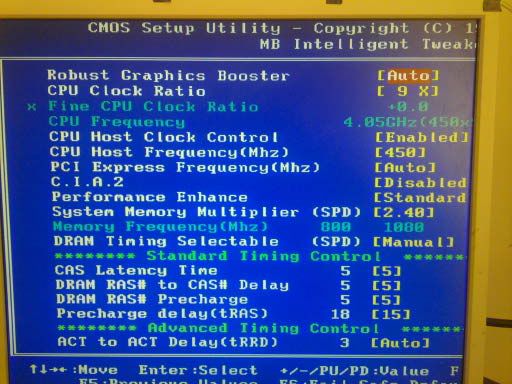
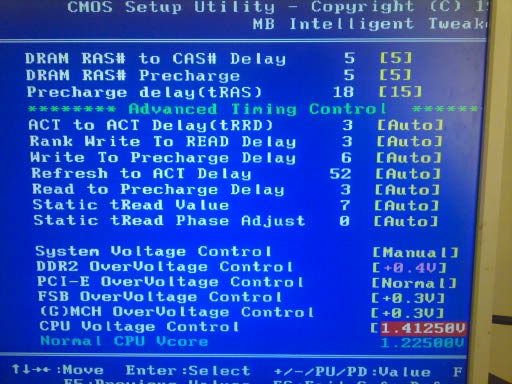
To get my E8400 running at 4.05GHz I had to set the voltage quite high in the bios (1.41250v) and the FSB/multiplier is 450x9

You're running a similar motherboard to me and looking on gigabyte's website they're pretty similar boards - that said, there's always some fsb/multiplier combinations that the system will just not like so it won't post with it

As your bios will probably be very similar to mine, here's some pics of my settings:

1287909963097.jpg


1287909979452.jpg


If you look at my CPUz validator link you can see that in windows, it reports the vcore as WAY lower than the bios setting! (is that vdroop?)
 
Why nobody has mentioned temps yet ? He's got arctic freezer : ).

Can you post a screenshot of your memory tab and cpu tab from CPU-Z for the stable OC settings??

Some RAMs don't like lowering FSBs so it's not always the ultimate choice, that's usually done only along with putting CPU multi to lowest to find FSB wall.

Post screenies of your stable settings first ( cpu / mem / temps ) and we'll go from there.

---------------

Might be the RAM holding you, corsair c5 ain't excellent mem and when you wanna go above 425fsb it can be on it's limits.
 
Last edited:
Temps are fine, barely touch 60c on Prime and IBT.

2s664pl.jpg


Multi and voltage a low because of the Intel speedstep thing.
 
60c is pretty high for such a low OC.

Put 1.4v on CPU, up RAM volts to 2.1v, disable speedstep and see if that helps.
Just check if it boots and works in OS and how are the temps.

Also check if you have option in BIOS to unlink the CPU and MEM so that when you up your FSB up the RAM stays the same.
 
Believe me i've tried upping every voltage going with no joy. I'll have a look in the BIOS for that setting but im pretty sure it doesn't exist on my board.
 
Thought you said you've only put 1.3 through it, which isn't all that much.
Did you up the volts from the working settings as I've said or just aimlessly upped everything before?

Make sure you check to default or auto volts first, sometimes when you change from auto to 'upped' settings, it can actually be lower than what it was before.

Also try increasing the fsb only a little bit on that increased volts, not all the way up.
Do lets say 415 on the mentioned 1.4v and see if that boots.
 
I'm on 419 on stock volts (1.25 vcore) which is stable. 420 basically seems to be the cut off point. I've taken the vcore as high 1.37 so far with no success.

Surely the voltage isn't the problem since i have a stable system at 419 on stock volts but cant even post when i raise it to 420 with or without increased voltage.
 
You will reach a certain point, like you have, where u will need very high voltage increases, to go further, its just how it is really.

When i had that cpu, last year, i could get 4ghz no problems with 1.3v and lower, but anything over 4ghz, needed closer to 1.4v, or higher. Bare in mind this was with a far better overclocking mobo aswell.

So it may be a few things, memory is reaching its limits, mobo is reaching its limits, or you need to add more vcore to the cpu. Remember not all cpu's clock with the same voltages.

If it does boot and be stable with increased voltages, u just have to think, is the voltage hike worth it for the performance increase.
 
Back
Top Bottom