First overclock - next steps in stress testing??

Associate
Joined
10 May 2008
Posts
287
Location
Sandhurst, United Kingdom
Afternoon all,

So I am up to 3.8ghz with the following settings...

CPU 21x181
DRAM 1451
UCLK 2903
CPU VOLTS 1.18125
CPU PLL 1.80
QPI 1.22500
IOH 1.14
DRAM VOLTS 1.64
CPU DIFF 800
CPU CLOCK SKEW 300

I feel I've cheated a bit, since I've read sooo many guides/how tos/user reports etc, that I feel like I've cobbled the above together without a proper understanding, or testing, of each setting.

I've run P95 smallfft for a few hours, and no hint of any issue yet. I understand I should leave it for at least 12. But what after that? Should I do P95 blend (which from what I read is probably where the illusion that all is well will be blown out of the water!)?? Or Intel Burn Test?

Anything glaringly obvious that I've done wrong with these settings? Although its unlikely I'll understand straight away if I'm told I have - since it all still feels a bit of a mystery!
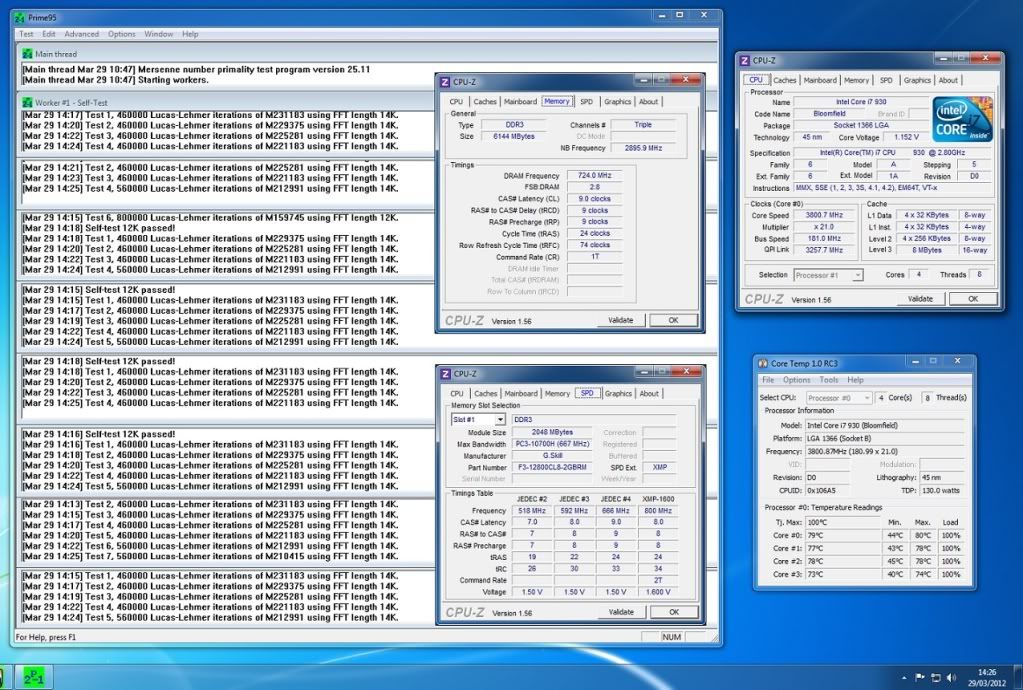
Screenshot.jpg
 
Last edited:
Temperature seems a bit high considering the low voltage used, daresay you'll be well over 80C with Intel burntest. Not used your cooler much in builds with older i7s as i stuck to highend air mostly so can't really comment on its performance and if it should be better.
 
Normally i am the oppisite to !Timmy! ;)
I prefer Intel Burn test, as i find it finds an unstable overclock faster than Prime95, but thats just my opinion.
The thing is, IBT runs hotter than prime, and as Justintime already said, he is getting very hot already.

In this case, i would just do an overnight run of Blend, for a minimum of 12 hrs.
 
I have to say I'm not that bothered about the temperature, as it went to 80 (but no higher) when I ran the smallfft test for a few hours before I overclocked it - So at stock volts it was still stressing to 80 degrees.

I'm away for the night, but its churning away on blend at the moment - it had done a few hours when I left it. So when I get home in the morning it will have done about 18 hours. Assuming no errors I think I'll be happy enough with that.
 
Well 80C at that voltage is pretty warm imo, gave my dad the last older i7 rig i had, 2 Apache fans and Ultra extreme heatsink 920 D0 at 1.3v 4Ghz don't go past 80C in LINX/IBT in 30C ambients, 75C or so in 'normal' temps of 22C or so and usually 75C/70C tops in prime blend. Thats an old hat but very potent heatsink and 1.3v, quiet too as its stuffed into an Antec Solo case! Maybe remount your cooler? 80C seems a bit odd at stock speed.
 
I guess it depends who you ask, as I posed the question about the temps a couple of days ago and seems some think that 80 is fine for a pre-sandy bridge i7.

http://forums.overclockers.co.uk/showthread.php?t=18387071

Its not got any higher after 8 hours of blend. I'll see how it performs in day to day gaming before I think about reseating it. I think one of my push/pull fans is running at a different speed to the other one too, by several hundred RPM in fact, so I need to put them on a splitter to CPU fan header instead of being independent. That may increase the flow a bit and bring off the temp a few degrees.
 
what cooler are you using? 80c is fine but no more!!! try to stay under that

are you clocked through cpu offset on that mb? where it downclocks the cpu at idle? full speed at load? or a fixed cpu voltage?

i could run at 4.2ghz with offset
 
I guess it depends who you ask, as I posed the question about the temps a couple of days ago and seems some think that 80 is fine for a pre-sandy bridge i7.

http://forums.overclockers.co.uk/showthread.php?t=18387071

Its not got any higher after 8 hours of blend. I'll see how it performs in day to day gaming before I think about reseating it. I think one of my push/pull fans is running at a different speed to the other one too, by several hundred RPM in fact, so I need to put them on a splitter to CPU fan header instead of being independent. That may increase the flow a bit and bring off the temp a few degrees.

80C is fine yes, not at 1.18v though imo, like i said i'm getting better temps on air with an ancient cooler at 1.3v and 200MHz more. I'd reseat or re-evaluate the case cooling, chips do vary but on avg. i'd say that was off a bit. If 3.8GHz is stable at 1.18v you might be holding your overclock back as it seems a good chip for 4Ghz+ on low volts, but you'll run out of thermal headroom before that. 80C is fine for Sandybridge as well btw.
 
Last edited:
some chips run hot with little voltage though and some run cool with fairly big voltages,id deffo look at the heatsink/thermal paste ect maybe upgrade to better heatsink?
 
some chips run hot with little voltage though and some run cool with fairly big voltages,id deffo look at the heatsink/thermal paste ect maybe upgrade to better heatsink?

Yeah, i've overclocked maybe well over a 100 920s over the yrs, same chip in essence and none were that hot at such a low vcore mate, i already addressed your point but also pointed out that on average that dosen't seem right. Didn't use the H50 much though, prefer good air or proper water so maybe it just can't handle that chip.
 
Maybe I'll go back to air. The H50 is (or rather has been) fine, but I have no particular loyalty to it, so perhaps now I'm overclocking I'll invest in a Noctua or Dark Rock Pro.

And the overclock is fixed CPU voltage, so its not downclocking at idle. Like I said, my understanding is still rubbish, but I thought I read that not locking down most settings at first when overclocking 930s can lead to problems (although wherever I read that, it also said its fine to revert to some auto settings once an overclock is stable).

You'll have to forgive me, cos I am out of my depth at present!! :)
 
Seeing 80c under LinX now that ive changed cases, previously topping out at 76c 1.3125v, alpenfohn k2 cooler, airflow in the new case isnt as good as my lian li A70F was. The h50 is generally on a par with old coolers such as the TRUE, a remount may help.
 
Maybe I'll go back to air. The H50 is (or rather has been) fine, but I have no particular loyalty to it, so perhaps now I'm overclocking I'll invest in a Noctua or Dark Rock Pro.

And the overclock is fixed CPU voltage, so its not downclocking at idle. Like I said, my understanding is still rubbish, but I thought I read that not locking down most settings at first when overclocking 930s can lead to problems (although wherever I read that, it also said its fine to revert to some auto settings once an overclock is stable).

You'll have to forgive me, cos I am out of my depth at present!! :)

only 3 main voltages you need to set manually imo,thos are cpu voltage, cpu imc(integrated memory controller) and dram voltage,the rest are generally fine on auto

to use cpu offset set cpu voltage back to offset and use +0.0100v to start with,then make a note of how much cpu voltage is being used in cpu-z and add more if needed or take off -0.0100v if stock voltage is too much

make sure all power saving states are enabled in bios then cpu can downclock at idle ect,it wont help your load temps but will help idle temps and voltages

i used the thermolab baram heatsink with one scythe ultra kaze fan hooked up to fan controller and one akasa apache hooked upto the cpu fan/mb header
i dont know how good these newer heatsinks perform
 
Last edited:
only 3 main voltages you need to set manually imo,thos are cpu voltage, cpu imc(integrated memory controller) and dram voltage,the rest are generally fine on auto

to use cpu offset set cpu voltage back to offset and use +0.0100v to start with,then make a note of how much cpu voltage is being used in cpu-z and add more if needed or take off -0.0100v if stock voltage is too much

So, during the night after about 12 hours of prime, I had the obligatory BSOD. Rather stupidly had forgotten to uncheck auto reboot, so not sure of the details. Have rectified that now.

Just off to Maplin now to get a 4 pin PWM splitter so I can get the two Apaches push/pulls running at the same speed, and will reseat the H50 this afternoon too. However I've also ordered a Be Quiet Dark Rock Pro which will be here Monday - definitely thinking I'll go back to air, regardless of the result of reseating the H50.

So you reckon set everything back to default, and start from scratch, with CPU on offset?
 
just set offset for cpu voltage,add only a tiny amount at a time because it gets added to the stock cpu voltage at load

id set dram according to your ram,either 1.5v or 1.65v
then set cpu imc to 1.32v
set cpu offset to +0.0100v to start with

then in windows make a note of how much the cpu voltage is under load in cpu-z
keep an eye on core temps dont let them go above 80c,quick spikes of 80-85c is acceptable but not constant
 
just set offset for cpu voltage,add only a tiny amount at a time because it gets added to the stock cpu voltage at load

id set dram according to your ram,either 1.5v or 1.65v
then set cpu imc to 1.32v
set cpu offset to +0.0100v to start with

then in windows make a note of how much the cpu voltage is under load in cpu-z
keep an eye on core temps dont let them go above 80c,quick spikes of 80-85c is acceptable but not constant

Well, have found something interesting when I just set about reseating the H50 - basically all the screws were no where near tight - must have worked loose over the last 12 months since I installed it. So I tightened them rather than reseating, and its knocked over 5 degrees off the temps. Unfortunately couldn't get a splitter, so have ordered one online. My 'pull' fan on the H50 block is plugged into a CHA_FAN output, and as I run my case fans on 'silent', it was running at half the speed of the 'push' fan, which is obviously on the CPU_FAN output. So I've gone back to standard running for the case fans, and its knocked yet another 5 degrees off. Bit noisy, but thats because all my case fans are at full. Once I have the splitter, the push/pull fans will be on cpu output, and I can go back to silent running on the cha_fan outputs.

So am blending again with max temperature of 72 degrees, which I guess is much better?

I haven't had time to revisit my overclock according to your advice, but I fully intend to do so. But I'm intrigued to see if my overnight BSOD was due to temps. So I'll leave it running again tonight on my locked voltage overclock and see what happens with the improved cooling. Hopefully over the weekend I can find time to follow your advice and use the offset.
 
looks ok at 72c for 3.8ghz

offset is good if you can get it working it will save you power and heat at idle and switch to full power when gaming ect or under stress

i used offset on my p6x58d-e,and it ran fine,used the same on gigabyte ud5 but its called dvid
 
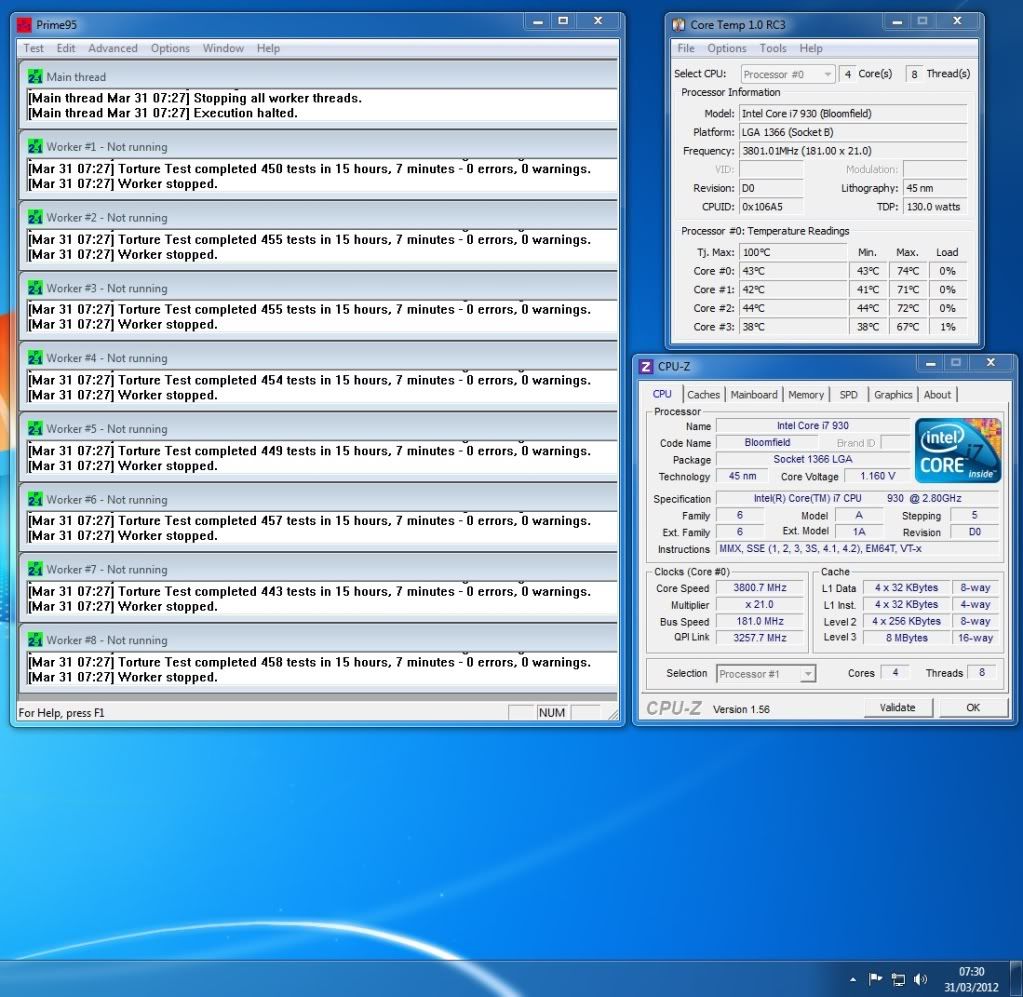
We I guess it was the temps that caused the BSOD, as I've just got home this morning and it was still blending happily at 15 hours.

At least I know its OK with the H50 now its seated properly -and with both fans at the same speed.

Just need to find the time this weekend to set about a new overclock using offset, as I definitely want it to downclock when possible.

Overclock.jpg
 
To get offset working, is there any way that I can use the fact that I now know a CPU voltage of 1.18125 results in a stable 3.8ghz overclock?

Or is a successful offset not governed by voltage at all, and therefore the fact that a locked 1.18125 voltage gives 3.8 stable is irrelevant?
 
Back
Top Bottom