First time OC'ing my E8400

Associate
Joined
27 Dec 2008
Posts
53
I've decided to overclock my e8400, basically to see how far it can go. This is my first time overclocking so i'm just a little bit hesitant :D

My specs are:

P5Q PRO
E8400 (AF7)
2x2gb ddr2-800 CL4 Ballistix
4850
From memory my PSU is a corsair 550w

I've read the stickies and various guides, but just want to make sure i'm going along the right lines. I've upped the FSB to 444 (ran it at 420 for over 12 hours on prime95) this is the highest I can get it to and pass on OCCT (core temp high of 54), it works out at 3.99 GHz, i'll run it on prime95 tonight. CPU voltage is set at 1.25 and the ram is at 1:1. I've changed most of the options on the bios from auto. Presuming it passes prime95 with the FSB at 444 do I then look at increasing the CPU voltage? Have I missed something obvious?

 
Just keep upping the FSB until it won't pass prime, then up the voltage a little... then prime again, if it fails again, up the voltage a little more... rinse and repeat until it DOES pass prime

Then repeat the whole process if you want to push further :)

3.99 is good for 1.25v :) I'm on 1.5+v for 4.2 :)
 
Just keep upping the FSB until it won't pass prime, then up the voltage a little... then prime again, if it fails again, up the voltage a little more... rinse and repeat until it DOES pass prime

Then repeat the whole process if you want to push further :)

3.99 is good for 1.25v :) I'm on 1.5+v for 4.2 :)

Cheers, that's kind of what I thought. What temp should I look to keep the cores below? Also how much should I increase the voltage by each time?
 
Just keep upping the FSB until it won't pass prime, then up the voltage a little... then prime again, if it fails again, up the voltage a little more... rinse and repeat until it DOES pass prime

Then repeat the whole process if you want to push further :)

3.99 is good for 1.25v :) I'm on 1.5+v for 4.2 :)

1.5+? Yikes, that's quite a lot. Good clock though. Is it fully stable and what's it on? Water I'd assume.


As for E8400 temps - aiming for under 65c under load is a good target. Do not go over 75c for a 24/7 rig.
 
Yeah it's fully stable, and it's not on water lol... I'm using a Thermalright Ultra120 :D with a single TriCool at 'mid' speed (soon to add a 2nd fan)

Temps at idle vary between mid 30s and low 40s depending if the heating is on (it's just above a radiator

It'll run prime all day if I ask it to and temps will barely peak over 70 however IBT kicks it up to around 85
 
Yeah it's fully stable, and it's not on water lol... I'm using a Thermalright Ultra120 :D with a single TriCool at 'mid' speed (soon to add a 2nd fan)

Temps at idle vary between mid 30s and low 40s depending if the heating is on (it's just above a radiator

It'll run prime all day if I ask it to and temps will barely peak over 70 however IBT kicks it up to around 85

That's very impressive. I'd never try above 1.45v for a 45nm chip just out of fear of degradation. What's the super pi 1M? :D
 
I would definately advise against going over 1.35V for these chips, mine experienced degredation just at 1.366V @4.5GHz (I eventually needed 1.39 just to get it stable and realised it was getting worse so dropped down again). 4GHz was the sweet spot and after that it was a bit of an uphill struggle for stability. I found 4.25GHz @ about 1.34V was where got, but you're doing well at your current effort of 3.99GHz so you may get further. Your RAM will be the limiting factor here though.
 
I would definately advise against going over 1.35V for these chips, mine experienced degredation just at 1.366V @4.5GHz (I eventually needed 1.39 just to get it stable and realised it was getting worse so dropped down again). 4GHz was the sweet spot and after that it was a bit of an uphill struggle for stability. I found 4.25GHz @ about 1.34V was where got, but you're doing well at your current effort of 3.99GHz so you may get further. Your RAM will be the limiting factor here though.

I failed prime95 after about 6 hours so i'll drop the fsb down by a couple and run it again tonight. Once it's stable should I increase the voltage by 0.01V each time?
 
Once it's stable you're all set! I would try upping your vcore a notch or two. 6 hrs of prime is nearly there so a small bump in vcore should even it out. With 800MHz RAM 4GHz is about as good as you'll get without overclocking RAM and adding a new can of worms to the stability mix. You may/may not need a small bump in voltage for your NB/MCH to support the higher FSB so if upping your vcore by .002 doesn't get you stable I'd suggest trying that (and never rule out your RAM as a cause of instability)
 
Once it's stable you're all set! I would try upping your vcore a notch or two. 6 hrs of prime is nearly there so a small bump in vcore should even it out. With 800MHz RAM 4GHz is about as good as you'll get without overclocking RAM and adding a new can of worms to the stability mix. You may/may not need a small bump in voltage for your NB/MCH to support the higher FSB so if upping your vcore by .002 doesn't get you stable I'd suggest trying that (and never rule out your RAM as a cause of instability)

I've dropped the fsb down by one again and got it running prime today, if it doesn't run for 12 hours without error i'll up the vcore a little. Is it going to be worth replacing the RAM in your opinion?
 
That's very impressive. I'd never try above 1.45v for a 45nm chip just out of fear of degradation. What's the super pi 1M? :D

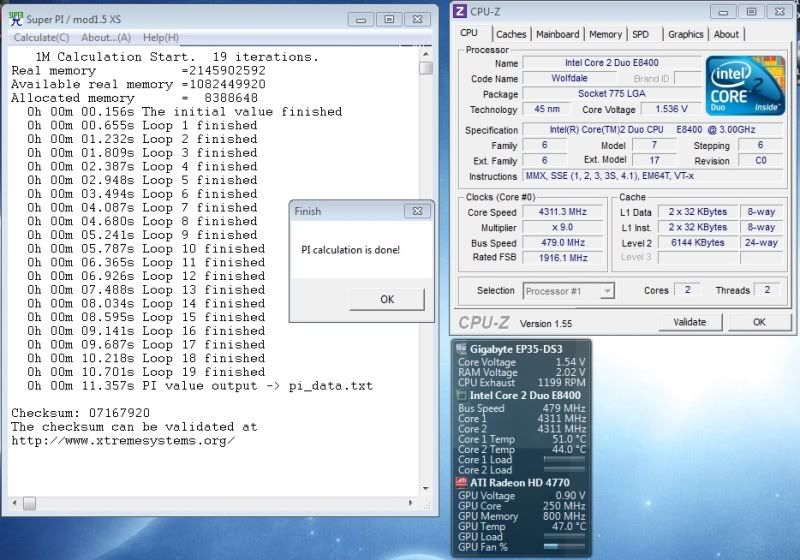
Got it up to 4.31 this morning, here's a superPI screenshot for ya :)

sPI431.jpg


Run it back donw to 4.2 for now, will prime test 4.3 later, vcore is a little high there for my liking lol - 1.6v in the bios lol
 
I was expecting a break into the 10s at 4.31 :p

But having said that, I've noticed that it's a C0 revision chip. Now that's impressive at those temps.

Would never risk those voltages myself though.

And what is that below your CPU-Z? A Sidebar gadget?
 
That's the gadget built into Open Hardware Monitor :) (www.openhardwaremonitor.org) it's really good... like HWMonitor, but better ;)

Only downfall is that you have to rename and add each sensor to the gadget manually... Quite annoying, but at least it only has to be done once lol

Probably could get into the 10's if I shut down other processes or booted in safe mode or something... That was just standard setup from boot, nothing specifically done to try and free more cpu time :)
 
That's the gadget built into Open Hardware Monitor :) (www.openhardwaremonitor.org) it's really good... like HWMonitor, but better ;)

Only downfall is that you have to rename and add each sensor to the gadget manually... Quite annoying, but at least it only has to be done once lol

Probably could get into the 10's if I shut down other processes or booted in safe mode or something... That was just standard setup from boot, nothing specifically done to try and free more cpu time :)

Downloaded and using. Sweet. Thanks!
 
This thread will give you some pointers no doubt ;)

Aha cheers, hadn't seen that one!

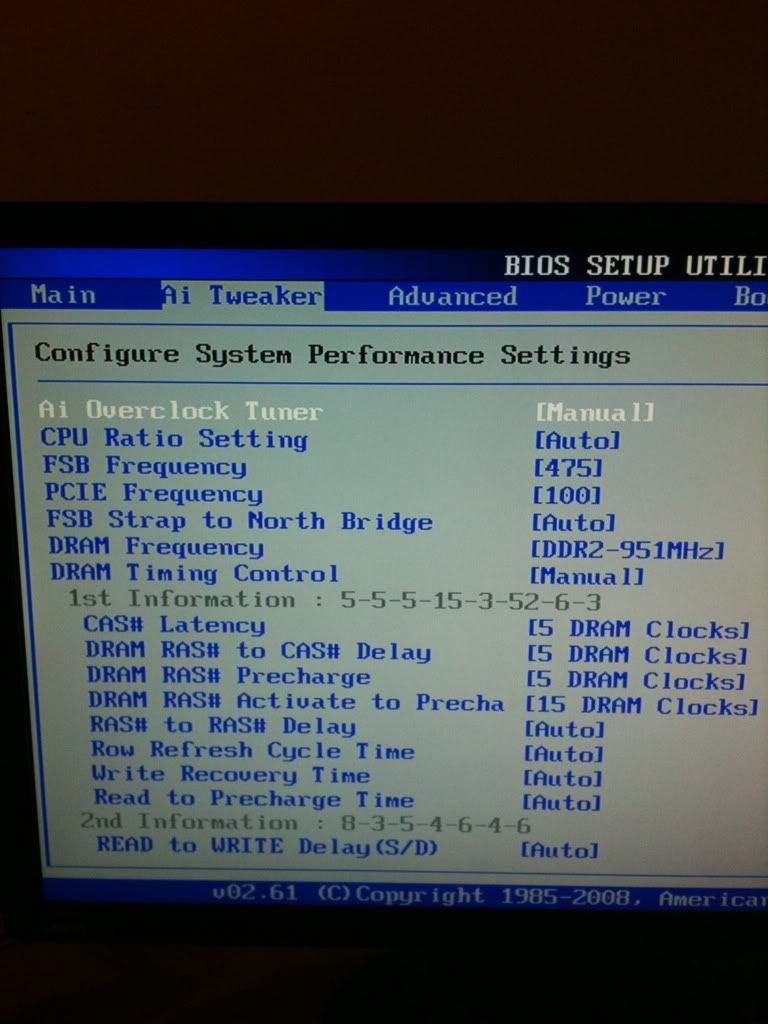
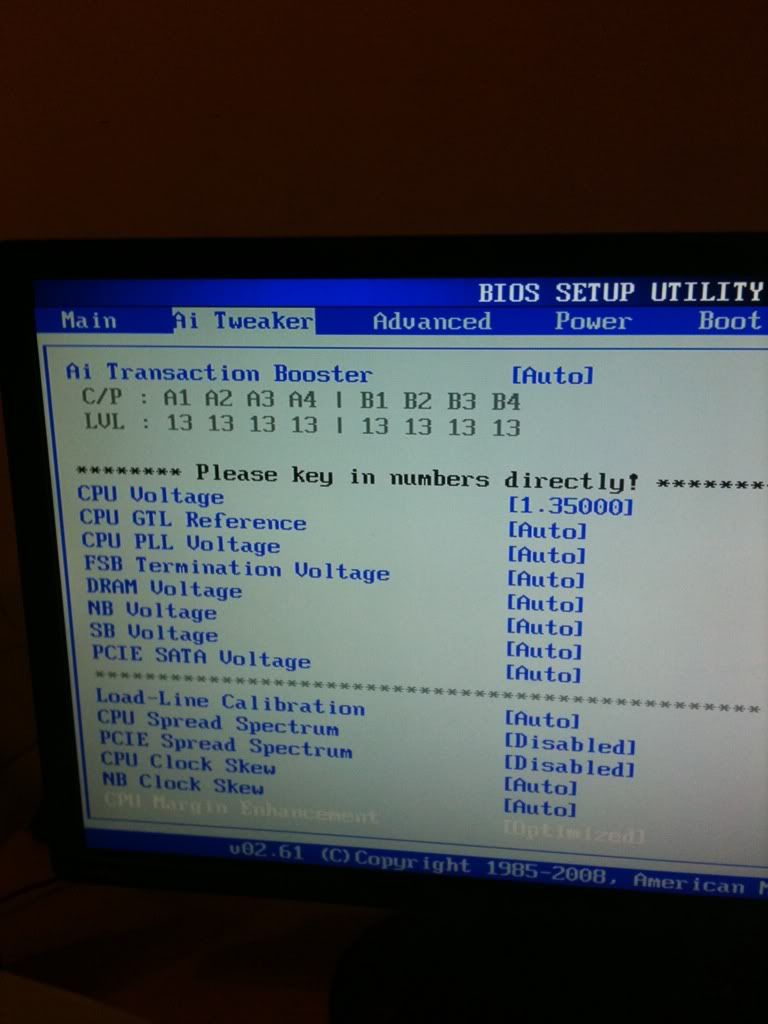
Got the fsb to 475 (ram is at 951) at a cpu voltage of 1.35. Has been running prime95 now for 8 hours with no errors, although the core temp highs are 70. FSB of 480 failed prime 95 so i'm guessing that to go any higher i'd need to raise the voltage higher? Don't really want to go above 1.35 from what people have said.

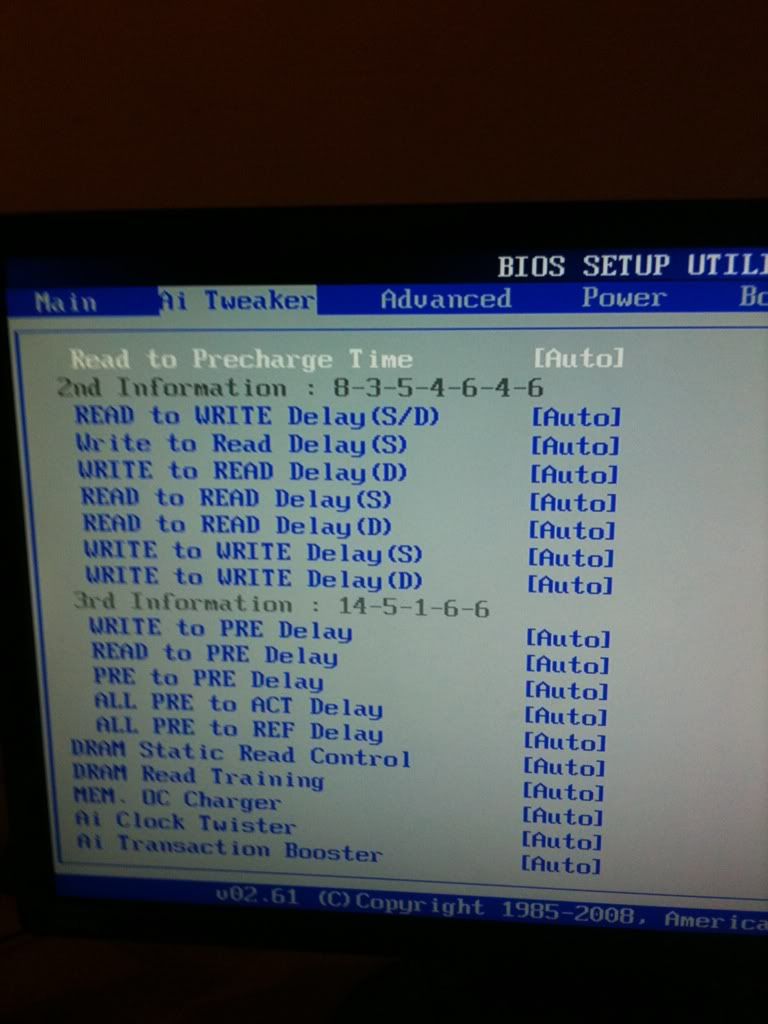
Anything else I can tweak to get it to be stable at a higher fsb without raising the cpu voltage? If not i'll just drop the voltage as low as I can whilst keeping the fsb at 475.

edit: Here are some pics of my bios, anything I should change?

4fa4fd71.jpg


06c0e680.jpg


6b972d73.jpg
 
Last edited:
You may need to up the northbridge voltage slightly or atleast manually set it to 1.4v.

Also the cpu voltage of 1.35 in the bios, is more then likey to be closer to 1.3v under load in windows, so your safe to up that quite a bit as long as loaded temps are 70's.

About the super pi times, this was my fastest with my old E8400 @ 4.497GHz 10.453s, you would need 4.6/4.7Ghz to hit sub 10s.
 
Last edited:
Back
Top Bottom