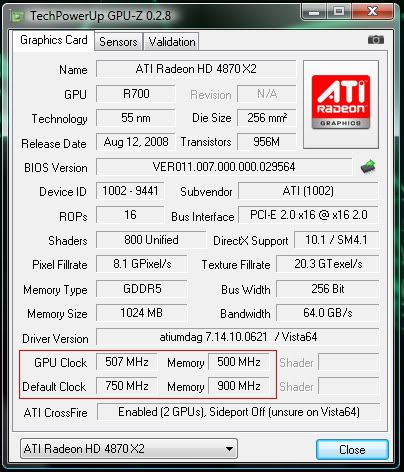
Hi, is there a way i can set up my gfx card so that when im in windows i can underclock the gfx card, to save power and cooler system, and when i open a game the card will change to different clocks and fan settings? Can i do this in ccc? Or do i have to use something more like rivatuner? Would it also be bad for the card, changing core/mem speed that frequently?
-
Competitor rules
Please remember that any mention of competitors, hinting at competitors or offering to provide details of competitors will result in an account suspension. The full rules can be found under the 'Terms and Rules' link in the bottom right corner of your screen. Just don't mention competitors in any way, shape or form and you'll be OK.
You are using an out of date browser. It may not display this or other websites correctly.
You should upgrade or use an alternative browser.
You should upgrade or use an alternative browser.
Games profiles
- Thread starter mpj88
- Start date
More options
Thread starter's posts
Caporegime
- Joined
- 8 Jul 2003
- Posts
- 30,080
- Location
- In a house
Im not sure if the clock speeds will save under profiles as well, i can't see why not though as you can have different fan setting profiles, so its worth a try.
All you do is set all your settings first (AA/AF, clock speeds etc...), then go to the Profile Manager and give it a name, make sure at the bottom (in the This Profile Includes bit), that you have All Catalyst Control Centre Settings selected, then save it, then just repeat the process for your next profile, go and change all the settings, give it a new name, save, and just repeat for as many profiles as want.
You can also use ATi Tray Tools instead of the CCC to do the profiles, as that does them exactly like Nvidia's do them, but im not sure if you can do clock speeds in that as well though as ive never used it.
Can't really see it doing much harm underclocking the speeds tbh, just overclocking, as that will shorten the life of the card obviously, and depending on how far you push break it.
All you do is set all your settings first (AA/AF, clock speeds etc...), then go to the Profile Manager and give it a name, make sure at the bottom (in the This Profile Includes bit), that you have All Catalyst Control Centre Settings selected, then save it, then just repeat the process for your next profile, go and change all the settings, give it a new name, save, and just repeat for as many profiles as want.
You can also use ATi Tray Tools instead of the CCC to do the profiles, as that does them exactly like Nvidia's do them, but im not sure if you can do clock speeds in that as well though as ive never used it.
Can't really see it doing much harm underclocking the speeds tbh, just overclocking, as that will shorten the life of the card obviously, and depending on how far you push break it.
Last edited:

Caporegime
- Joined
- 8 Jul 2003
- Posts
- 30,080
- Location
- In a house
They already clock down to save power, it's written into the vidbios of modern cards. I use RivaTuner for fan profiles.
Yeah they do, but i thought he wanted to clock it down further than the 2D speeds.
so why dont you see it drop in gpu-z or programs like that?
Could understand if they do it, bit like speedstep on cpus, but you can actually see that change!
Here we go: