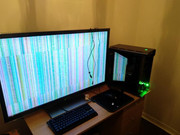
righto you have a ryzen at heart of the build, this particualr one dosnt look to have a built in gpu so that rules out what i was going to sugest.
regarding your psu that unit is more than enough to supply all the components plus the gpu, i owuld sugest to remove the graphics card and clean out any dust particals which may cause issues be sure to clean both the gpu contacts plus the pci express slot on the mainboard, use a paint brush for the gpu and blow with your mouth at the pcie slot on the mainboard, rebuild and turn back on and see if that helps.
if not then if you have a spare cable to use between the gpu and the screen, trying this may work as the cable may be damaged, thridly you could swap the pci express power cable to the gpu, if your psu has a spare swap over and see if this helps.
if the above steps are a no go you could try the card in a diffrent pc if you have a spare to hand and if the issuse persists then the card may be at fault, in which case contact ocuk for a rma and find a replacment
good luck