


I have been having some issues lately with my Msi gtx 460 where it has been crashing in Crysis (1) and throwing up display driver errors after crashing, This was on the latest drivers for the card from Nvidia and I was also getting a pink screen though not solid as I could still see the desktop.
Anyway I thought 1st it must be the card so checked gpuz for temps and the card was running as it should be, with no high temps etc, So I turned my attention to the psu as I had another card prior to this that was overclocked and that would crash in heaven and Crysis, Though tbh I think that was just because the overclock was too high. I checked the psu with a multimeter and stressed both the cpu (intelburn) and Furmark and I was getting 12.08-12.05 from idle to load, So concluded that this was fine, The psu btw is a corsair 650tx and has always been rock solid.
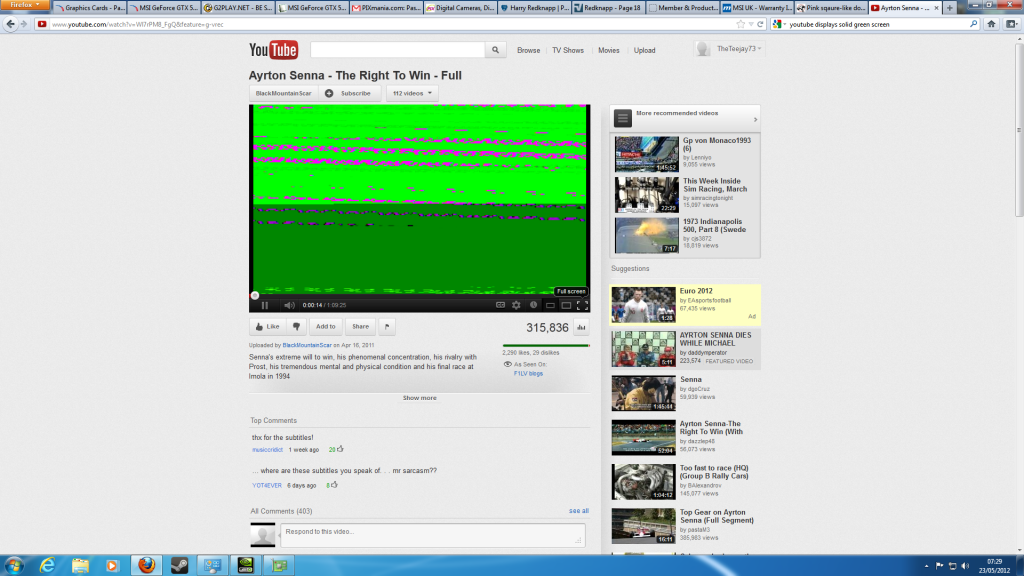
I then decided to ditch those drivers and go back to the previous ones and all seems fine until I try to play anything in flash player like you tube etc and I now get either solid green screen or the same that is on the screen shot, I am now starting to think that my gfx card is on it`s way out but I have nothing conclusive apart from the issues I already stated, Like I said the card operates as it should be judging by gpuz!!
Any help guy`s would be most appreciated!
Anyway I thought 1st it must be the card so checked gpuz for temps and the card was running as it should be, with no high temps etc, So I turned my attention to the psu as I had another card prior to this that was overclocked and that would crash in heaven and Crysis, Though tbh I think that was just because the overclock was too high. I checked the psu with a multimeter and stressed both the cpu (intelburn) and Furmark and I was getting 12.08-12.05 from idle to load, So concluded that this was fine, The psu btw is a corsair 650tx and has always been rock solid.
I then decided to ditch those drivers and go back to the previous ones and all seems fine until I try to play anything in flash player like you tube etc and I now get either solid green screen or the same that is on the screen shot, I am now starting to think that my gfx card is on it`s way out but I have nothing conclusive apart from the issues I already stated, Like I said the card operates as it should be judging by gpuz!!
Any help guy`s would be most appreciated!
