• Competitor rules

    Please remember that any mention of competitors, hinting at competitors or offering to provide details of competitors will result in an account suspension. The full rules can be found under the 'Terms and Rules' link in the bottom right corner of your screen. Just don't mention competitors in any way, shape or form and you'll be OK.

GTX 680 Reference 1.21v BIOS

You first guv'nor.

From what an MSI Lightning user says the voltage bump doesn't really do anything useful in terms of performance (sometimes a decrease).

This might be different though!
 
121vgpu.jpg


Precision X states my voltage is now 1.213 but not sure if it actually is. I have run aa Heaven bench and also a 3DMark11 bench but seen no improvement and would go so far to say I have seen a drop :( Temps are now going above 70c and I know the card throttles back at 70c so maybe this is why.


I would like to try this when it is a little cooler or I have my 680 under water.
 
Surely your volts have gone up if your temps are now higher? Its very hot today so maybe its that. Needs a bit more investigation but looks promising for a small boost :cool:
 
Surely your volts have gone up if your temps are now higher? Its very hot today so maybe its that. Needs a bit more investigation but looks promising for a small boost :cool:

I am sure they have...Temps were showing 75c which it has never gone over 70c before so it does look like it has. I will be going under water in the next couple of months, so that will help keep temps a little lower.
 
Tempting but want to see more first.

I have aftermarket cooling on my 680 so can keep it sub 60 Deg C no worries.

It gave me 180 points more in 3DMark11 gfx scores...I wouldn't recommend it though, as I feel that boost is not enough to justify potential bricking.

I have now flashed back to my old bios and will have another play when I go under water.
 
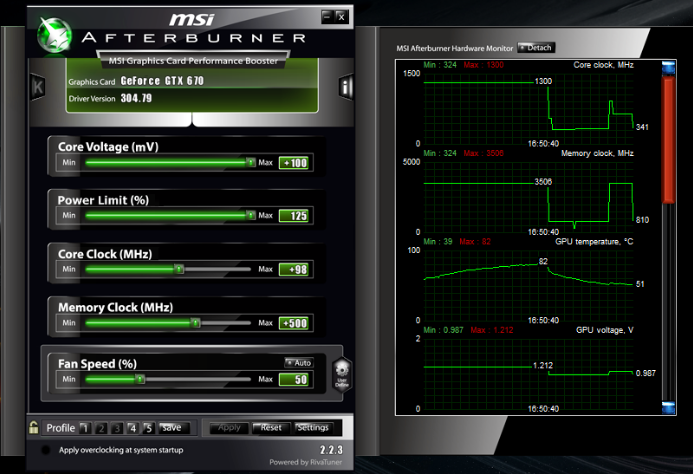
I've got my Non reference Galaxy GTX 670 modded.

There is no throttle
Fan goes from 20-100%
1.21 v which actually gives 1.23 because of volts you can only see with a multimeter.

Highest I could get my core speed stable was 1276mhz, but now it's stable at 1310mhz

Capture-4.png
 
Last edited:
I've got my Non reference Galaxy GTX 670 modded.

There is no throttle
Fan goes from 20-100%
1.21 v which actually gives 1.23 because of volts you can only see with a multimeter.

Highest I could get my core speed stable was 1276mhz, but now it's stable at 1310mhz

I did see your name on mvktech. I can see the benefit but it is so hot in my house and no air con or even a big fan to help is messing my usually very good temps up. It did improve my scores and I am happy with it, just temps I am not :(
 
I think my temps may have went up 3c at the most, but it's very hot here too, so it's hard to say really.
I will put my stock bios back on today. I just wanted to break 1300mhz lol
 
I flashed my one of my GPU's with this new BIOS this afternoon.
The BIOS version shown on GPU-Z as 80.04.09.00.01(P2002-0000)
This is the same version as all my other cards.
Has the flash been succesful ?

This is also the same version that is shown in gregsters POST further up
 
I flashed my one of my GPU's with this new BIOS this afternoon.
The BIOS version shown on GPU-Z as 80.04.09.00.01(P2002-0000)
This is the same version as all my other cards.
Has the flash been succesful ?

This is also the same version that is shown in gregsters POST further up

Should be. Just check with Precision X and see if your Volts have max 1.213 now. All that is done is altered the original BIOS, so should still say the same with just a voltage tweak.
 
Thanks very much gregster for the very quick reply.
I tryed precision X & it was showing 1.213 for all the cards :(
I just run an unmodded card on its own & thats showing 1.175
So just flashed another & all is good :)

Another quick question if you don't mind
When you overclock your card, do you increase the power target to 132% or do you increase the volts
 
Thanks very much gregster for the very quick reply.
I tryed precision X & it was showing 1.213 for all the cards :(
I just run an unmodded card on its own & thats showing 1.175
So just flashed another & all is good :)

Another quick question if you don't mind
When you overclock your card, do you increase the power target to 132% or do you increase the volts

I did both. I got a slight increase in score for 3DMark11 (around 200 points) and now I have flashed back to my original bios. I will put this new bios back on when I am water cooled though, as my temps were too high.
 
Back
Top Bottom