


• Competitor rules

    Please remember that any mention of competitors, hinting at competitors or offering to provide details of competitors will result in an account suspension. The full rules can be found under the 'Terms and Rules' link in the bottom right corner of your screen. Just don't mention competitors in any way, shape or form and you'll be OK.

gtx90 randomly underclocking

Soldato
Joined
13 Oct 2004
Posts
2,774
Location
Teesside
Hi all,

randomly in games, and even sometimes when starting my pc and launching a game fo rthe first time, my graphics card clocks and voltage drop, to these rates:
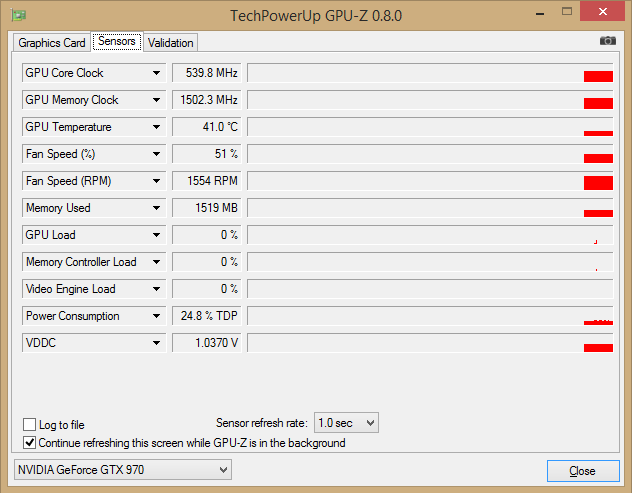
Untitled_zps421ce85d.png


Nothing i do seems to fix it other than restarting... its not overclocked much..

do i need to rma?

*Title Edit - should read GTX970
 
Its underclocking because there isn't any GPU load just like speedstep on your CPU works.

You can partially disable it by forcing the minimum clocks speeds to be no lower than the base clock in the Nvidia control panel (Power Management mode - Maximum performance) but there isn't much need to, once the load increases the GPU clocks will rise.
 
Its underclocking because there isn't any GPU load just like speedstep on your CPU works.

You can partially disable it by forcing the minimum clocks speeds to be no lower than the base clock in the Nvidia control panel (Power Management mode - Maximum performance) but there isn't much need to, once the load increases the GPU clocks will rise.


^^^ what he said , it only using what it needs . its not faulty at all , think of the electricity your also saving lol
 
No sorry thats not whats happening.

I dont mean when it normally drops its clocks when not being used.

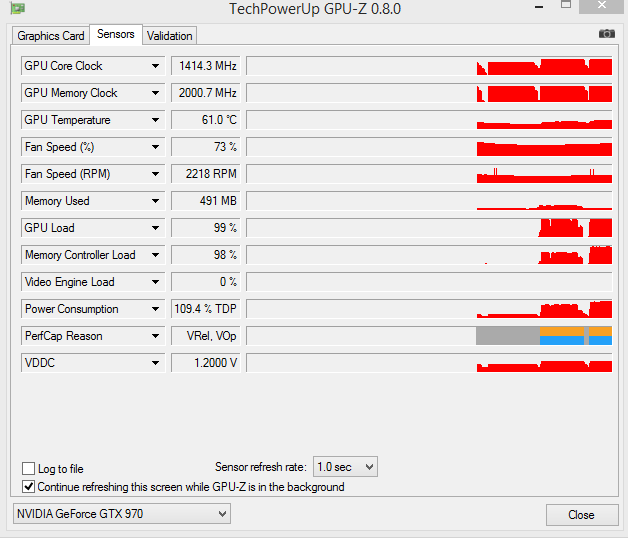
I havent yet has gpu-z running when this happens as its only happed maybe 3 times in the apst two weeks, but basically mid game when my card is at 100% usage, the clock drop to the levels in the first screenshot, and nothing i do, even running a benchmark, or trying to manually change clocks on afterburner affect the card, it just sits at those underclocked states. The only thing i can do to get it to return to normal clocks is to restart my pc
 
No sorry thats not whats happening.

I dont mean when it normally drops its clocks when not being used.

I havent yet has gpu-z running when this happens as its only happed maybe 3 times in the apst two weeks, but basically mid game when my card is at 100% usage, the clock drop to the levels in the first screenshot, and nothing i do, even running a benchmark, or trying to manually change clocks on afterburner affect the card, it just sits at those underclocked states. The only thing i can do to get it to return to normal clocks is to restart my pc

have you tried different Drivers? ... i think i may have noticed this myself.. driver change fixed it for me.
 
no i havent - to be honest it happens quite rarely so its hard to pinpoint when you've fixed it or not! I'm currently on the latest drivers - what drivers are you on?
 
no i havent - to be honest it happens quite rarely so its hard to pinpoint when you've fixed it or not! I'm currently on the latest drivers - what drivers are you on?

roll back and try different one's ..... cant remember which drivers seem to behave like this for me... iv been through 3-4 gpu's in the last year its hard to know!

but i would certainly try different ones to rule out driver conflict!

on 980 now!(well waiting on my return RMA) but the best driver for me was 344.80.

hope this helps!
 
roll back and try different one's ..... cant remember which drivers seem to behave like this for me... iv been through 3-4 gpu's in the last year its hard to know!

but i would certainly try different ones to rule out driver conflict!

on 980 now!(well waiting on my return RMA) but the best driver for me was 344.80.

hope this helps!

this is till happening to me, ive updated bios, tried disabling 2d clocks by enabling constant voltage in afterburner, chagned my nvidia drivers, and yet still randomly (can take 5+ hours of gaming) the core, memory and voltage all drop and stick and nothing can change them - *NOTHING*, except a reboot.

How can i send this back for a replacement when it takes so long and is so intermittent and so hard for ocuk to detect... sigh im getting stressed over this now!
 
Back
Top Bottom

