


Earlier on, in my infinite wisdom might I add, I decided it would be good to change the sharing options of my HDD which has my XP install on, whilst in Vista.
Little did I know that this rendered the drive inaccessible whilst in XP, meaning I can't really do much with it at all.
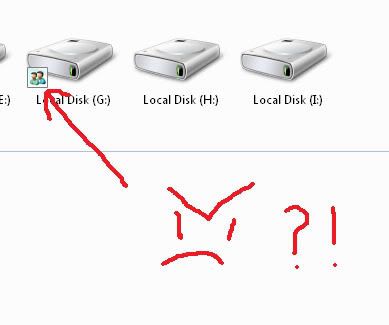
Is there a way to change what I've done? I notice now that a user icon appears next to the drive icon. I can't seem to shift it after trying several things. Is there any way I can revert to default sharing settings and once again allow access to files etc on the disk when in XP? I'm currently unable to access 'sharing' or 'security' in drive properties in XP.
Little did I know that this rendered the drive inaccessible whilst in XP, meaning I can't really do much with it at all.
Is there a way to change what I've done? I notice now that a user icon appears next to the drive icon. I can't seem to shift it after trying several things. Is there any way I can revert to default sharing settings and once again allow access to files etc on the disk when in XP? I'm currently unable to access 'sharing' or 'security' in drive properties in XP.
Last edited:

