Help lighting a case

Soldato
Joined
2 Dec 2004
Posts
14,878
Location
Under The Desk, Wales
My daughter wants a new case for her pc with a window.

We both like:

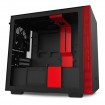
NZXT Black/Red H210 Mini ITX Windowed PC Gaming Case

Can i get some help regarding lighting the inside of the case please?

She likes red. We already have some decent 120mm fans which are really quiet. How can i introduce red lighting in the case / best solutions? I dont mind changing the 3 fans we have (CPU, INTAKE, EXHAUST).

Any help would be great. Ra
 
Some basic Red LED fans will be fine, get a fan splitter and away you go.
I wouldn't recommend red led strips as it will completely wash everything out in red light. Try white as it will highlight everything else. Full ARGB is your best option. A lot of these run from either molex or sata power

iCue has a lot of preset options but I can see how it can be complicated to set up with the hardware as its quite selective (Same fan type, you can't mix fans so go for Corsair types). I have a complete set up and there are A LOT of cables involved.

What mobo does your daughter have?
What are the current fans / set up?
Whats the PSU?

I think nice quiet LED fans would suffice for now. Any idea on good ones that are quiet?
Not sure on mobo. Its ITX and prob 5 year old now.
Fan set up at mo is one at front, one at back and one at the top.
PSU is 550 Bquiet modular.

Daughter likes the case in my first post which i am going to get for her. She loves red!

I may change fan on the CPU too. Needs to be quiet

All fans are 120mm (new case accepts 120mm too).
 
I'm going to make some assumptions here until you can confirm the mobo model such as the number of fan ports on the mobo

With that case, it looks like you can't see the fans from the front so move the one at the back join the one in the front (use fan splitter).

In regards to quiet, it shouldn't matter too much unless the speed is ramped up to maximum. I'd just go with some 120mm Corsair Red Led fans

Whats the CPU cooler?

Sorry for lack of info.

CPU cooler is a low profile one. Again, cant rem the name. Its a great cooler though. All the fans are really quiet.

I been looking at these fans:

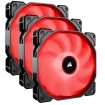
Corsair AF120 Triple 120mm Red LED 3pin Cooling Fans 2018 Edition

Quiet is very important when it comes to fans. Can hardly hear anything coming from the case.
 
Last edited:
Those the ones?

You can add LED strips later if they are needed but IMO they wouldn't be.

My basket at Overclockers UK:
Total: £116.92 (includes shipping: £0.00)

Those are decent fans?

I suppose i could use one on the CPU but obviously it cant be monitored / controlled? (Have to turn off CPU fan monitor in bios?).

I can get the case for £69 elsewhere
 
Considering the added cost of the fans, the H210i at £100 isn't too far off since you wont need new fans.

There's also the H200i for £79.99. Looks extremely similar and has an integrated light strip too. Lights and fans can be controlled with software and uses the usb header on the motherboard.

H200i looks interesting

Think i will stick with my original choice of case. And get some decent LED fans...
 
Last edited:
Back
Top Bottom