


Help me locate missing drivers

Associate
Joined
21 Oct 2002
Posts
1,680
Location
UK
Hi all,

I didn't know where to put this, is it hardware or software?

I recently bought a new laptop. It's a HP ENVY Sleekbook 6-1006sa. I immediately put a ssd into it and installed windows. I managed to get most of the drivers from the manufactures site but for some reason the chipset drivers and ub drivers are missing. At the moment I can't use the usb ports on the laptop. Everything else seems to be working ok (touchpad, wifi etc)

My device manager currently looks like this

devicemanager.png


This is the manufacturers website with available drivers. Notice no usb or chipset.
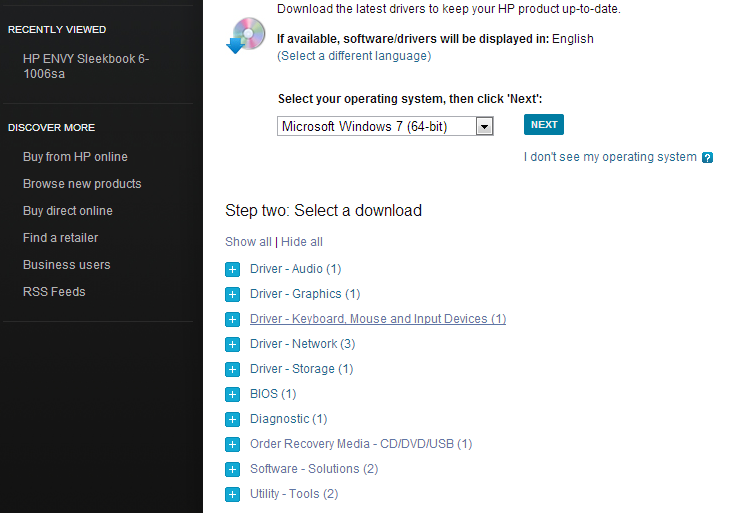
drivers.png


Any help in finding these for me is greatly appreciated!

Thanks

 
maybe theres some generic chipset drivers that might work
not sure if its intel or what but might be worth a search
 
Right click on the unknown device and click on*Properties.Under the Properties window click on*Details*tab and select*Device Instance Id*from the drop down box.

You should get a code like: PCI\VEN_8086&DEV_27DC&SUBSYS_30868086&REV_01\4&1E46F438&0&40F0

The bit after ven_ and before the & is the vendor Id in this case 8086
The bit after the dev_ and before the & is the device id in this case 27dc

Go to pcidatabase . com and you can search to see who makes the device your missing drivers for, then Google the device name + the word drivers and you should get them (usually from the manufacturers website)
 
Thanks that's great!

I have fallen at the first step though.

The usb3 controller has this as the device ident

PCI\VEN_1022&DEV_7812&SUBSYS_18DE103C&REV_03\3&2411E6FE&2&80

I can only find it on a few sites (like driveridentifier ) but i think I need to sign up and download software which I am not really willing to do.

I presume the drivers will be on the hard drive that originally came with the laptop (I just removed it and installed a new SSD so it can just go back in if necessary). I wouldn't know how to get those drivers onto the new ssd though.
 
The missing drivers may be on the HP recovery disk that came with the laptop. See "Order Recovery Media".

Or try the chipset drivers from AMD.

Andi.
 
I presume the drivers will be on the hard drive that originally came with the laptop (I just removed it and installed a new SSD so it can just go back in if necessary). I wouldn't know how to get those drivers onto the new ssd though.

Does anyone know if the above is possible? In order to do this I would have to remove the SSD and put the original hard drive in. Some how extract the drivers from this drive onto a usb stick. Switch the hard drives back and install the drivers.

Is this possible?

If so, how do I find the drivers and copy them over to the SSD?
 
Back
Top Bottom
