


Well uninstalled mine gts then used driver sweeper to uninstall anything that was left over. also uninstalled it from device manager in safe mode.
installed 4870 1gig installed drivers. rebooted pc
Now when the pc boots i get 2 errors
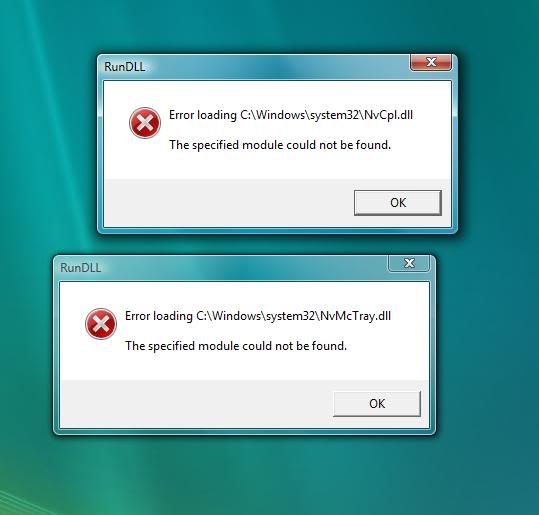
any idea how to fix them as they really annoying?
and second thing which option i do have to install or i have to install all options
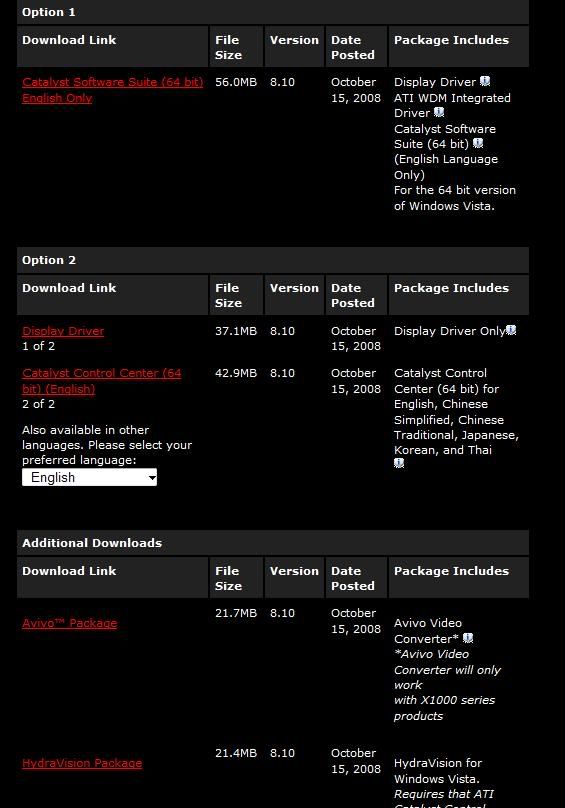
Ty for help
edit: well i guess no one knew how to fix it. well i found how to fix those nvidia errors if anyone has smiler problem do that :
first same as second but do i need 8.10 hydravision what does it do anyway
installed 4870 1gig installed drivers. rebooted pc
Now when the pc boots i get 2 errors
any idea how to fix them as they really annoying?
and second thing which option i do have to install or i have to install all options
Ty for help
edit: well i guess no one knew how to fix it. well i found how to fix those nvidia errors if anyone has smiler problem do that :
Start and type msconfig in the Search Box. Press Enter.
This will open the Configuration Editor. Select the Startup Tab.
Look for an entry there that refers to that NvMc Tray.dll file.
Remove the check mark from that entry.
Reboot the computer to see if the error message returns.
first same as second but do i need 8.10 hydravision what does it do anyway
Last edited:

