


Hiding cables &cable braiding

Associate
Joined
24 Nov 2005
Posts
2,240
Location
Skelton in Cleveland
Just a quickie,

Some of the wires that i have coming from my power supply could most certainly be hidden, but i want to go for as clean a look as possible.

My question is this....how conductive (if at all) is the material that cable braiding is made from, and could i get away with running the cables directly under the motherboard?

In an ideal world i would have no wires on show at all, i know this is impossible but im going for a minimalistic look.

Please dont hesitate to reply with suggestions/ideas, time & patience are something i have an abundance of.

BTW this is the case... http://www.overclockers.co.uk/showproduct.php?prodid=CA-155-CM

 
Not conductive at all. You can run the cables under the motherboard fine but be carefull the solder on the mobo dosn't break thru the cable to the wire inside.
 
Just a quickie,

Some of the wires that i have coming from my power supply could most certainly be hidden, but i want to go for as clean a look as possible.

My question is this....how conductive (if at all) is the material that cable braiding is made from, and could i get away with running the cables directly under the motherboard?

In an ideal world i would have no wires on show at all, i know this is impossible but im going for a minimalistic look.

Please dont hesitate to reply with suggestions/ideas, time & patience are something i have an abundance of.

BTW this is the case... http://www.overclockers.co.uk/showproduct.php?prodid=CA-155-CM
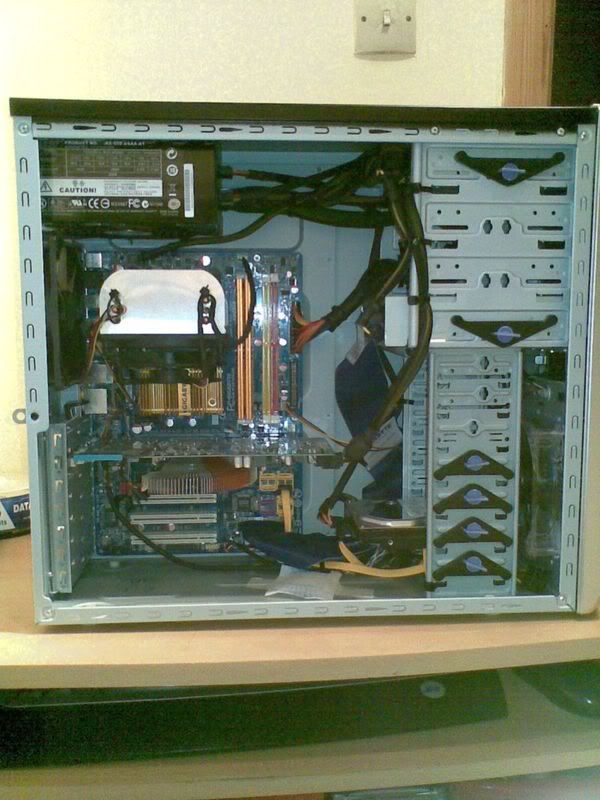
A photo of inside your case would help...
 
Here it is,

CaseInnards.jpg


It isnt too untidy at the minute but i want it really clean, couple of points i should mention is that the CPU cooler is now orientated differently, and that the graphics card power lead is like that due to the graphics card bending under its own weight, therefore that lead is also taking some stress off the mobo and graphics card.

Thanks
 
Last edited:
Doohickey,

Thanks for pointing that out, that picture was taken just after i had built the computer, i soon realised my mistake afterwards when i ran that Sandra? program.

I also replaced the horrendous IDE ribbon cable with a new sata cable.
 
I must admit I have never really understood what putting the RAM sticks in dual channel configuration actually does. Could someone explain the benefit over just sticking them in the way Zoot did in that picture.
 
I must admit I have never really understood what putting the RAM sticks in dual channel configuration actually does. Could someone explain the benefit over just sticking them in the way Zoot did in that picture.

Me either Corran, and the only reason i did it was because the Sandra program advised to do it, didnt notice any difference in performance in the 2 to 3 days that the RAM was configured like that, to how it is now (dual Channel)

@badbob,

Dont mean to sound off or anything but thats exactly what i was trying to cut down on, im looking for a really clean look here, and im just not happy tie wrapping everything away...i want the cables truely hidden.
 
right if you can take the other side panel off too and use a dremel ( or some tool) to make holes in the places suggested to allow cables to come through. like route the cables round the back of the mobo tray . take a look see
2000949430311215101_rs.jpg
 
Back
Top Bottom


